|
|
|
|
OPC 10000-11 |
|
|
OPC Unified Architecture Part 11: Historical Access
Release 1.05.04 2024-10-15
|




|
|
|
|
OPC 10000-11 |
|
|
OPC Unified Architecture Part 11: Historical Access
Release 1.05.04 2024-10-15
|
|
Specification Type |
Industry Standard Specification |
|
|
|
|
|
|
|
|
|
|
|
|
|
Document |
OPC 10000-11 |
|
|
|
Title: |
OPC Unified Architecture |
Date: |
2024-10-15 |
|
|
|
|
|
|
Version: |
Release 1.05.04 |
Software |
MS-Word |
|
|
|
Source: |
OPC 10000-11 - UA Specification Part 11 - Historical Access 1.05.04.docx |
|
|
|
|
|
|
Author: |
OPC Foundation |
Status: |
Release |
|
|
|
|
|
CONTENTS
All Event Types in 5.8Historical Audit Events
3 Terms, definitions, and abbreviations
4.3 Historians and interruption of data collection
4.4 Modification of Historical Data/Events
4.6 Bounding Values and time domain
4.7 Changes in AddressSpace over time
5 Historical Information Model
5.2.2 HistoricalDataConfigurationType
5.2.4 Historical Data Configuration Object
5.3.2 HasHistoricalConfiguration ReferenceType
5.3.3 HasCurrentData ReferenceType
5.3.4 HasCurrentEvent ReferenceType
5.4.2 HistoricalEventFilter Property
5.4.3 HistoricalEventConfigurationType
5.4.4 HistoricalEventNode Attributes
5.5.2 External Historical Event Node
5.6 Example Object Models in Historian Servers (informative)
5.6.2 HistoricalDataNodes Address Space Model
5.6.4 HistoricalEventNodes Address Space Model
5.7 Exposing supported functions and capabilities
5.7.2 HistoryServerCapabilitiesType
5.8.2 AuditHistoryEventUpdateEventType
5.8.3 AuditHistoryValueUpdateEventType
5.8.4 AuditHistoryAnnotationUpdateEventType
5.8.5 AuditHistoryDeleteEventType
5.8.6 AuditHistoryRawModifyDeleteEventType
5.8.7 AuditHistoryAtTimeDeleteEventType
5.8.8 AuditHistoryEventDeleteEventType
5.8.9 AuditHistoryConfigurationChangeEventType
5.8.10 AuditHistoryBulkInsertEventType
6 Historical Access specific usage of Services
6.2 Historical Nodes StatusCodes
6.2.2 Operation level result codes
6.4 Arrays, index ranges and substrings
6.5 HistoryReadDetails parameters
6.5.2 ReadEventDetails structure
6.5.3 ReadRawModifiedDetails structure
6.5.4 ReadProcessedDetails structure
6.5.5 ReadAtTimeDetails structure
6.5.6 ReadAnnotationDataDetails structure
6.5.7 SortRuleElement structure details
6.5.8 SortOrderType Enumeration
6.6 HistoryData parameters returned
6.6.3 HistoryModifiedData type
6.6.5 HistoryModifiedEvent DataType
6.7 HistoryUpdateType Enumeration
6.8 PerformUpdateType Enumeration
6.9 HistoryUpdateDetails parameter
6.9.2 UpdateDataDetails structure
6.9.3 UpdateStructureDataDetails structure
6.9.4 UpdateEventDetails structure
6.9.5 DeleteRawModifiedDetails structure
6.9.6 DeleteAtTimeDetails structure
6.9.7 DeleteEventDetails structure
Annex A (informative) Client conventions
A.1 How clients can request timestamps
A.2 Determining the first or last historical data point
Figure 1 – Possible OPC UA Server supporting Historical Access................................... 4
Figure 3 – Historical Variable with Historical Data Configuration and Annotations.............. 17
Figure 5 – Representation of an Event with History in the AddressSpace........................ 19
Table 18 – AuditHistoryAnnotationUpdateEventType definition..................................... 26
Table 20 – AuditHistoryRawModifyDeleteEventType definition...................................... 27
Table 23 – AuditHistoryConfigurationChangeEventType definition................................. 29
Table 27 – HistoryReadDetails parameter Symbolic Names......................................... 34
Table 61 – HistoryUpdateDetails parameter Symbolic Names....................................... 48
____________
UNIFIED
ARCHITECTURE –
This specification is for developers of OPC UA clients and servers. The specification is a result of an analysis and design process to develop a standard interface to facilitate the development of servers and clients by multiple vendors that shall inter-operate seamlessly together.
Copyright © 2006-2024, OPC Foundation, Inc.
COPYRIGHT RESTRICTIONS
Any unauthorized use of this specification may violate copyright laws, trademark laws, and communications regulations and statutes. This document contains information which is protected by copyright. All Rights Reserved. No part of this work covered by copyright herein may be reproduced or used in any form or by any means--graphic, electronic, or mechanical, including photocopying, recording, taping, or information storage and retrieval systems--without permission of the copyright owner.
OPC Foundation
members and non-members are prohibited from copying and redistributing this
specification. All copies must be obtained on an individual basis, directly
from the OPC Foundation Web site
https://opcfoundation.org/.
PATENTS
The attention of adopters is directed to the possibility that compliance with or adoption of OPC specifications may require use of an invention covered by patent rights. OPC shall not be responsible for identifying patents for which a license may be required by any OPC specification, or for conducting legal inquiries into the legal validity or scope of those patents that are brought to its attention. OPC specifications are prospective and advisory only. Prospective users are responsible for protecting themselves against liability for infringement of patents.
WARRANTY AND LIABILITY DISCLAIMERS
WHILE THIS PUBLICATION IS BELIEVED TO BE ACCURATE, IT IS PROVIDED "AS IS" AND MAY CONTAIN ERRORS OR MISPRINTS. THE OPC FOUDATION MAKES NO WARRANTY OF ANY KIND, EXPRESSED OR IMPLIED, WITH REGARD TO THIS PUBLICATION, INCLUDING BUT NOT LIMITED TO ANY WARRANTY OF TITLE OR OWNERSHIP, IMPLIED WARRANTY OF MERCHANTABILITY OR WARRANTY OF FITNESS FOR A PARTICULAR PURPOSE OR USE. IN NO EVENT SHALL THE OPC FOUNDATION BE LIABLE FOR ERRORS CONTAINED HEREIN OR FOR DIRECT, INDIRECT, INCIDENTAL, SPECIAL, CONSEQUENTIAL, RELIANCE OR COVER DAMAGES, INCLUDING LOSS OF PROFITS, REVENUE, DATA OR USE, INCURRED BY ANY USER OR ANY THIRD PARTY IN CONNECTION WITH THE FURNISHING, PERFORMANCE, OR USE OF THIS MATERIAL, EVEN IF ADVISED OF THE POSSIBILITY OF SUCH DAMAGES.
The entire risk as to the quality and performance of software developed using this specification is borne by you.
RESTRICTED RIGHTS LEGEND
This Specification is provided with Restricted Rights. Use, duplication or disclosure by the U.S. government is subject to restrictions as set forth in (a) this Agreement pursuant to DFARs 227.7202-3(a); (b) subparagraph (c)(1)(i) of the Rights in Technical Data and Computer Software clause at DFARs 252.227-7013; or (c) the Commercial Computer Software Restricted Rights clause at FAR 52.227-19 subdivision (c)(1) and (2), as applicable. Contractor / manufacturer are the OPC Foundation, 16101 N. 82nd Street, Suite 3B, Scottsdale, AZ, 85260-1830.
COMPLIANCE
The OPC Foundation shall at all times be the sole entity that may authorize developers, suppliers and sellers of hardware and software to use certification marks, trademarks or other special designations to indicate compliance with these materials. Products developed using this specification may claim compliance or conformance with this specification if and only if the software satisfactorily meets the certification requirements set by the OPC Foundation. Products that do not meet these requirements may claim only that the product was based on this specification and must not claim compliance or conformance with this specification.
Trademarks
Most computer and software brand names have trademarks or registered trademarks. The individual trademarks have not been listed here.
GENERAL PROVISIONS
Should any provision of this Agreement be held to be void, invalid, unenforceable or illegal by a court, the validity and enforceability of the other provisions shall not be affected thereby.
This Agreement shall be governed by and construed under the laws of the State of Minnesota, excluding its choice or law rules.
This Agreement embodies the entire understanding between the parties with respect to, and supersedes any prior understanding or agreement (oral or written) relating to, this specification.
ISSUE REPORTING
The OPC Foundation
strives to maintain the highest quality standards for its published
specifications, hence they undergo constant review and refinement. Readers are
encouraged to report any issues and view any existing errata here:
https://opcfoundation.org/developer-tools/specifications-unified-architecture/errata/.
Revision 1.05.04 Highlights
The following table includes the Mantis issues resolved with this revision.
|
Mantis ID |
Scope |
Summary |
Resolution |
|
Feature |
Enhance Historical events retrieval to support sorting |
Updated HistoricalEventConfigurationType and added 6.5.2.5ReadEventDetailsSorted structure details, SortRuleElement structure details and SortOrderType Enumeration. |
|
|
Bug Fix |
Historical Audit Events shall be abstract |
All Event Types in 5.8Historical Audit Eventsare made abstract. · AuditHistoryEventUpdateEventType · AuditHistoryValueUpdateEventType · AuditHistoryAnnotationUpdateEventType · AuditHistoryDeleteEventType · AuditHistoryRawModifyDeleteEventType · AuditHistoryAtTimeDeleteEventType · AuditHistoryEventDeleteEventType · AuditHistoryConfigurationChangeEventType · AuditHistoryBulkInsertEventType |
OPC Unified Architecture
Part 11: Historical Access
This document is part of the OPC Unified Architecture standards series and defines the Information Model associated with Historical Access (HA). It particularly includes additional and complementary descriptions of the NodeClasses and Attributes needed for Historical Access, additional standard Properties, and other information and behaviour.
The complete AddressSpace Model including all NodeClasses and Attributes is specified in OPC 10000-3. The predefined Information Model is defined in OPC 10000-5. The Services to detect and access historical data and events, and description of the ExtensibleParameter types are specified in OPC 10000-4.
This document includes functionality to compute and return Aggregates like minimum, maximum, average etc. The Information Model and the concrete working of Aggregates are defined in OPC 10000-13.
Conventions for Historical Access Clients are informatively provided in Annex A.
The following documents, in whole or in part, are normatively referenced in this document and are indispensable for its application. For dated references, only the edition cited applies. For undated references, the latest edition of the referenced document (including any amendments and errata) applies.
OPC 10000-1, OPC Unified Architecture - Part 1: Overview and Concepts
http://www.opcfoundation.org/UA/Part1/
OPC 10000-3, OPC Unified Architecture - Part 3: Address Space Model
http://www.opcfoundation.org/UA/Part3/
OPC 10000-4, OPC Unified Architecture - Part 4: Services
http://www.opcfoundation.org/UA/Part4/
OPC 10000-5, OPC Unified Architecture - Part 5: Information Model
http://www.opcfoundation.org/UA/Part5/
OPC 10000-7, OPC Unified Architecture - Part 7: Profiles
http://www.opcfoundation.org/UA/Part7/
OPC 10000-8, OPC Unified Architecture - Part 8: Data Access
http://www.opcfoundation.org/UA/Part8/
OPC 10000-13, OPC Unified Architecture - Part 13: Aggregates
http://www.opcfoundation.org/UA/Part13/
For the purposes of this document, the terms and definitions given in OPC 10000-1, OPC 10000-3, OPC 10000-4, OPC 10000-13 and the following apply.
3.1.1
Annotation
metadata associated with an item at a given instance in time
Note 1 to entry: An Annotation is metadata that is associated with an item at a given instance in time.
BoundingValues
values associated with the starting and ending time
Note 1 to entry: BoundingValues are the values that are associated with the starting and ending time of a ProcessingInterval specified when reading from the historian. BoundingValues may be required by Clients to determine the starting and ending values when requesting RawData over a time range. If a RawData value exists at the start or end point, it is considered the bounding value even though it is part of the data request. If no RawData value exists at the start or end point, then the Server will determine the boundary value, which may require data from a data point outside of the requested range. See 4.6 for details on using BoundingValues.
3.1.3
Historian
application storing time series data and/or time series events
HistoricalNode
Object, Variable, Property or View in the AddressSpace where a Client can access historical data or Events
Note 1 to entry: A HistoricalNode is a term used in this document to represent any Object, Variable, Property or View in the AddressSpace for which a Client can read and/or update historical data or Events. The terms “HistoricalNodes’s history” or “history of a HistoricalNodes” will refer to the time series data or Events stored for this HistoricalNode. The term HistoricalNode refers to both HistoricalDataNodes and HistoricalEventNodes.
HistoricalDataNode
Variable or Property in the AddressSpace where a Client can access historical data
Note 1 to entry: A HistoricalDataNode represents any Variable or Property in the AddressSpace for which a Client can read and/or update historical data. “HistoricalDataNode history” or “history of a HistoricalDataNode” refers to the time series data stored for this HistoricalNode. Examples of such data are:
· device data (like temperature sensors)
· calculated data
· status information (open/closed, moving)
· dynamically changing system data (like stock quotes)
· diagnostic data
The term HistoricalDataNodes is used when referencing aspects of the standard that apply to accessing historical data only.
HistoricalEventNode
Object or View in the AddressSpace for which a Client can access historical Events
Note 1 to entry: “HistoricalEventNode’s history” or “history of a HistoricalEventNode” refers to the time series Events stored in some historical system. Examples of such data are:
· Notifications
· system Alarms
· operator action Events
· system triggers (such as new orders to be processed)
The term HistoricalEventNode is used when referencing aspects of the standard that apply to accessing historical Events only.
ModifiedValues
HistoricalDataNode’s value that has been changed (or manually inserted or deleted) after it was stored in the historian
Note 1 to entry: For some Servers, a lab data entry value is not a modified value, but if a user corrects a lab value, the original value would be considered a modified value, and would be returned during a request for ModifiedValues. Also manually inserting a value that was missed by a standard collection system can be considered a modified value. Unless specified otherwise, all historical Services operate on the current, or most recent, value for the specified HistoricalDataNode at the specified timestamp. Requests for ModifiedValues are used to access values that have been superseded, deleted or inserted. It is up to a system to determine what is considered a modified value. Whenever a Server has modified data available for an entry in the historical collection it shall set the ExtraData bit in the StatusCode.
RawData
data that is stored within the historian for a HistoricalDataNode
Note 1 to entry: The data can be all data collected for the DataValue or it can be some subset of the data depending on the historian and the storage rules invoked when the item’s values were saved.
StartTime/EndTime
bounds of a history request which define the time domain
Note 1 to entry: For all requests, a value falling at the end time of the time domain is not included in the domain, so that requests made for successive, contiguous time domains will include every value in the historical collection exactly once.
TimeDomain
interval of time covered by a particular request, or response
Note 1 to entry: In general, if the start time is earlier than or the same as the end time, the time domain is considered to begin at the start time and end just before the end time; if the end time is earlier than the start time, the time domain still begins at the start time and ends just before the end time, with time "running backward" for the particular request and response. In both cases, any value which falls exactly at the end time of the TimeDomain is not included in the TimeDomain. See the examples in 4.6. BoundingValues effect the time domain as described in 4.6.
All timestamps which can legally be represented in a UtcTime DataType are valid timestamps, and the Server may not return an invalid argument result code due to the timestamp being outside of the range for which the Server has data. See OPC 10000-3 for a description of the range and granularity of this DataType. Servers are expected to handle out-of-bounds timestamps gracefully, and return the proper StatusCodes to the Client.
StructuredHistoryData
structured data stored in a history collection where parts of the structure are used to uniquely identify the data within the data collection
Note 1 to entry: Most historical data applications assume only one current value per timestamp. Therefore, the timestamp of the data is considered the unique identifier for that value. Some data or meta data such as Annotations can permit multiple values to exist at a single timestamp. In such cases the Server would use one or more parameters of the StructuredHistoryData entry to uniquely identify each element within the history collection. Annotations are examples of StructuredHistoryData.
DA Data Access
HA Historical Access
HDA Historical Data Access
This document defines the handling of historical time series data and historical Event data in the OPC Unified Architecture (in a Historian). Included is the specification of the representation of historical data and Events in the AddressSpace.
A Server supporting Historical Access provides Clients with transparent access to different historical data and/or historical Event sources (e.g., process Historians, event Historians, etc.).
The historical data or Events can be in a proprietary data collection, database or a short-term buffer within memory. A Server supporting Historical Access will provide historical data and Events for all or a subset of the available Variables, Objects, Properties or Views within the Server AddressSpace.
Figure 1 illustrates how the AddressSpace of a UA Server can consist of a broad range of different historical data and/or historical Event sources.
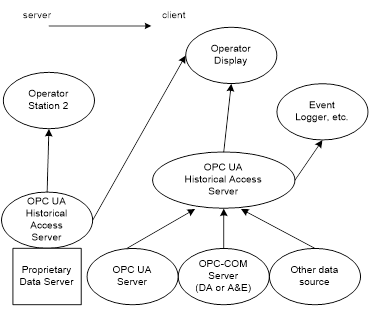
Figure 1 – Possible OPC UA Server supporting Historical Access
The Historian can be implemented as a standalone OPC UA Server that collects data from another OPC UA Server or another data source. The Historian can also just aggregate historical data from underlying Historians. The Client that references the OPC UA Server supporting Historical Access for historical data can be simple trending packages that desire values over a given time frame or they can be complex reports that require data in multiple formats.
There are general requirements for Historians, but Historians can vary in functionality. A consistent requirement for all Historians is that they store Historical data including a timestamp. All historical data should include status information for each value, but a Historian can compress this to only storing status information that indicates a problem (Bad status) and/or status change, instead of storing a status for every time series data item. The status of historical data can be complex. What is required is that the values returned as part of the timeseries raw data match the data that would have been observed if the Value was subscribed to at that point in time.
Historical Events are more complicated. In a stream of Events each Event can have a different list of fields. EventTypes are defined in a hierarchical manner, where each EventType inherits fields from its parent type and can add additional fields. Some of these additional fields can be mandatory and are required to understand or process the given EventType. A Historian that stores Events, shall be configurable to store all mandatory fields for any EventTypes that it historizes. If it receives for storage an EventType that it does not support all mandatory fields for, it can store it as one of its supertype EventTypes (one that it does support all mandatory fields for), but then it shall not claim that it supports historizing of that EventType (see 5.4.3). The Historian shall also provide information about the fields that are currently being historized (see 5.4.3).
When an Historian is collecting and storing data, the data collection can be interrupted. The interruption can have been for collecting the current values of data or for an event stream. The interruption can have been due to an interruption in the source of a value or an interruption of the forwarding of historical data from an underlying Historian. The interruption can also have been due to an action that stopped the collection of HistoricalData or historical Events. Some of these interruptions can recover with no loss of data, others can result in data gaps. The Historian shall report any gaps when a client is accessing the stored historical data with an error code of Bad_DataLost.
For example, if a subscription for data breaks, and the historian recovers the subscription after several minutes, it can check the SourceTimestamp of the initial values in the subscription. If the initial value SourceTimestamp matches the last stored value SourceTimestamp, then no data was lost and nothing needs to be stored indicating the given HistoricalDataNode‘s data collection was interrupted. But if the SourceTimestamp of the initial value is later than the SourceTimestamp of the last stored value, then the historian has no way of knowing if any data was lost and it shall record a bad status for the value with the timestamp of when the connection was broken.
For Event collection, in addition to what is described for a data collection the following also has to be addressed. If a Subscription for Event is interrupted for long enough that the Subscription buffer reports an overflow (instance of EventQueueOverflowEventType), then the Event storage shall report this error. This can be accomplished by storing the instance of EventQueueOverflowEventType event or by recording a Bad_DataLost. If the lost data is indicated by EventQueueOverflowEventType, this event shall always be returned for any filter, just as it is in an Event Subscription.
A Historian collects values (data or Events) and provides long term storage of these values. Occasionally data that is collected is incorrect. It can be incorrect for many reasons, such as a failed sensor, or failed communication or even an out of calibration sensor. Sometimes the correct values are obtained from another source and the historical value is updated from this source. In many Historians, the act of updating a historical value needs to be tracked. This specification provides two aspects for tracking:
· Recording the original value and information related to who made the change (see 6.9 for HistoryUpdateDetails).
· Generating an audit event describing the history edit action (see 5.8).
Some Historians obtain data from other sources (for example not an OPC UA Subscription). This data can be from lab data analysis package or other off-line activities. This data is typically provided in bulk and with SourceTimestamps that are in the past. For this type of data, even though it can be inserted using an HistoryUpdateDetails service call, the Historian does not have to create a modification record for the initial insertion.
Modification of Events is different than modification of data, in that in a single event stream there can be many Events with the same Timestamp. Events need to be identified by their EventId. The EventId is generated as part of normal Event processing in a Server and is used to correlate actions related to the Event. For example, when an Alarm (which is represented by an Event) is acknowledged, the acknowledgement is related to the specific EventId that represent that event is time. A Historian that historizes Events shall store the EventId that it receives; Modification of Events shall not allow modification to EventIds.
The nature of OPC UA Historical Access requires that a single timestamp reference be used to relate the multiple data points, and the Client can request which timestamp will be used as the reference. See OPC 10000-4 for details on the TimestampsToReturn enumeration. An OPC UA Server supporting Historical Access will treat the various timestamp settings as described below. A HistoryRead with invalid settings will be rejected with Bad_TimestampsToReturnInvalid (see OPC 10000-4).
For HistoricalDataNodes, the SourceTimestamp is used to determine which historical data values are to be returned.
The request is in terms of SourceTimestamp but the reply could be in SourceTimestamp, ServerTimestamp or both timestamps. If the reply has the Server timestamp the timestamps could fall outside of the range of the requested time.
SOURCE Return the SourceTimestamp.
SERVER Return the ServerTimestamp.
BOTH Return both the SourceTimestamp and ServerTimestamp.
NEITHER This is not a valid setting for any HistoryRead accessing HistoricalDataNodes.
Any reference to timestamps in this context throughout this document will represent either ServerTimestamp or SourceTimestamp as dictated by the type requested in the HistoryRead Service. Some Servers may not support historizing both SourceTimestamp and ServerTimestamp, but it is expected that all Servers will support historizing SourceTimestamp (see OPC 10000-7 for details on Server Profiles).
If a request is made requesting both ServerTimestamp and SourceTimestamp and the Server is only collecting the SourceTimestamp, the Server shall return Bad_TimestampNotSupported. Some Historians can aggregate data from underlying Historians. These Servers can have a mix of data, some with ServerTimestamp some without. The Historian may not know if a HistoricalDataNode supports ServerTimestamps. As a result of this uncertainty, the Bad_TimestampNotSupported can be returned on the service level or at the operation level.
For HistoricalEventNodes this parameter does not apply. This parameter is ignored since the entries returned are dictated by the Event Filter. See OPC 10000-4 for details.
When accessing HistoricalDataNodes via the HistoryRead Service, requests can set a flag, returnBounds, indicating that BoundingValues are requested. For a complete description of the Extensible Parameter HistoryReadDetails that include StartTime, EndTime and NumValuesPerNode, see 6.5. The concept of Bounding Values and how they affect the time domain that is requested as part of the HistoryRead request is further explained in 4.4. Subclause 4.4 also provides examples of TimeDomains to further illustrate the expected behaviour.
When making a request for historical data using the HistoryRead Service, the required parameters include at least two of these three parameters: startTime, endTime and numValuesPerNode. What is returned when BoundingValues are requested varies according to which of these parameters are provided. For a Historian that has values stored at 5:00, 5:02, 5:03, 5:05 and 5:06, the data returned when using the Read Raw functionality is given by Table 1. In the table, FIRST stands for a tuple with a value of null, a timestamp of the specified StartTime, and a StatusCode of Bad_BoundNotFound. LAST stands for a tuple with a value of null, a timestamp of the specified EndTime, and a StatusCode of Bad_BoundNotFound.
In some cases, attempting to locate bounds, particularly FIRST or LAST points, can be resource intensive for Servers. Therefore, how far back or forward to look in history for Bounding Values is Server dependent, and the Server search limits can be reached before a bounding value can be found. There are also cases, such as reading Annotations or Attribute data where Bounding Values may not be appropriate. For such use cases it is permissible for the Server to return a StatusCode of Bad_BoundNotSupported.
Table 1 – Bounding Value examples
|
Start Time |
End Time |
numValuesPerNode |
Bounds |
Data Returned |
|
5:00 |
5:05 |
0 |
Yes |
5:00, 5:02, 5:03, 5:05 |
|
5:00 |
5:05 |
0 |
No |
5:00, 5:02, 5:03 |
|
5:01 |
5:04 |
0 |
Yes |
5:00, 5:02, 5:03, 5:05 |
|
5:01 |
5:04 |
0 |
No |
5:02, 5:03 |
|
5:05 |
5:00 |
0 |
Yes |
5:05, 5:03, 5:02, 5:00 |
|
5:05 |
5:00 |
0 |
No |
5:05, 5:03, 5:02 |
|
5:04 |
5:01 |
0 |
Yes |
5:05, 5:03, 5:02, 5:00 |
|
5:04 |
5:01 |
0 |
No |
5:03, 5:02 |
|
4:59 |
5:05 |
0 |
Yes |
FIRST, 5:00, 5:02, 5:03, 5:05 |
|
4:59 |
5:05 |
0 |
No |
5:00, 5:02, 5:03 |
|
5:01 |
5:07 |
0 |
Yes |
5:00, 5:02, 5:03, 5:05, 5:06, LAST |
|
5:01 |
5:07 |
0 |
No |
5:02, 5:03, 5:05, 5:06 |
|
5:00 |
5:05 |
3 |
Yes |
5:00, 5:02, 5:03 |
|
5:00 |
5:05 |
3 |
No |
5:00, 5:02, 5:03 |
|
5:01 |
5:04 |
3 |
Yes |
5:00, 5:02, 5:03 |
|
5:01 |
5:04 |
3 |
No |
5:02, 5:03 |
|
5:05 |
5:00 |
3 |
Yes |
5:05, 5:03, 5:02 |
|
5:05 |
5:00 |
3 |
No |
5:05, 5:03, 5:02 |
|
5:04 |
5:01 |
3 |
Yes |
5:05, 5:03, 5:02 |
|
5:04 |
5:01 |
3 |
No |
5:03, 5:02 |
|
4:59 |
5:05 |
3 |
Yes |
FIRST, 5:00, 5:02 |
|
4:59 |
5:05 |
3 |
No |
5:00, 5:02, 5:03 |
|
5:01 |
5:07 |
3 |
Yes |
5:00, 5:02, 5:03 |
|
5:01 |
5:07 |
3 |
No |
5:02, 5:03, 5:05 |
|
5:00 |
UNSPECIFIED |
3 |
Yes |
5:00, 5:02, 5:03 |
|
5:00 |
UNSPECIFIED |
3 |
No |
5:00, 5:02, 5:03 |
|
5:00 |
UNSPECIFIED |
6 |
Yes |
5:00, 5:02, 5:03, 5:05, 5:06, LASTa |
|
5:00 |
UNSPECIFIED |
6 |
No |
5:00, 5:02, 5:03, 5:05, 5:06 |
|
5:07 |
UNSPECIFIED |
6 |
Yes |
5:06, LAST |
|
5:07 |
UNSPECIFIED |
6 |
No |
NODATA |
|
UNSPECIFIED |
5:06 |
3 |
Yes |
5:06,5:05,5:03 |
|
UNSPECIFIED |
5:06 |
3 |
No |
5:06,5:05,5:03 |
|
UNSPECIFIED |
5:06 |
6 |
Yes |
5:06,5:05,5:03,5:02,5:00, FIRSTb |
|
UNSPECIFIED |
5:06 |
6 |
No |
5:06, 5:05, 5:03, 5:02, 5:00 |
|
UNSPECIFIED |
4:48 |
6 |
Yes |
5:00, FIRST |
|
UNSPECIFIED |
4:48 |
6 |
No |
NODATA |
|
4:48 |
4:48 |
0 |
Yes |
FIRST,5:00 |
|
4:48 |
4:48 |
0 |
No |
NODATA |
|
4:48 |
4:48 |
1 |
Yes |
FIRST |
|
4:48 |
4:48 |
1 |
No |
NODATA |
|
4:48 |
4:48 |
2 |
Yes |
FIRST,5:00 |
|
5:00 |
5:00 |
0 |
Yes |
5:00,5:02c |
|
5:00 |
5:00 |
0 |
No |
5:00 |
|
5:00 |
5:00 |
1 |
Yes |
5:00 |
|
5:00 |
5:00 |
1 |
No |
5:00 |
|
5:01 |
5:01 |
0 |
Yes |
5:00, 5:02 |
|
5:01 |
5:01 |
0 |
No |
NODATA |
|
5:01 |
5:01 |
1 |
Yes |
5:00 |
|
5:01 |
5:01 |
1 |
No |
NODATA |
|
a The timestamp of LAST cannot be the specified End Time because there is no specified End Time. In this situation the timestamp for LAST will be equal to the previous timestamp returned plus one second. b The timestamp of FIRST cannot be the specified End Time because there is no specified Start Time. In this situation the timestamp for FIRST will be equal to the previous timestamp returned minus one second. c When the Start Time = End Time (there is data at that time), and Bounds is set to True, the start bounds will equal the Start Time and the next data point will be used for the end bounds. |
||||
Clients use the browse Services of the View Service Set to navigate through the AddressSpace to discover the HistoricalNodes and their characteristics. These Services provide the most current information about the AddressSpace. It is possible and probable that the AddressSpace of a Server will change over time (i.e. TypeDefinitions can change; NodeIds can be modified, added or deleted).
Server developers and administrators need to be aware that modifying the AddressSpace can impact a Client’s ability to access historical information. If the history for a HistoricalDataNodes is still required, but the HistoricalDataNodes is no longer historized, then the Object should be maintained in the AddressSpace, with the appropriate AccessLevel Attribute and Historizing Attribute settings (see OPC 10000-3 for details on access levels).
If the HistoricalConfiguration of a HistoricalDataNode in the AddressSpace is changed and audit events are supported, an audit Event of AuditHistoryConfigurationChangeEventType shall be generated.
A Historian shall expose the Historizing attribute on any nodes that are currently collecting historical data. They shall also set the AccessLevel HistoryRead and optionally the HistoryWrite bits for HistoricalNodes (those with Historical data).
If a HistoricalConfiguration Object is added to or deleted from a Server or a Reference to a HistoricalConfiguration Object is added to or deleted from a Node, a GeneralModelChangeEvent shall be generated. If an Annotation Property is added to or deleted from a Node, a GeneralModelChangeEvent shall be generated.
The Historical Access model defines additional Properties that are applicable for both HistoricalDataNodes and HistoricalEventNodes.
The DataVariable or Object that has Annotation data will add the Annotations Property as shown in Table 2.
Table 2 – Annotations Property
|
Name |
Use |
Data Type |
Description |
|
Annotations |
O |
Annotation |
The Annotations Property is used to indicate that the history collection exposed by a HistoricalDataNode supports Annotation data. Annotation DataType is defined in 6.6.6. |
|
ConformanceUnits |
|||
Since it is not allowed for Properties to have Properties, the Annotations Property is only available for DataVariables or Objects.
The Annotations Property shall be present on every HistoricalDataNode that supports modifications, deletions, or additions of Annotations whether or not Annotations currently exist. Annotation data is accessed using the standard HistoryRead functions. Annotations are modified, inserted or deleted using the standard HistoryUpdate functions and the UpdateStructuredDataDetails structure. The presence of the Annotations Property does not indicate the presence of Annotations on the HistoricalDataNode.
A Server shall add the Annotations Property to a HistoricalDataNode only if it will also support Annotations on that HistoricalDataNode. See OPC 10000-4 for adding Properties to Nodes. A Server shall remove all Annotation data if it removes the Annotations Property from an existing HistoricalDataNode.
An Annotation can be accessed in two manners. It can be accessed via ReadAnnotationDataDetails or ReadRawModifiedDetails structure in the HistoryRead service.
The ReadAnnotationDataDetails is described in 6.5.6. The ReadAnnotationDataDetails contains an element reqTimes that is a list of Timestamps. These Timestamps can be obtained from an invocation of the HistoryRead service call with a ReadRawModifiedDetails parameter for the HistoricalDataNode of the Annotations Property. In the returned dataValues array, values with the ExtraData flag set provide the SourceTimestamp.
The ReadRawModifiedDetails structure is described in 6.5.3. For the ReadRawModifiedDetails, Annotation is returned by passing an instance of the Annotation Property NodeId as the NodeId in the NodesToRead parameter.
Annotation data does not have a separate HistoricalDataConfigurationType object instance. The historical configuration defined on the parent node applies to the Annotations Property.
As with all HistoricalNodes, modifications, deletions or additions of Annotations will raise the appropriate historical audit Event with the corresponding NodeId.
The Historical Data model defines additional ObjectTypes and Objects. These descriptions also include required use cases for HistoricalDataNodes.
The Historical Access Data model extends the standard type model by defining the HistoricalDataConfigurationType. This Object defines the general characteristics of a Node that defines the historical configuration of any HistoricalDataNode that is defined to contain history. It is formally defined in Table 3.
Instances of the HistoricalDataConfigurationType use the standard BrowseName as defined in 5.2.4.
Table 3 – HistoricalDataConfigurationType definition
|
Attribute |
Value |
||||
|
BrowseName |
HistoricalDataConfigurationType |
||||
|
IsAbstract |
False |
||||
|
References |
NodeClass |
BrowseName |
DataType |
TypeDefinition |
ModellingRule |
|
HasComponent |
Object |
AggregateConfiguration |
-- |
AggregateConfigurationType |
Mandatory |
|
HasComponent |
Object |
AggregateFunctions |
-- |
FolderType |
Optional |
|
HasProperty |
Variable |
Stepped |
Boolean |
PropertyType |
Mandatory |
|
HasProperty |
Variable |
Definition |
String |
PropertyType |
Optional |
|
HasProperty |
Variable |
MaxTimeInterval |
Duration |
PropertyType |
Optional |
|
HasProperty |
Variable |
MinTimeInterval |
Duration |
PropertyType |
Optional |
|
HasProperty |
Variable |
ExceptionDeviation |
Double |
PropertyType |
Optional |
|
HasProperty |
Variable |
ExceptionDeviationFormat |
ExceptionDeviationFormat |
PropertyType |
Optional |
|
HasProperty |
Variable |
StartOfArchive |
UtcTime |
PropertyType |
Optional |
|
HasProperty |
Variable |
StartOfOnlineArchive |
UtcTime |
PropertyType |
Optional |
|
HasProperty |
Variable |
ServerTimestampSupported |
Boolean |
PropertyType |
Optional |
|
HasProperty |
Variable |
MaxTimeStoredValues |
Duration |
PropertyType |
Optional |
|
HasProperty |
Variable |
MaxCountStoredValues |
UInt32 |
PropertyType |
Optional |
|
ConformanceUnits |
|||||
|
Historical Access Exception Storage |
|||||
|
Historical Access Periodic Storage |
|||||
|
Historical Access Default HistoricalData Configuration |
|||||
|
Historical Access Archive Period |
|||||
AggregateConfiguration Object represents the browse entry point for information on how the Server treats Aggregate specific functionality such as handling Uncertain data. This Object is required to be present even if it contains no Aggregate configuration Objects. Aggregates are defined in OPC 10000-13.
AggregateFunctions is an entry point to browse to all Aggregate capabilities supported by the Server for Historical Access. All HistoryAggregates supported by the Server should be able to be browsed starting from this Object. Aggregates are defined in OPC 10000-13.
The Stepped Variable specifies whether the historical data was collected in such a manner that it should be displayed as SlopedInterpolation (sloped line between points) or as SteppedInterpolation (vertically-connected horizontal lines between points) when RawData is examined. This Property also effects how some Aggregates are calculated. A value of True indicates the stepped interpolation mode. A value of False indicates SlopedInterpolation mode. The default value is False.
The Definition Variable is a vendor-specific, human readable string that specifies how the value of this HistoricalDataNode is calculated. Definition is non-localized and will often contain an equation that can be parsed by certain Clients.
Example: Definition::= “(TempA – 25) + TempB”
The MaxTimeInterval Variable specifies the maximum interval between data points in the history repository regardless of their value change (see OPC 10000-3 for definition of Duration).
The MinTimeInterval Variable specifies the minimum interval between data points in the history repository regardless of their value change (see OPC 10000-3 for definition of Duration).
If MaxTimeInterval=MinTimeInterval and they do not equal 0 then data is collected based on a periodic sampling rate at the defined interval.
The ExceptionDeviation Variable specifies the minimum amount that the data for the HistoricalDataNodes shall change in order for the change to be reported to the history database.
The ExceptionDeviationFormat Variable specifies how the ExceptionDeviation is determined. Its values are defined in Table 4.
The StartOfArchive Variable specifies the date before which there is no data in the archive either online or offline.
The StartOfOnlineArchive Variable specifies the date of the earliest data in the online archive.
The presence of the optional Variable ServerTimestampSupported indicates the Server supports the storage of ServerTimestamps. A value of True indicates the Server (and this configuration) stores ServerTimestamps in addition to SourceTimestamp. The default is False.
The MaxTimeStoredValues is the maximum time period that is available for historical data. This is set if the historian is a circular buffer based on time (e.g. it stores the last 6 hours of data).
The MaxCountStoredValues is the maximum number of values that can be stored for a single point assigned to this configuration.
Typically, either MaxTimeStoredValues or MaxCountStoredValues is provided, if both are provided the smaller of the two applies. E.g. if 3 hours are specified and 10,000 values, then for a slowly changing point the 3 hour would be the cut off, but for a point that change more than once a second the 10,000 values would be encountered first.
Table 4 – ExceptionDeviationFormat Items
|
Name |
Value |
Description |
|
ABSOLUTE_VALUE |
0 |
ExceptionDeviation is an absolute Value. |
|
PERCENT_OF_VALUE |
1 |
ExceptionDeviation is a percentage of Value. |
|
PERCENT_OF_RANGE |
2 |
ExceptionDeviation is a percentage of InstrumentRange (InstrumentRange is defined in OPC 10000-8). |
|
PERCENT_OF_EU_RANGE |
3 |
ExceptionDeviation is a percentage of EURange (EURange is defined in OPC 10000-8). |
|
UNKNOWN |
4 |
ExceptionDeviation type is Unknown or not specified. |
Its representation in the AddressSpace is defined in Table 58.
Table 5 – ExceptionDeviationFormat definition
|
Attribute |
Value |
|||||
|
BrowseName |
ExceptionDeviationFormat |
|||||
|
IsAbstract |
False |
|||||
|
References |
NodeClass |
BrowseName |
DataType |
TypeDefinition |
Other |
|
|
Subtype of the 0:Enumeration type defined in OPC 10000-5 |
||||||
|
0:HasProperty |
Variable |
0:EnumStrings |
0:LocalizedText [] |
0:PropertyType |
|
|
|
Conformance Units |
||||||
|
Historical Access Exception Storage |
||||||
Subclause 5.2.6 lists the Attributes of Variables that have particular importance for historical data. They are specified in detail in OPC 10000-3.
· AccessLevel
· Historizing
This Object is used as the browse entry point for information about HistoricalDataNode configuration. The content of this Object is already defined by its type definition in Table 3. It is formally defined in Table 6. If a HistoricalDataNode has configuration defined then one instance shall have a BrowseName of ‘HA Configuration’. Additional configurations can be defined with different BrowseNames. It is highly recommended that display names for historical configuration historical configuration are chosen that clearly describe the historical configuration e.g. “1 Second Collection”, “Long Term Configuration”, etc. All historical configuration Objects shall be referenced using the HasHistoricalConfiguration ReferenceType.
Table 6 – Historical Access configuration definition
|
Attribute |
Value |
||||
|
BrowseName |
HA Configuration |
||||
|
References |
Node |
BrowseName |
DataType |
TypeDefinition |
ModellingRule |
|
HasTypeDefinition |
Object Type |
HistoricalDataConfigurationType |
Defined in Table 3 |
||
|
|
|||||
Figure 2 illustrate the references defined by this specification (outlined in red). Each reference type is described in their own sections.
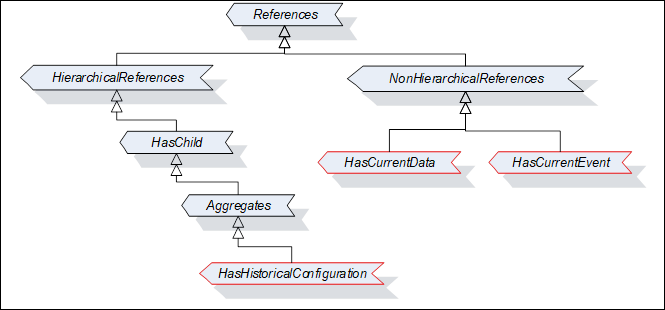
Figure 2 – ReferenceType hierarchy
This ReferenceType is a concrete ReferenceType that can be used directly. It is a subtype of the Aggregates ReferenceType and will be used to refer from a Historical Node to one or more HistoricalDataConfigurationType Objects or HistoricalEventConfigurationType Objects.
The semantic indicates that the target Node is “used” by the source Node of the Reference. Its representation in the AddressSpace is specified in Table 7.
Table 7 – HasHistoricalConfiguration ReferenceType
|
Attributes |
Value |
||
|
BrowseName |
HasHistoricalConfiguration |
||
|
InverseName |
HistoricalConfigurationOf |
||
|
Symmetric |
False |
||
|
IsAbstract |
False |
||
|
References |
NodeClass |
BrowseName |
Comment |
|
The subtype of Aggregates ReferenceType is defined in OPC 10000-5. |
|||
|
ConformanceUnits |
|||
This ReferenceType is a concrete ReferenceType that can be used directly. It is a subtype of the NonHierarchicalReferences ReferenceType and will be used to refer from a HistoricalDataNode to a Node that is the source of the data being historized by the Source Node. Typically, this node is an external node in another Server.
Its representation in the AddressSpace is specified in Table 8. The Source node of this reference type shall be a HistoricalDataNode. The Target node shall be any Variable or Property
Table 8 – HasCurrentData ReferenceType
|
Attributes |
Value |
||
|
BrowseName |
HasCurrentData |
||
|
InverseName |
HasHistoricalData |
||
|
Symmetric |
False |
||
|
IsAbstract |
False |
||
|
References |
NodeClass |
BrowseName |
Comment |
|
The subtype of NonHierarchicalReferences ReferenceType is defined in OPC 10000-5. |
|||
|
ConformanceUnits |
|||
|
Historical Access HasCurrentData |
|||
|
|
|||
This ReferenceType is a concrete ReferenceType that can be used directly. It is a subtype of the NonHierarchicalReferences ReferenceType and will be used to relate HistoricalEventNode to a Node that is the source of the data being historized. Typically, this node is an external node in another Server.
Its representation in the AddressSpace is specified in Table 9. The Source node of this reference type shall be a HistoricalEventNode. The Target node shall be any Object or View that has the EventNotifier Attribute set to TRUE.
Table 9 – HasCurrentEvent ReferenceType
|
Attributes |
Value |
||
|
BrowseName |
HasCurrentEvent |
||
|
InverseName |
HasHistoricalEvent |
||
|
Symmetric |
False |
||
|
IsAbstract |
False |
||
|
References |
NodeClass |
BrowseName |
Comment |
|
The subtype of NonHierarchicalReferences ReferenceType is defined in OPC 10000-5. |
|||
|
ConformanceUnits |
|||
|
Historical Access HasCurrentEvent |
|||
|
|
|||
The Historical Event model defines additional Properties. These descriptions also include required use cases for HistoricalEventNodes.
Historical Access of Events uses an EventFilter. It is important to understand the differences between applying an EventFilter to current Event Notifications, and historical Event retrieval.
In real time monitoring Events are received via Notifications when subscribing to an EventNotifier. The EventFilter provides the filtering and content selection of Event Subscriptions. If an Event Notification conforms to the filter defined by the where parameter of the EventFilter, then the Notification is sent to the Client.
In historical Event retrieval the EventFilter represents the filtering and content selection used to describe what parameters of Events are available in history. These may or may not include all of the parameters of the real-time Event, i.e. not all fields available when the Event was generated can have been stored in history.
The HistoricalEventFilter can change over time so a Client can specify any field for any EventType in the EventFilter. If a field is not stored in the historical collection, then the field is set to null when it is referenced in the selectClause or the whereClause.
A HistoricalEventNode that has Event history available shall provide the Property. This Property is formally defined in Table 10.
Table 10 – Standard Historical Events Properties
|
Name |
Use |
Data Type |
Description |
|
HistoricalEventFilter |
M |
EventFilter |
A filter used by the Server to determine which Event fields are available in history. It also includes a where clause that indicates the types of Events or restrictions on the Events that are available via the HistoricalEventNode. The HistoricalEventFilter Property can be used as a guideline for what Event fields the Historian is currently storing. But this field may have no bearing on what Event fields the Historian is capable of storing or what was stored in the past. |
|
ConformanceUnits |
|||
|
|
|||
The Historical Access Event model extends the standard type model by defining the HistoricalEventConfigurationType. This Object defines the general characteristics of a Node that defines the historical configuration of any HistoricalEventNode that is defined to contain history. It is formally defined in Table 11.
Instances of this type shall be referenced by a HistoricalEventNode using the HasHistoricalConfiguration ReferenceType where the source node is the HistoricalEventNode and the destination node is the instance.
Table 11 – HistoricalEventConfigurationType definition
|
Attribute |
Value |
||||
|
BrowseName |
HistoricalEventConfigurationType |
||||
|
IsAbstract |
False |
||||
|
References |
NodeClass |
BrowseName |
DataType |
TypeDefinition |
ModellingRule |
|
HasComponent |
Object |
EventTypes |
-- |
FolderType |
Mandatory |
|
HasProperty |
Variable |
StartOfArchive |
UtcTime |
PropertyType |
Optional |
|
HasProperty |
Variable |
StartOfOnlineArchive |
UtcTime |
PropertyType |
Optional |
|
HasProperty |
Variable |
SortByEventFields |
SimpleAttributeOperand[] |
PropertyType |
Optional |
|
ConformanceUnits |
|||||
EventTypes is an entry point to browse to all EventTypes that can be stored by the Historian. For all EventTypes listed in this folder, all mandatory items in the listed type shall be capable of being stored as part of the Event history. It is recommended that all optional properties that are supported by the EventType can also be stored as part of the Event history.
The StartOfArchive Variable specifies the date before which there is no Event data in the archive either online or offline.
The StartOfOnlineArchive Variable specifies the date of the earliest Event data in the online archive.
The optional SortByEventFields Variable describes the event fields which a Server supports for use with the ReadEventDetailsSorted Structure defined in 6.5.2.5. When it is present it shall include at least the event fields Time, SourceName and Severity of the BaseEventType Type defined in OPC 10000-5.
The Attributes of Objects or Views that have importance for historical Events are specified in detail in OPC 10000-3. The following Attributes are particularly important for a HistoricalEventNode:
· EventNotifier OptionSet bits:
· HistoryRead 2 Indicates if the history of the Events is readable. (0 means not readable, 1 means readable).
· HistoryWrite 3 Indicates if the history of the Events is writable. (0 means not writable, 1 means writable).
The EventNotifier Attribute is used to indicate if the Node can be used to read and/or update historical Events.
Many Historians will collect information from internal nodes or from some underlying system. The collected information can be obtained using non-OPC UA communication. This type of historical configuration is vendor specific.
Some Historians collect information from other OPC UA Servers. The Historian can mirror the point in their own information models and use the HasCurrentData or the HasCurrentEvent Reference to indicate the source node for the data or Event. Mirroring Variables is typically simple. Variables usually do not have complex structure or nested Variables under them. For Events, the source of Events can be the Server Node or some higher level Object and replicating that Object or entire Server and the complex structure under it would not make sense.
Instances of this ObjectType are used in a Historian to indicate the historical collection related details of an event stream that is being sourced from another OPC UA Server. An instance of this ObjectType shall include a HasCurrentEvent reference to the remote Server Object that is the source of the Events that are being collected.
Table 12 – HistoricalExternalEventSourceType definition
|
Attribute |
Value |
||||
|
BrowseName |
HistoricalExternalEventSourceType |
||||
|
IsAbstract |
False |
||||
|
References |
NodeClass |
BrowseName |
DataType |
TypeDefinition |
ModellingRule |
|
HasProperty |
Variable |
Server |
String |
PropertyType |
Optional |
|
HasProperty |
Variable |
EndpointUrl |
String |
PropertyType |
Optional |
|
HasProperty |
Variable |
SecurityMode |
MessageSecurityMode |
PropertyType |
Optional |
|
HasProperty |
Variable |
SecurityPolicyUri |
String |
PropertyType |
Optional |
|
HasProperty |
Variable |
IdentityTokenPolicy |
UserTokenPolicy |
PropertyType |
Optional |
|
HasProperty |
Variable |
TransportProfileUri |
String |
PropertyType |
Optional |
|
HasProperty |
Variable |
HistoricalEventFilter |
EventFilter |
PropertyType |
Mandatory |
|
ConformanceUnits |
|||||
|
Historical Access External Event Source |
|||||
All instances of HistoricalExternalEventSourceType shall set the Object Attributes bits as described in 5.4.4.
An instance of this ObjectType can also have a HasHistoricalConfiguration to an instance of HistoricalEventConfigurationType, if it does not then the Server level default configuration shall apply.
The following optional information can be provided to describe how the Historian connects to receive the event stream:
· Server is a URI that represents a logical name for a Server that is the source of the event stream (see OPC 10000-4 ServerUri for additional details).
· EndpointUrl is a String that provides the URL for the Endpoint used for the connection.
· SecurityMode is a MessageSecurityMode enumeration that describes the type of security to apply to the messages in this connection.
· SecurityPolicyUri a string that describes the URI for SecurityPolicy used when securing messages for this connection.
· IdentityTokenPolicy is the type of UserIdentity token that is used for this connection.
· TransportProfileUri is a string that describes the URI of the transport profile use for this connection.
HistoricalEventFilter is mandatory and is defined in 5.4.2
Subclause 5.6 provides examples of Historian instance configuration. It includes both HistoricalData and HistoricalEvent configuration, both internally collected data and externally sourced data.
HistoricalDataNodes are always a part of other Nodes in the AddressSpace. They are never defined by themselves. A simple example of a container for HistoricalDataNodes would be a “Folder Object”.
Figure 3 illustrates the basic AddressSpace Model of DataVariables that includes History.
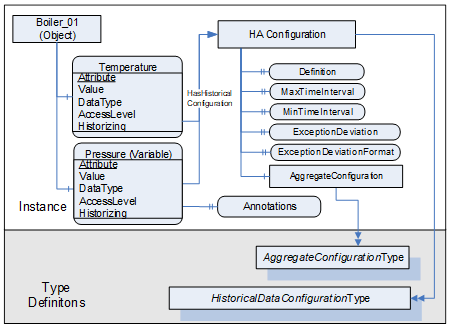
Figure 3 – Historical Variable with Historical Data Configuration and Annotations
Each HistoricalDataNode with history shall have the Historizing Attribute (see OPC 10000-3) defined and can reference a HistoricalAccessConfiguration Object. In the case where the HistoricalDataNode is itself a Property then the HistoricalDataNode inherits the values from the parent node of the Property.
Not every Variable in the AddressSpace could contain history data. To see if history data is available, a Client will look for the HistoryRead/Write states in the AccessLevel Attribute (see OPC 10000-3 for details on use of this Attribute).
Figure 3 only shows a subset of Attributes and Properties. Other Attributes that are defined for Variables in OPC 10000-3, can also be available.
The following example illustrates a Historian that obtains values for a HistoricalData node from another Server.
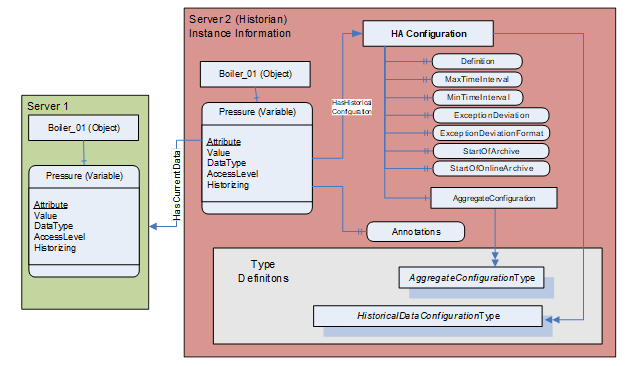
Figure 4 - Example Historizing External Data Source
The Pressure Variable has a custom historical configuration. It also has one or more Annotations associated with it, as indicated by the Annotations property. This configuration has no aggregates configured (the AggregateConfiguration is empty). Since there are no aggregates, a value for Stepped is not provided and thus defaults to false.
HistoricalEventNode Objects or Views in the AddressSpace that expose historical Events. These Nodes are identified via the EventNotifier Attribute, and provide some historical subset of the Events generated by the Server.
Each HistoricalEventNode is represented by an Object or View with a specific set of Attributes. The HistoricalEventFilter Property specifies the fields available in the history.
Not every Object or View in the AddressSpace can be a HistoricalEventNode. To qualify as HistoricalEventNode, a Node must contain historical Events. To see if historical Events are available, a Client will look for the HistoryRead/HistoryWrite states in the EventNotifier Attribute. See OPC 10000-3 for details on the use of this Attribute.
Figure 5 illustrates the basic AddressSpace Model of an Event model that includes History.
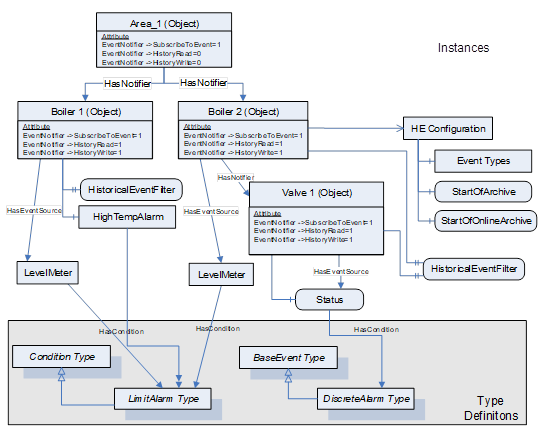
Figure 5 – Representation of an Event with History in the AddressSpace
Figure 6 provides an illustration of information related to Event sources that are in a Historian, where the events are being source from external Servers.
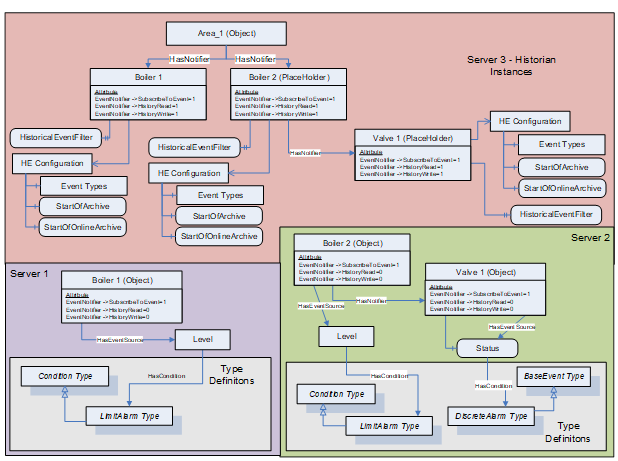
Figure 6 - Event History configuration example
OPC UA Servers can support several different functionalities and capabilities. The following standard Objects are used to expose these capabilities in a common fashion, and there are several standard defined concepts that can be extended by vendors. The Objects are outlined in OPC 10000-1.
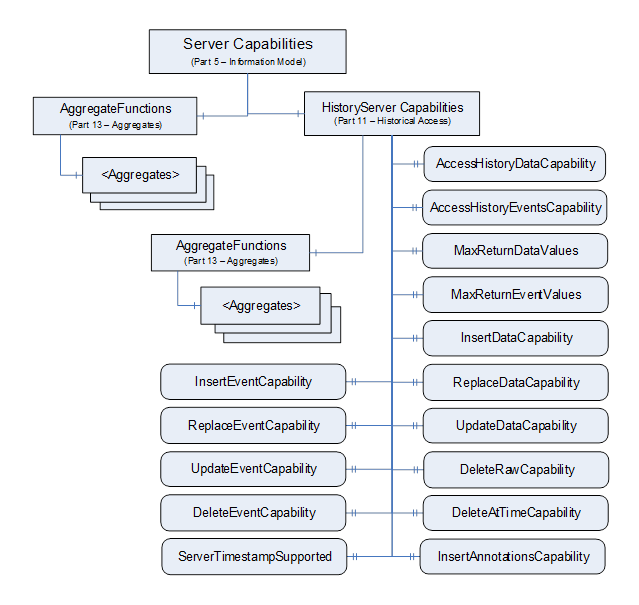
Figure 7 – Server and HistoryServer Capabilities
The ServerCapabilitiesType Objects for any OPC UA Server supporting Historical Access shall contain a Reference to a HistoryServerCapabilitiesType Object.
The content of this BaseObjectType is already defined by its type definition in OPC 10000-5. The Object extensions are formally defined in Table 13.
These properties are intended to inform a Client of the general capabilities of the Server. They do not guarantee that all capabilities will be available for all Nodes. For example, not all Nodes will support Events, or in the case of an aggregating Server where underlying Servers may not support Insert or a particular Aggregate. In such cases the HistoryServerCapabilities Property would indicate the capability is supported, and the Server would return appropriate StatusCodes for situations where the capability does not apply.
Table 13 – HistoryServerCapabilitiesType Definition
|
Attribute |
Value |
||||
|
BrowseName |
HistoryServerCapabilitiesType |
||||
|
IsAbstract |
False |
||||
|
References |
NodeClass |
Browse Name |
Data Type |
Type Definition |
Modelling Rule |
|
HasProperty |
Variable |
AccessHistoryDataCapability |
Boolean |
PropertyType |
Mandatory |
|
HasProperty |
Variable |
AccessHistoryEventsCapability |
Boolean |
PropertyType |
Mandatory |
|
HasProperty |
Variable |
MaxReturnDataValues |
UInt32 |
PropertyType |
Mandatory |
|
HasProperty |
Variable |
MaxReturnEventValues |
UInt32 |
PropertyType |
Mandatory |
|
HasProperty |
Variable |
InsertDataCapability |
Boolean |
PropertyType |
Mandatory |
|
HasProperty |
Variable |
ReplaceDataCapability |
Boolean |
PropertyType |
Mandatory |
|
HasProperty |
Variable |
UpdateDataCapability |
Boolean |
PropertyType |
Mandatory |
|
HasProperty |
Variable |
DeleteRawCapability |
Boolean |
PropertyType |
Mandatory |
|
HasProperty |
Variable |
DeleteAtTimeCapability |
Boolean |
PropertyType |
Mandatory |
|
HasProperty |
Variable |
InsertEventCapability |
Boolean |
PropertyType |
Mandatory |
|
HasProperty |
Variable |
ReplaceEventCapability |
Boolean |
PropertyType |
Mandatory |
|
HasProperty |
Variable |
UpdateEventCapability |
Boolean |
PropertyType |
Mandatory |
|
HasProperty |
Variable |
DeleteEventCapability |
Boolean |
PropertyType |
Mandatory |
|
HasProperty |
Variable |
InsertAnnotationCapability |
Boolean |
PropertyType |
Mandatory |
|
HasComponent |
Object |
AggregateFunctions |
-- |
FolderType |
Mandatory |
|
HasProperty |
Variable |
ServerTimestampSupported |
Boolean |
PropertyType |
Optional |
|
ConformanceUnits |
|||||
All UA Servers that support Historical Access shall include an instance of HistoryServerCapabilitiesType as part of its ServerCapabilities.
The AccessHistoryDataCapability Variable defines if the Server supports access to historical data values. A value of True indicates the Server supports access to the history for HistoricalDataNodes, a value of False indicates the Server does not support access to the history for HistoricalDataNodes. The default value is False. At least one of AccessHistoryDataCapability or AccessHistoryEventsCapability shall have a value of True for the Server to be a valid OPC UA Server supporting Historical Access.
The AccessHistoryEventsCapability Variable defines if the server supports access to historical Events. A value of True indicates the server supports access to the history of Events, a value of False indicates the Server does not support access to the history of Events. The default value is False. At least one of AccessHistoryDataCapability or AccessHistoryEventsCapability shall have a value of True for the Server to be a valid OPC UA Server supporting Historical Access.
The MaxReturnDataValues Variable defines the maximum number of values that can be returned by the Server for each HistoricalDataNode accessed during a request. A value of 0 indicates that the Server forces no limit on the number of values it can return. It is valid for a Server to limit the number of returned values and return a continuation point even if MaxReturnDataValues = 0. For example, it is possible that although the Server does not impose any restrictions, the underlying system can impose a limit that the Server is not aware of. The default value is 0.
Similarly, the MaxReturnEventValues specifies the maximum number of Events that a Server can return for a HistoricalEventNode.
The InsertDataCapability Variable indicates support for the Insert capability. A value of True indicates the Server supports the capability to insert new data values in history, but not overwrite existing values. The default value is False.
The ReplaceDataCapability Variable indicates support for the Replace capability. A value of True indicates the Server supports the capability to replace existing data values in history, but will not insert new values. The default value is False.
The UpdateDataCapability Variable indicates support for the Update capability. A value of True indicates the Server supports the capability to insert new data values into history if none exists, and replace values that currently exist. The default value is False.
The DeleteRawCapability Variable indicates support for the delete raw values capability. A value of True indicates the Server supports the capability to delete RawData values in history. The default value is False.
The DeleteAtTimeCapability Variable indicates support for the delete at time capability. A value of True indicates the Server supports the capability to delete a data value at a specified time. The default value is False.
The InsertEventCapability Variable indicates support for the Insert capability. A value of True indicates the Server supports the capability to insert new Events in history. An insert is not a replace. The default value is False.
The ReplaceEventCapability Variable indicates support for the Replace capability. A value of True indicates the Server supports the capability to replace existing Events in history. A replace is not an insert. The default value is False.
The UpdateEventCapability Variable indicates support for the Update capability. A value of True indicates the Server supports the capability to insert new Events into history if none exists, and replace values that currently exist. The default value is False.
The DeleteEventCapability Variable indicates support for the deletion of Events capability. A value of True indicates the Server supports the capability to delete Events in history. The default value is False.
The InsertAnnotationCapability Variable indicates support for Annotations. A value of True indicates the Server supports the capability to insert Annotations. Some Servers that support Inserting of Annotations will also support editing and deleting of Annotations. The default value is False.
AggregateFunctions is an entry point to browse to all Aggregate capabilities supported by the Server for Historical Access. All HistoryAggregates supported by the Server should be able to be browsed starting from this Object. Aggregates are defined in OPC 10000-13. If the Server does not support Aggregates the Folder is left empty.
The ServerTimestampSupported indicates the Server supports the storage of ServerTimestamps. If this Variable is not present, the Server does not support storage of ServerTimestamps.
This specification defines a manner of exposing the configuration associated with a HistoricalNode (both HistoricalDataNode and HistoricalEventNode), but this configuration is not required for all nodes. If the configuration of individual nodes is not provided for all nodes, the Historian shall expose a default instance under the Server Object. If HistoricalDataNodes exist without a referenced configuration, an Object with a BrowseName of “DefaultHAConfiguration” shall be exposed. If HistoricalEventNodes exist without configuration, an object with a BrowseName of “DefaultHEConfiguration” shall be exposed. For any Node that does not have a referenced historical configuration but does support history, the default appropriate configuration shall be applied (DefaultHAConfiguration for Variables, DefaultHEConfiguration for Objects).
A Client shall assume the default configuration for any HistoricalNode that does not reference a historical configuration.
The DefaultHAConfiguration object is defined in Table 14.
Table 14 - DefaultHAConfiguration definition
|
Attribute |
Value |
|||
|
BrowseName |
DefaultHAConfiguration |
|||
|
|
|
|||
|
References |
NodeClass |
BrowseName |
DataType |
TypeDefinition |
|
OrganizedBy by the Server Object defined in OPC 10000-5 |
||||
|
HasTypeDefinition |
ObjectType |
HistoricalDataConfigurationType |
Defined in 5.2.2 |
|
|
ConformanceUnits |
||||
|
Historical Access Default HA Configuration |
||||
The DefaultHEConfiguration object is defined inTable 15.
Table 15 - DefaultHEConfiguration definition
|
Attribute |
Value |
|||
|
BrowseName |
DefaultHEConfiguration |
|||
|
|
|
|||
|
References |
NodeClass |
BrowseName |
DataType |
TypeDefinition |
|
OrganizedBy by the Server Object defined in OPC 10000-5 |
||||
|
HasTypeDefinition |
ObjectType |
HistoricalEventConfigurationType |
Defined in 5.4.3 |
|
|
ConformanceUnits |
||||
|
Historical Access Default HE Configuration |
||||
AuditEvents are generated as a result of an action taken on the Server by a Client of the Server. For example, in response to a Client issuing a write to a Variable, the Server would generate an AuditEvent describing the Variable as the source and the user and Client Session as the initiators of the Event. Not all Servers support auditing, but if a Server supports auditing, then it shall support audit Events as described in OPC 10000-7 to determine if a Server supports auditing. Servers shall generate Events of the AuditHistoryUpdateEventType or a sub-type of this type for all invocations of the HistoryUpdate Service on any HistoricalNode. See OPC 10000-3 and OPC 10000-5 for details on the AuditHistoryUpdateEventType model. In the case where the HistoryUpdate Service is invoked to insert Historical Events, the AuditHistoryEventUpdateEventType Event shall include the EventId of the inserted Event and a description that indicates that the Event was inserted. In the case where the HistoryUpdate Service is invoked to delete records, the AuditHistoryDeleteEventType or one of its sub-types shall be generated. See 6.8 for details on updating historical data or Events.
In particular using the Delete raw or Delete modified functionality shall generate an AuditHistoryRawModifyDeleteEventType Event or a sub-type of it. Using the Delete at time functionality shall generate an AuditHistoryAtTimeDeleteEventType Event or a sub-type of it. Using the Delete Event functionality shall generate an AuditHistoryEventDeleteEventType Event or a sub-type of it. All other updates shall follow the guidelines provided in the AuditHistoryUpdateEventType model.
This is a subtype of AuditHistoryUpdateEventType and is used for categorization of History Event update related Events. This type follows all the behaviour of its parent type. Its representation in the AddressSpace is formally defined in Table 16.
Table 16 – AuditHistoryEventUpdateEventType definition
|
Attribute |
Value |
||||
|
BrowseName |
AuditHistoryEventUpdateEventType |
||||
|
IsAbstract |
True |
||||
|
References |
NodeClass |
BrowseName |
DataType |
TypeDefinition |
ModellingRule |
|
Subtype of the AuditHistoryUpdateEventType defined in OPC 10000-3, i.e. it has HasProperty References to the same Nodes. |
|||||
|
HasProperty |
Variable |
UpdatedNode |
NodeId |
PropertyType |
Mandatory |
|
HasProperty |
Variable |
PerformInsertReplace |
PerformUpdateType |
PropertyType |
Mandatory |
|
HasProperty |
Variable |
Filter |
EventFilter |
PropertyType |
Mandatory |
|
HasProperty |
Variable |
NewValues |
HistoryEventFieldList [ ] |
PropertyType |
Mandatory |
|
HasProperty |
Variable |
OldValues |
HistoryEventFieldList [ ] |
PropertyType |
Mandatory |
|
ConformanceUnits |
|||||
|
Historical Access Event Audit Events |
|||||
This EventType inherits all Properties of the AuditHistoryUpdateEventType. Their semantic is defined in OPC 10000-3.
The UpdateNode identifies the Attribute that was written on the SourceNode.
The PerformInsertReplace enumeration reflects the parameter on the Service call.
The Filter reflects the Event filter passed on the call to select the Events that are to be updated.
The NewValues identify the value that was written to the Event.
The OldValues identify the value that the Events contained before the update. It is acceptable for a Server that does not have this information to report a null value. In the case of an insert it is expected to be a null value.
Both the NewValues and the OldValues will contain Events with the appropriate fields, each with appropriately encoded values.
This is a subtype of AuditHistoryUpdateEventType and is used for categorization of history value update related Events. This type follows all the behaviour of its parent type. Its representation in the AddressSpace is formally defined in Table 17.
Table 17 – AuditHistoryValueUpdateEventType definition
|
Attribute |
Value |
||||
|
BrowseName |
AuditHistoryValueUpdateEventType |
||||
|
IsAbstract |
True |
||||
|
References |
NodeClass |
BrowseName |
DataType |
TypeDefinition |
ModellingRule |
|
Subtype of the AuditHistoryUpdateEventType defined in OPC 10000-3, i.e. it has HasProperty References to the same Nodes. |
|||||
|
HasProperty |
Variable |
UpdatedNode |
NodeId |
PropertyType |
Mandatory |
|
HasProperty |
Variable |
PerformInsertReplace |
PerformUpdateType |
PropertyType |
Mandatory |
|
HasProperty |
Variable |
NewValues |
DataValue[] |
PropertyType |
Mandatory |
|
HasProperty |
Variable |
OldValues |
DataValue[] |
PropertyType |
Mandatory |
|
ConformanceUnits |
|||||
|
Historical Access Data Audit Events |
|||||
This EventType inherits all Properties of the AuditHistoryUpdateEventType. Their semantic is defined in OPC 10000-3.
The UpdatedNode identifies the Attribute that was written on the SourceNode.
The PerformInsertReplace enumeration reflects the parameter on the Service call.
The NewValues identify the value that was written to the Event.
The OldValues identify the value that the Event contained before the write. It is acceptable for a Server that does not have this information to report a null value. In the case of an insert it is expected to be a null value.
Both the NewValues and the OldValues will contain a value in the DataType and encoding used for writing the value.
This is a subtype of AuditHistoryUpdateEventType and is used the insertion or change of an annotation. This type follows all the behaviour of its parent type. Its representation in the AddressSpace is formally defined in Table 18.
Table 18 – AuditHistoryAnnotationUpdateEventType definition
|
Attribute |
Value |
||||
|
BrowseName |
AuditHistoryAnnotationUpdateEventType |
||||
|
IsAbstract |
True |
||||
|
References |
NodeClass |
BrowseName |
DataType |
TypeDefinition |
ModellingRule |
|
Subtype of the AuditHistoryUpdateEventType defined in OPC 10000-3, i.e. it has HasProperty References to the same Nodes. |
|||||
|
HasProperty |
Variable |
PerformInsertReplace |
PerformUpdateType |
PropertyType |
Mandatory |
|
HasProperty |
Variable |
NewValues |
Annotation[] |
PropertyType |
Mandatory |
|
HasProperty |
Variable |
OldValues |
Annotation[] |
PropertyType |
Mandatory |
|
ConformanceUnits |
|||||
|
Historical Access Annotation Audit Events |
|||||
|
|
|||||
This EventType inherits all Properties of the AuditHistoryUpdateEventType. Their semantic is defined in OPC 10000-3.
The PerformInsertReplace enumeration reflects the corresponding parameter on the Service call.
The NewValues identify the Annotation that was written. In the case of a remove, it is expected to be a null value.
The OldValues identify the value that the Annotation contained before the write. It is acceptable for a Server that does not have this information to report a null value in the case of an update. In the case of an insert it is expected to be a null value.
Both the NewValues and the OldValues will contain a value in the DataType and encoding used for writing the value.
This is a subtype of AuditHistoryUpdateEventType and is used for categorization of history delete related Events. This type follows all the behaviour of its parent type. Its representation in the AddressSpace is formally defined in Table 19.
Table 19 – AuditHistoryDeleteEventType definition
|
Attribute |
Value |
||||
|
BrowseName |
AuditHistoryDeleteEventType |
||||
|
IsAbstract |
True |
||||
|
References |
NodeClass |
BrowseName |
DataType |
TypeDefinition |
ModellingRule |
|
Subtype of the AuditHistoryUpdateEventType defined in OPC 10000-3, i.e. it has HasProperty References to the same Nodes. |
|||||
|
HasProperty |
Variable |
UpdatedNode |
NodeId |
PropertyType |
Mandatory |
|
HasSubtype |
ObjectType |
AuditHistoryRawModifyDeleteEventType |
|
|
|
|
HasSubtype |
ObjectType |
AuditHistoryAtTimeDeleteEventType |
|
|
|
|
HasSubtype |
ObjectType |
AuditHistoryEventDeleteEventType |
|
|
|
|
ConformanceUnits |
|||||
|
Historical Access Delete Raw Audit Events |
|||||
This EventType inherits all Properties of the AuditUpdateEventType. Their semantic is defined in OPC 10000-3.
The UpdatedNode property identifies the NodeId that was used for the delete operation.
This is a subtype of AuditHistoryDeleteEventType and is used for categorization of history delete related Events. This type follows all the behaviour of its parent type. Its representation in the AddressSpace is formally defined in Table 20.
Table 20 – AuditHistoryRawModifyDeleteEventType definition
|
Attribute |
Value |
||||
|
BrowseName |
AuditHistoryRawModifyDeleteEventType |
||||
|
IsAbstract |
True |
||||
|
References |
NodeClass |
BrowseName |
DataType |
TypeDefinition |
ModellingRule |
|
Subtype of the AuditHistoryDeleteEventType defined in Table 19, i.e. it has HasProperty References to the same Nodes. |
|||||
|
HasProperty |
Variable |
IsDeleteModified |
Boolean |
PropertyType |
Mandatory |
|
HasProperty |
Variable |
StartTime |
UtcTime |
PropertyType |
Mandatory |
|
HasProperty |
Variable |
EndTime |
UtcTime |
PropertyType |
Mandatory |
|
HasProperty |
Variable |
OldValues |
DataValue[] |
PropertyType |
Mandatory |
|
ConformanceUnits |
|||||
|
Historical Access Audit Delete Raw |
|||||
This EventType inherits all Properties of the AuditHistoryDeleteEventType. Their semantic is defined in 5.8.5.
The IsDeleteModified reflects the isDeleteModified parameter of the call.
The StartTime reflects the starting time parameter of the call.
The EndTime reflects the ending time parameter of the call.
The OldValues identify the value that history contained before the delete. A Server should report all deleted values. It is acceptable for a Server that does not have this information to report a null value. The OldValues will contain a value in the DataType and encoding used for writing the value.
This is a subtype of AuditHistoryDeleteEventType and is used for categorization of history delete related Events. This type follows all the behaviour of its parent type. Its representation in the AddressSpace is formally defined in Table 21.
Table 21 – AuditHistoryAtTimeDeleteEventType definition
|
Attribute |
Value |
||||
|
BrowseName |
AuditHistoryAtTimeDeleteEventType |
||||
|
IsAbstract |
True |
||||
|
References |
NodeClass |
BrowseName |
DataType |
TypeDefinition |
ModellingRule |
|
Subtype of the AuditHistoryDeleteEventType defined in Table 19, i.e. it has HasProperty References to the same Nodes. |
|||||
|
HasProperty |
Variable |
ReqTimes |
UtcTime[] |
PropertyType |
Mandatory |
|
HasProperty |
Variable |
OldValues |
DataValue[] |
PropertyType |
Mandatory |
|
ConformanceUnits |
|||||
|
Historical Access Audit Delete At Time |
|||||
This EventType inherits all Properties of the AuditHistoryDeleteEventType. Their semantic is defined in 5.8.8.
The ReqTimes reflect the request time parameter of the call.
The OldValues identifies the value that history contained before the delete. A Server should report all deleted values. It is acceptable for a Server that does not have this information to report a null value. The OldValues will contain a value in the DataType and encoding used for writing the value.
This is a subtype of AuditHistoryDeleteEventType and is used for categorization of history delete related Events. This type follows all the behaviour of its parent type. Its representation in the AddressSpace is formally defined in Table 22.
Table 22 – AuditHistoryEventDeleteEventType definition
|
Attribute |
Value |
||||
|
BrowseName |
AuditHistoryEventDeleteEventType |
||||
|
IsAbstract |
True |
||||
|
References |
NodeClass |
BrowseName |
DataType |
TypeDefinition |
ModellingRule |
|
Subtype of the AuditHistoryDeleteEventType defined in Table 19, i.e. it has HasProperty References to the same Nodes. |
|||||
|
HasProperty |
Variable |
EventIds |
ByteString[] |
PropertyType |
Mandatory |
|
HasProperty |
Variable |
OldValues |
HistoryEventFieldList |
PropertyType |
Mandatory |
|
ConformanceUnits |
|||||
|
Historical Access Audit Delete Events |
|||||
This EventType inherits all Properties of the AuditHistoryDeleteEventType. Their semantic is defined in 5.8.5.
The EventIds reflect the EventIds parameter of the call.
The OldValues identify the value that history contained before the delete. A Server should report all deleted values. It is acceptable for a Server that does not have this information to report a null value. The OldValues will contain an Event with the appropriate fields, each with appropriately encoded values.
This is a subtype of AuditEventType and is used for categorization of history configuration changes. This type follows all the behaviour of its parent type. Its representation in the AddressSpace is formally defined in Table 22.
Table 23 – AuditHistoryConfigurationChangeEventType definition
|
Attribute |
Value |
||||
|
BrowseName |
AuditHistoryConfigurationChangeEventType |
||||
|
IsAbstract |
True |
||||
|
References |
NodeClass |
BrowseName |
DataType |
TypeDefinition |
ModellingRule |
|
Subtype of the AuditEventType defined in OPC 10000-5, i.e. it has HasProperty References to the same Nodes. |
|||||
|
ConformanceUnits |
|||||
|
Historical Access Audit Configuration Change Events |
|||||
This EventType inherits all Properties of the AuditEventType. Their semantic is defined in OPC 10000-5.
This is a subtype of AuditEventType and is used for tracking a bulk insertion of HistoricalData or HistoricalEvents into a Historian. This Event should not be generated for a given Node more frequently than once per minute, even if inserts occur more frequently.
This type follows all the behaviour of its parent type. Its representation in the AddressSpace is formally defined Table 24.
Table 24 – AuditHistoryBulkInsertEventType definition
|
Attribute |
Value |
||||
|
BrowseName |
AuditHistoryBulkInsertEventType |
||||
|
IsAbstract |
True |
||||
|
References |
NodeClass |
BrowseName |
DataType |
TypeDefinition |
ModellingRule |
|
Subtype of the AuditEventType defined in OPC 10000-5, i.e. it has HasProperty References to the same Nodes. |
|||||
|
HasProperty |
Variable |
UpdatedNode |
NodeId |
PropertyType |
Mandatory |
|
HasProperty |
Variable |
StartTime |
UtcTime |
PropertyType |
Mandatory |
|
HasProperty |
Variable |
EndTime |
UtcTime |
PropertyType |
Mandatory |
|
ConformanceUnits |
|||||
|
Historical Access Audit BulkInsert Events |
|||||
This EventType inherits all Properties of the AuditEventType. Their semantic is defined in OPC 10000-5.
UpdatedNode is the NodeId that had a bulk insert of historical information. It can be a HistoricalDataNode or a HistoricalEventNode.
StartTime is the oldest time of the block that was inserted.
EndTime is the newest time of the block that was inserted.
OPC 10000-4 specifies all Services needed for OPC UA Historical Access. In particular:
· The Browse Service Set or Query Service Set to detect HistoricalNodes and their configuration.
· The HistoryRead and HistoryUpdate Services of the Attribute Service Set to read and update history of HistoricalDataNodes.
The HistoryRead service has the following parameters (see OPC 10000-4 for details):
· historyReadDetails
· timestampsToReturn
· releaseContinuationPoints
· nodesToRead []
· nodeId
· indexRange
· dataEncoding
· continuationPoint
The HistoryReadDetails is an extensible parameter that can be any of the parameters defined in Table 27. Each of these parameters are described in detail in 6.5. The other parameters listed above can have special requirements described in 6.5.
The return parameter for the HistoryRead service has the following parameter:
· results []
· statusCode
· continuationPoint
· historyData
The historyData parameter is an extensible parameter that is defined in 6.6. The other return parameters can have special meanings assigned either in 6.6 or in 6.5.
Subclause 6.2 defines additional codes and rules that apply to the StatusCode when used for HistoricalDataNodes.
The general structure of the StatusCode is specified in OPC 10000-4. It includes a set of common operational result codes which also apply to historical data and/or Events.
In OPC UA Historical Access the StatusCode is used to indicate the conditions under which a Value or Event was stored, and thereby can be used as an indicator of its usability. Due to the nature of historical data and/or Events, additional information beyond the basic quality and call result code needs to be conveyed to the Client, for example, whether the value is actually stored in the data repository, whether the result was Interpolated, whether all data inputs to a calculation were of good quality, etc.
In the following, Table 25 contains codes with Bad severity indicating a failure; Table 26 contains Good (success) codes.
It is important to note that these are the codes that are specific for OPC UA Historical Access and supplement the codes that apply to all types of data and are therefore defined in OPC 10000-4, OPC 10000-8 and OPC 10000-13.
Table 25 – Bad operation level result codes
|
Symbolic Id |
Description |
|
Bad_NoData |
No data exists for the requested time range or Event filter. |
|
Bad_BoundNotFound |
No data found to provide upper or lower bound value. |
|
Bad_BoundNotSupported |
Bounding Values are not applicable or the Server has reached its search limit and will not return a bound. |
|
Bad_DataLost |
Data is missing due to collection started/stopped/lost. |
|
Bad_DataUnavailable |
Expected data is unavailable for the requested time range due to an un-mounted volume, an off-line historical collection, or similar reason for temporary unavailability. |
|
Bad_EntryExists |
The data or Event was not successfully inserted because a matching entry exists. |
|
Bad_NoEntryExists |
The data or Event was not successfully updated because no matching entry exists. |
|
Bad_TimestampNotSupported |
The Client requested history using a TimestampsToReturn the Server does not support. For example requested ServerTimestamp when Server only supports SourceTimestamp. |
|
Bad_InvalidArgument |
One or more arguments are invalid or missing. |
|
Bad_AggregateListMismatch |
The list of Aggregates does not have the same length as the list of operations. |
|
Bad_AggregateConfigurationRejected |
The Server does not support the specified AggregateConfiguration for the Node. |
|
Bad_AggregateNotSupported |
The specified Aggregate is not valid for the specified Node. |
|
Bad_ArgumentsMissing |
See OPC 10000-4 for the description of this result code. |
|
Bad_TypeDefinitionInvalid |
See OPC 10000-4 for the description of this result code. |
|
Bad_SourceNodeIdInvalid |
See OPC 10000-4 for the description of this result code. |
|
Bad_OutOfRange |
See OPC 10000-4 for the description of this result code. |
|
Bad_NotSupported |
See OPC 10000-4 for the description of this result code. |
|
Bad_IndexRangeInvalid |
See OPC 10000-4 for the description of this result code. |
|
Bad_NotWritable |
See OPC 10000-4 for the description of this result code. |
Table 26 – Good operation level result codes
|
Symbolic Id |
Description |
|
Good_NoData |
No data exists for the requested time range or Event filter. |
|
Good_EntryInserted |
The data or Event was successfully inserted into the historical database |
|
Good_EntryReplaced |
The data or Event field was successfully replaced in the historical database |
|
Good_DataIgnored |
The Event field was ignored and was not inserted into the historical database. |
It may be noted that there are both Good and Bad Status codes that deal with cases of no data or missing data. In general, Good_NoData is used for cases where no data was found when performing a simple ‘Read’ request. Bad_NoData is used in cases where some action is requested on an interval and no data could be found. The distinction exists if users are attempting an action on a given interval where they would expect data to exist, or would like to be notified that the requested action could not be performed.
Good_NoData is returned for cases such as:
– ReadEventDetails where startTime=endTime
– ReadEventDetails data is requested and does not exist
– ReadRawModifiedDetails where data is requested and does not exist
Bad_NoData is returned for cases such as:
– ReadEventDetails data is requested and underlying historian does not support the requested field
– ReadProcessed where data is requested and does not exist
– Any Delete requests where data does not exist
The above use cases are illustrative examples. Detailed explanations on when each status code is returned are found in 6.5 and 6.8.
The StatusCode in addition contains an informational bit called Semantics Changed (see OPC 10000-4).
UA Servers that implement OPC UA Historical Access should not set this bit; rather they should propagate the StatusCode which has been stored in the data repository. The Client should be aware that the returned data values can have this bit set.
The continuationPoint parameter in the HistoryRead Service is used to mark a point from which to continue the history read if not all values could be returned in one response. The value is opaque for the Client and is only used to maintain the state information for the Server to continue from. For HistoricalDataNode requests, a Server can use the timestamp of the last returned data item if the timestamp is unique. This can reduce the need in the Server to store state information for the ContinuationPoint.
The Client specifies the maximum number of results per operation in the request Message. A Server shall not return more than this number of results but it can return fewer results. The Server allocates a ContinuationPoint if there are more results to return. The Server can return fewer results due to buffer issues or other internal constraints. It can also be required to return a ContinuationPoint due to HistoryRead parameter constraints. If a request is taking a long time to calculate and is approaching the timeout time, the Server can return partial results with a ContinuationPoint. This can be done if the calculation is going to take more time than the Client timeout. In some cases, it can take longer than the Client timeout to calculate even one result. Then the Server can return zero results with a ContinuationPoint that allows the Server to resume the calculation on the next Client read call. For additional discussions regarding ContinuationPoints and HistoryRead please see the individual extensible HistoryReadDetails parameter in 6.5.
If the Client specifies a ContinuationPoint, then the HistoryReadDetails parameter and the TimestampsToReturn parameter shall be the same as in the original call. It is permissible to change the dataEncoding parameter with each request. If the HistoryReadDetails parameter or TimestampsToReturn parameter change the Server can ignore the updated parameters, it can detect any changes to the parameters and report an error or it can process the request as if it was a new request. The exact behaviour is Server specific.
If the Client specifies a ContinuationPoint that is no longer valid, then the Server shall return a Bad_ContinuationPointInvalid error.
If the releaseContinuationPoints parameter is set in the request the Server shall not return any data and shall release all ContinuationPoints passed in the request.
If the ContinuationPoint for an operation is missing or invalid then the StatusCode for the operation shall be Bad_ContinuationPointInvalid.
Historians are not required to be able to store arrays. Optional ConformanceUnits exist to indicate if they support storage of arrays. If a Historian does store arrays, it may not support returning an index range in an array, it may only provide the entire array. ConformanceUnits are provided to indicate if a Historian supports index ranges. For ReadProcessedDetails, some Aggregates do not support arrays (see 6.5.4 for details).
If the Historian does not support index ranges, but an indexRange parameter is provided, then the Server shall return Bad_NotSupported.
If a Historian supports index ranges, the size of the array can change over the time period being retrieved (see Figure 8 for an illustration). For retrieval of index ranges of values, all records that exist in the requested time period are returned. For any Value that does not have any values in the requested index range a status of Bad_IndexRangeNoData is returned. In the illustration the top table indicates the data that was collected by the Historian. The time interval covered by the historical ReadRawModifiedDetails request is labelled in the figure as well as the indexRange that was requested [not all parameters for the request are illustrated]. The results box indicates the timestamps, values and statuses that are returned. It is important to understand that a record is returned for all recorded timestamps, some just indicate a bad status. The status returned can be the bad status that was stored when the data was collected (e.g. Bad_CommunicationFailure) or it can be the result of processing the request for the index range (i.e. Bad_IndexRangeNoData).
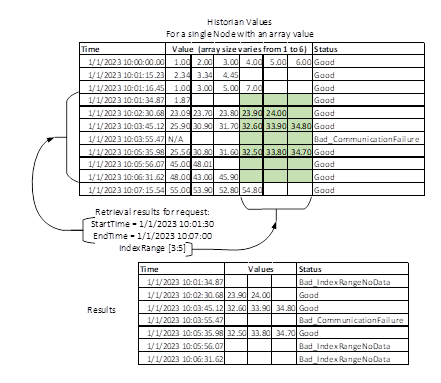
Figure 8 - History Array example
Figure 9 provides a second illustration where a different time interval is selected as well as a different index range. This index range [1:2] contains more data and thus less Bad_IndexRangeNoData is returned.
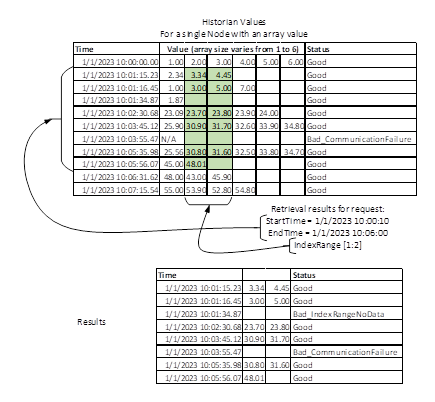
Figure 9 - Historian Array Illustration 2
Historians that store strings may not be able to return substring of stored strings, they can restrict retrieval to the entire string. ConformanceUnits are provided to indicate if the Historian supports processing of substrings for historical retrieval.
All processing for substrings, follow the same rules as for arrays (see NumericRange in OPC 10000-4).
The HistoryRead Service defined in OPC 10000-4 can perform several different functions. The HistoryReadDetails parameter is an Extensible Parameter that specifies which function to perform and the details that are specific to that function. See OPC 10000-4 for the definition of Extensible Parameter. Table 27 lists the symbolic names of the valid Extensible Parameter structures. Some structures will perform different functions based on the setting of its associated parameters. For simplicity the functionality of each structure is listed. For example, text such as ‘using the Read modified functionality’ refers to the function the HistoryRead Service performs using the Extensible Parameter structure ReadRawModifiedDetails with the isReadModified Boolean parameter set to TRUE.
Table 27 – HistoryReadDetails parameter Symbolic Names
|
Symbolic Name |
Functionality |
Description |
|
ReadEventDetails |
Read event |
This structure selects a set of Events from the history database by specifying a filter and a time domain for one or more Objects or Views. See 6.5.2.1. When this parameter is specified, the Server returns a HistoryEvent structure for each operation (see 6.6.4). |
|
ReadEventDetails2 |
Read event |
This structure selects a set of Events from the history database by specifying a filter and a time domain for one or more Objects or Views. See 6.5.2.1. When this parameter is specified, the Server returns a HistoryEvent structure for each operation (see 6.6.4). |
|
ReadEventDetails2 |
Read event modified |
This structure selects a set of modified Events from the history database by specifying a filter and a time domain for one or more Objects or Views. See 6.5.2.3 When this parameter is specified, the Server returns a HistoryModifiedEvent structure for each operation (see 6.6.4). |
|
ReadRawModifiedDetails |
Read raw |
This structure selects a set of values from the history database by specifying a time domain for one or more Variables. See 6.5.3.1. When this parameter is specified, the Server returns a HistoryData structure for each operation (see 6.6.2). |
|
ReadRawModifiedDetails |
Read modified |
This parameter selects a set of ModifiedValues from the history database by specifying a time domain for one or more Variables. See 6.5.3.1. When this parameter is specified, the Server returns a HistoryModifiedData structure for each operation (see 6.6.3). |
|
ReadProcessedDetails |
Read processed |
This structure selects a set of Aggregate values from the history database by specifying a time domain for one or more Variables. See 6.5.4.1. When this parameter is specified, the Server returns a HistoryData structure for each operation (see 6.6.2) |
|
ReadAtTimeDetails |
Read at time |
This structure selects a set of raw or interpolated values from the history database by specifying a series of timestamps for one or more Variables. See 6.5.5.1. When this parameter is specified, the Server returns a HistoryData structure for each operation (see Clause 6.6.2). |
|
ReadAnnotationDataDetails |
Read Annotation Data |
This structure selects a set of Annotation Data from the history database by specifying a series of timestamps for one or more Variables. See 6.5.6.1. When this parameter is specified, the Server returns an Annotation structure for each operation (see Clause 6.6.6). |
The HistoryReadDetails Structure definition in the AddressSpace is shown in Table 28. The Structure is an abstract supertype and contains no fields.
Table 28 – HistoryReadDetails definition
|
Attribute |
Value |
|||||
|
BrowseName |
HistoryReadDetails |
|||||
|
IsAbstract |
True |
|||||
|
References |
NodeClass |
BrowseName |
DataType |
TypeDefinition |
Other |
|
|
Subtype of the Structure defined in OPC 10000-3 |
||||||
|
Conformance Units |
||||||
Table 29 defines the ReadEventDetails structure. This parameter is only valid for Objects that have the EventNotifier Attribute set to TRUE (see OPC 10000-3). At least two of the three parameters, numValuesPerNode, startTime, and endTime shall be specified.
Table 29 – ReadEventDetails Structure
|
Name |
Type |
Description |
|
ReadEventDetails |
Structure |
Specifies the details used to perform an Event history read. |
|
numValuesPerNode |
Counter |
The maximum number of Events returned for any Node over the time range. If only one time is specified, the time range shall extend to return this number of Events. The default value of 0 indicates that there is no maximum. |
|
startTime |
UtcTime |
Beginning of period to read. The default value of DateTime.MinValue indicates that the startTime is unspecified. |
|
endTime |
UtcTime |
End of period to read. The default value of DateTime.MinValue indicates that the endTime is unspecified. |
|
Filter |
EventFilter |
A filter used by the Server to determine which HistoricalEventNode should be included. This parameter shall be specified and at least one EventField is required. The EventFilter parameter type is an Extensible parameter type. It is defined and used in the same manner as defined for monitored data items which are specified in OPC 10000-4. This filter also specifies the EventFields that are to be returned as part of the request. |
Its representation in the AddressSpace is defined in Table 30.
Table 30 – ReadEventDetails definition
|
Attribute |
Value |
|||||
|
BrowseName |
ReadEventDetails |
|||||
|
IsAbstract |
False |
|||||
|
References |
NodeClass |
BrowseName |
DataType |
TypeDefinition |
Other |
|
|
Subtype of the HistoryReadDetails defined in Table 28 |
||||||
|
Conformance Units |
||||||
The ReadEventDetails structure is used to read the Events from the history database for the specified time domain for one or more HistoricalEventNodes. The ReadEventDetails2 can also be used. The Events are filtered based on the filter structure provided. This filter includes the EventFields that are to be returned. For a complete description of filter refer to OPC 10000-4.
The startTime and endTime are used to filter on the Time field for Events.
The time domain of the request is defined by startTime, endTime, and numValuesPerNode; at least two of these shall be specified. If endTime is less than startTime, or endTime and numValuesPerNode alone are specified then the data will be returned in reverse order with later/newer data provided first as if time were flowing backward. If all three are specified then the call shall return up to numValuesPerNode results going from startTime to endTime, in either ascending or descending order depending on the relative values of startTime and endTime. If numValuesPerNode is 0 then all of the Events in the range are returned. The default value of startTime, endTime or numValuesPerNode is used to indicate not specified.
It is specifically allowed for the startTime and the endTime to be identical. This allows the Client to request the Event(s) at a single instance in time. When the startTime and endTime are identical then time is presumed to be flowing forward. If no data exists at the time specified then the Server shall return the Good_NoData StatusCode.
The standard ContinuationPoint rules (see 6.3) apply. In addition, the following ContinuationPoint rule applies to ReadEventDetails. If a startTime, endTime and numValuesPerNode are all provided, and if more than numValuesPerNode Events exist within that time range for a given Node, then only numValuesPerNode Events per Node are returned along with a ContinuationPoint.
For an interval in which no data exists, the corresponding StatusCode shall be Good_NoData.
The filter parameter is used to determine which historical Events and their corresponding fields are returned. It is possible that the fields of an EventType are available for real time updating, but not available from the Historian. In this case a StatusCode value will be returned for any Event field that cannot be returned. The value of the StatusCode shall be Bad_NoData.
When reading Events, TimestampsToReturn only applies to Event fields that are of type DataValue. If the requested TimestampsToReturn is not supported for an Event field then the returned value of the Event field is the Bad_TimestampNotSupported StatusCode.
Table 29 defines the ReadEventDetails2 structure. The structure is a subtype of ReadEventDetails. This subtype only adds the readModified Boolean. The description provided in 6.5.2.2 applies when readModified Boolean is set to FALSE. This updated structure can be used for all event retrieval operations.
ReadEventDetails2 is only valid for Objects that have the EventNotifier Attribute set to TRUE (see OPC 10000-3). At least two of the three parameters, numValuesPerNode, startTime, and endTime shall be specified.
Table 31 – ReadEventDetails2 Structure
|
Name |
Type |
Description |
|
ReadEventDetails2 |
Structure |
Specifies the details used to perform an Event history read. |
|
readModified |
Boolean |
TRUE for Read Modified functionality |
Its representation in the AddressSpace is defined in Table 30.
Table 32 – ReadEventDetails2 definition
|
Attribute |
Value |
|||||
|
BrowseName |
ReadEventDetails2 |
|||||
|
IsAbstract |
False |
|||||
|
References |
NodeClass |
BrowseName |
DataType |
TypeDefinition |
Other |
|
|
Subtype of the ReadEventDetails |
||||||
|
Conformance Units |
||||||
When this structure is used for reading ModifiedEvents (isReadModified is set to TRUE), it reads the ModifiedEvents, modification type, the user identifier, and the timestamp of the modification from the history database for the specified time domain for one or more HistoricalDataNodes. If there are multiple replaced Events the Server shall return all of them. The updateType specifies what Event is returned in the modification record. If the updateType is INSERT the Event is the new Event that was inserted. If the updateType is anything else the Event is the old Event that was changed. See 6.9 HistoryUpdateDetails parameter for details on what updateTypes are available.
The purpose of this function is to read Events from history that have been Modified.
The startTime and endTime are used to filter on the Time field for Events.
The domain of the request is defined by startTime, endTime, and numValuesPerNode; at least two of these shall be specified. If endTime is less than startTime, or endTime and numValuesPerNode alone are specified, then the data shall be returned in reverse order with the later data coming first. If all three are specified then the call shall return up to numValuesPerNode results going from StartTime to EndTime, in either ascending or descending order depending on the relative values of StartTime and EndTime. If numValuesPerNode is 0 then all of the Events in the range are returned.
It is specifically allowed for the startTime and the endTime to be identical. This allows the Client to request the Event(s) at a single instance in time. When the startTime and endTime are identical then time is presumed to be flowing forward. If no Events exists at the time specified then the Server shall return the Good_NoData StatusCode.
The standard ContinuationPoint rules (see 6.3) apply. In addition, the following ContinuationPoint rule applies to ReadEventDetails. If a startTime, endTime and numValuesPerNode are all provided, and if more than numValuesPerNode Events exist within that time range for a given Node, then only numValuesPerNode Events per Node are returned along with a ContinuationPoint.
For an interval in which no Events exists, the corresponding StatusCode shall be Good_NoData.
The filter parameter is used to determine which historical Events and their corresponding fields are returned. It is possible that the fields of an EventType are available for real time updating, but not available from the Historian. In this case a StatusCode value will be returned for any Event field that cannot be returned. The value of the StatusCode shall be Bad_NoData.
When reading Events, TimestampsToReturn only applies to Event fields that are of type DataValue. If the requested TimestampsToReturn is not supported for an Event field then the returned value of the Event field is the Bad_TimestampNotSupported StatusCode.
Table 33 defines the ReadEventDetailsSorted structure. The structure is a subtype of the ReadEventDetails Structure defined in 6.5.2, adding a SortClause used to define the order in which events will be returned by the Server. The Server shall use the SortClause to determine how the filtered rows shall be sorted before the results are returned.
Table 33 – ReadEventDetailsSorted Structure
|
Name |
Type |
Description |
|
ReadEventDetailsSorted |
Structure |
Specifies the details used to perform an Event history read. |
|
SortClause |
SortRuleElement[] |
Sorting rules for the filtered notification that match the EventFilter. The priority of the ordering is evaluated by using the position of the elements in this array, starting with the first element. |
Its representation in the AddressSpace is defined in Table 34.
Table 34 – ReadEventDetailsSorted definition
|
Attribute |
Value |
|||||
|
BrowseName |
ReadEventDetailsSorted |
|||||
|
IsAbstract |
False |
|||||
|
References |
NodeClass |
BrowseName |
DataType |
TypeDefinition |
Other |
|
|
Subtype of the ReadEventDetails defined in 6.5.2 |
||||||
|
Conformance Units |
||||||
Table 35 defines the ReadRawModifiedDetails structure. Two of the three parameters, numValuesPerNode, startTime, and endTime shall be specified.
Table 35 – ReadRawModifiedDetails structure
|
Name |
Type |
Description |
|
ReadRawModifiedDetails |
Structure |
Specifies the details used to perform a “raw” or “modified” history read. |
|
isReadModified |
Boolean |
TRUE for Read Modified functionality, FALSE for Read Raw functionality. Default value is FALSE. |
|
startTime |
UtcTime |
Beginning of period to read. Set to default value of DateTime.MinValue if no specific start time is specified. |
|
endTime |
UtcTime |
End of period to read. Set to default value of DateTime.MinValue if no specific end time is specified. |
|
numValuesPerNode |
Counter |
The maximum number of values returned for any Node over the time range. If only one time is specified, the time range shall extend to return this number of values. The default value 0 indicates that there is no maximum. |
|
returnBounds |
Boolean |
A Boolean parameter with the following values: TRUE Bounding Values should be returned FALSE All other cases |
Its representation in the AddressSpace is defined in Table 30.
Table 36 – ReadRawModifiedDetails definition
|
Attribute |
Value |
|||||
|
BrowseName |
ReadRawModifiedDetails |
|||||
|
IsAbstract |
False |
|||||
|
References |
NodeClass |
BrowseName |
DataType |
TypeDefinition |
Other |
|
|
Subtype of the HistoryReadDetails defined in Table 28 |
||||||
|
Conformance Units |
||||||
When this structure is used for reading Raw Values (isReadModified is set to FALSE), it reads the values, qualities, and timestamps from the history database for the specified time domain for one or more HistoricalDataNodes. This parameter is intended for use by a Client that wants the actual data saved within the historian. The actual data can be compressed or can be all RawData collected for the item depending on the historian and the storage rules invoked when the item values were saved. When returnBounds is TRUE, the Bounding Values for the time domain are returned. The optional Bounding Values are provided to allow the Client to interpolate values for the start and end times when trending the actual data on a display.
The time domain of the request is defined by startTime, endTime, and numValuesPerNode; at least two of these shall be specified. If endTime is less than startTime, or endTime and numValuesPerNode alone are specified then the data will be returned in reverse order, with later data coming first as if time were flowing backward. If numValuesPerNode is not specified (set to 0), then all the values in the range are returned. A default value of DateTime.MinValue (see Table 35) is used to indicate when startTime or endTime is not specified. When only startTime (or only endTime) and numValuePerNode is specified, the provided time is used as a starting point and the requested number of values is returned.
The standard ContinuationPoint rules (see 6.3) apply. In addition, the following ContinuationPoint rule applies to ReadRawModifiedDetails If a startTime, endTime and numValuesPerNode are all provided and if more than numValuesPerNode values exist within that time range for a given Node then only numValuesPerNode values per Node shall be returned along with a ContinuationPoint.
It is specifically allowed for the startTime and the endTime to be identical. This allows the Client to request just one value. When the startTime and endTime are identical then time is presumed to be flowing forward. It is specifically not allowed for the Server to return a Bad_InvalidArgument StatusCode if the requested time domain is outside of the Server's range. Such a case shall be treated as an interval in which no data exists.
If Bounding Values are requested and a non-zero numValuesPerNode was specified then any Bounding Values returned are included in the numValuesPerNode count. If numValuesPerNode is 1 then only the start bound is returned (the end bound if the reverse order is needed). If numValuesPerNode is 2 then the start bound and the first data point are returned (the end bound if reverse order is needed). When Bounding Values are requested and no bounding value is found then the corresponding StatusCode entry will be set to Bad_BoundNotFound, a timestamp equal to the start or end time as appropriate, and a value of null. How far back or forward to look in history for Bounding Values is Server dependent.
For an interval in which no data exists, if Bounding Values are not requested, then the corresponding StatusCode shall be Good_NoData. If Bounding Values are requested and one or both exist, then the result code returned is Success and the bounding value(s) are returned.
For cases where there are multiple values for a given timestamp, all but the most recent are considered to be ModifiedValues and the Server shall return the most recent value. If the Server returns a value which hides other values at a timestamp then it shall set the ExtraData bit in the StatusCode associated with that value. The additional values can be retrieved with the isReadModified flag set to true, see 6.5.3.3. If the Server contains additional information regarding a value, such as Annotations, then the ExtraData bit shall also be set.
If the requested TimestampsToReturn is not supported for a Node, the operation shall return the Bad_TimestampNotSupported StatusCode.
When this structure is used for reading ModifiedValues (isReadModified is set to TRUE), it reads the ModifiedValues, StatusCodes, timestamps, modification type, the user identifier, and the timestamp of the modification from the history database for the specified time domain for one or more HistoricalDataNodes. If there are multiple replaced values the Server shall return all of them. The updateType specifies what value is returned in the modification record. If the updateType is INSERT the value is the new value that was inserted. If the updateType is anything else the value is the old value that was changed. See 6.9 HistoryUpdateDetails parameter for details on what updateTypes are available.
The purpose of this function is to read values from history that have been Modified. The returnBounds parameter shall be set to FALSE for this case, otherwise the Server returns a Bad_InvalidArgument StatusCode.
The domain of the request is defined by startTime, endTime, and numValuesPerNode; at least two of these shall be specified. If endTime is less than startTime, or endTime and numValuesPerNode alone are specified, then the data shall be returned in reverse order with the later data coming first. If all three are specified then the call shall return up to numValuesPerNode results going from StartTime to EndTime, in either ascending or descending order depending on the relative values of StartTime and EndTime. If numValuesPerNode is 0 then all of the values in the range are returned. If the Server cannot return all ModifiedValues for a given timestamp in a single response then it shall return ModifiedValues with the same timestamp in subsequent calls.
The standard ContinuationPoint rules (see 6.3) apply. In addition, the following ContinuationPoint rule applies to ReadRawModifiedDetails. If more than numValuesPerNode values exist within that time range for a given Node then only numValuesPerNode values per Node are returned along with a ContinuationPoint.
If a value has been modified multiple times then all values for the time are returned. This means that a timestamp can appear in the array more than once. The order of the returned values with the same timestamp should be from the most recent to oldest modification timestamp, if startTime is less than or equal to endTime. If endTime is less than startTime, then the order of the returned values will be from the oldest modification timestamp to the most recent. It is Server dependent whether multiple modifications are kept or only the most recent.
If the requested TimestampsToReturn is not supported for a Node then the operation shall return the Bad_TimestampNotSupported StatusCode.
Table 37 defines the structure of the ReadProcessedDetails structure.
Table 37 – ReadProcessedDetails structure
|
Name |
Type |
Description |
|
ReadProcessedDetails |
Structure |
Specifies the details used to perform a “processed” history read. |
|
startTime |
UtcTime |
Beginning of period to read. |
|
endTime |
UtcTime |
End of period to read. |
|
ProcessingInterval |
Duration |
Interval between returned Aggregate values. The value 0 indicates that there is no ProcessingInterval defined. |
|
aggregateType[] |
NodeId |
The NodeId of the HistoryAggregate object that indicates the list of Aggregates to be used when retrieving the processed history. See OPC 10000-13 for details. |
|
AggregateConfiguration |
Aggregate Configuration |
Aggregate configuration structure. |
|
useServerCapabilitiesDefaults |
Boolean |
As described in OPC 10000-4 AggregateFilter Structure. (also see AggregateConfiguration settings defined in OPC 10000-13, and as described in HistorianConfiguration Objects (see 5.2.2). |
|
TreatUncertainAsBad |
Boolean |
As described in OPC 10000-13. |
|
PercentDataBad |
Byte |
As described in OPC 10000-13. |
|
PercentDataGood |
Byte |
As described in OPC 10000-13. |
|
UseSlopedExtrapolation |
Boolean |
As described in OPC 10000-13. |
See OPC 10000-13 for details on possible NodeId values for the aggregateType parameter.
Its representation in the AddressSpace is defined in Table 30.
Table 38 – ReadProcessedDetails definition
|
Attribute |
Value |
|||||
|
BrowseName |
ReadProcessedDetails |
|||||
|
IsAbstract |
False |
|||||
|
References |
NodeClass |
BrowseName |
DataType |
TypeDefinition |
Other |
|
|
Subtype of the HistoryReadDetails defined in Table 28 |
||||||
|
Conformance Units |
||||||
|
Historical Access Aggregates |
||||||
This structure is used to compute Aggregate values, qualities, and timestamps from data in the history database for the specified time domain for one or more HistoricalDataNodes. The time domain is divided into intervals of duration ProcessingInterval. The specified Aggregate Type is calculated for each interval beginning with startTime by using the data within the next ProcessingInterval.
For example, this function can provide hourly statistics such as Maximum, Minimum, and Average for each item during the specified time domain when ProcessingInterval is 1 hour.
The domain of the request is defined by startTime, endTime, and ProcessingInterval. All three shall be specified. If endTime is less than startTime then the data shall be returned in reverse order with the later data coming first. If startTime and endTime are the same then the Server shall return Bad_InvalidArgument as there is no meaningful way to interpret such a case. If the ProcessingInterval is specified as 0 then Aggregates shall be calculated using one interval starting at startTime and ending at endTime.
The aggregateType[] parameter allows a Client to request multiple Aggregate calculations per requested NodeId. If multiple Aggregates are requested then a corresponding number of entries are required in the NodesToRead array.
For example, to request Min Aggregate for NodeId FIC101, FIC102, and both Min and Max Aggregates for NodeId FIC103 would require NodeId FIC103 to appear twice in the NodesToRead array request parameter.
|
aggregateType[] |
NodesToRead[] |
|
Min |
FIC101 |
|
Min |
FIC102 |
|
Min |
FIC103 |
|
Max |
FIC103 |
If the array of Aggregates does not match the array of NodesToRead then the Server shall return a StatusCode of Bad_AggregateListMismatch.
The aggregateConfiguration parameter allows a Client to override the Aggregate configuration settings supplied by the AggregateConfiguration Object on a per call basis. See OPC 10000-13 for more information on Aggregate configurations. If the Server does not support the ability to override the Aggregate configuration settings, then it shall return a StatusCode of Bad_ AggregateConfigurationRejected. If the Aggregate is not valid for the Node then the StatusCode shall be Bad_AggregateNotSupported.
The values used in computing the Aggregate for each interval shall include any value that falls exactly on the timestamp at the beginning of the interval, but shall not include any value that falls directly on the timestamp ending the interval. Thus, each value shall be included only once in the calculation. If the time domain is in reverse order, then we consider the later timestamp to be the one beginning the subinterval, and the earlier timestamp to be the one ending it. Note that this means that simply swapping the start and end times will not result in getting the same values back in reverse order as the intervals being requested in the two cases are not the same.
The standard ContinuationPoint rules (see 6.3) apply.
Refer to OPC 10000-13 for handling of Aggregate specific cases. Not all Aggregates can be applied to arrays, for example calculated value Aggregates can not be performed on arrays (e.g. Minimum, Maximum, Average…). Any Aggregate that can not be applied to an array, shall report Bad_NotSupported for the operation result associated with the given NodeId.
Table 39 defines the ReadAtTimeDetails structure.
Table 39 – ReadAtTimeDetails structure
|
Name |
Type |
Description |
|
ReadAtTimeDetails |
Structure |
Specifies the details used to perform an “at time” history read. |
|
reqTimes [] |
UtcTime |
The entries define the specific timestamps for which values are to be read. |
|
useSimpleBounds |
Boolean |
Use SimpleBounds to determine the value at the specific timestamp. |
Its representation in the AddressSpace is defined in Table 30.
Table 40 – ReadAtTimeDetails definition
|
Attribute |
Value |
|||||
|
BrowseName |
ReadAtTimeDetails |
|||||
|
IsAbstract |
False |
|||||
|
References |
NodeClass |
BrowseName |
DataType |
TypeDefinition |
Other |
|
|
Subtype of the HistoryReadDetails defined in Table 28 |
||||||
|
Conformance Units |
||||||
|
Historical Access Time Instance |
||||||
The ReadAtTimeDetails structure reads the values and qualities from the history database for the specified timestamps for one or more HistoricalDataNodes. This function is intended to provide values to correlate with other values with a known timestamp. For example, a Client may need to read the values of sensors when lab samples were collected.
The order of the values and qualities returned shall match the order of the timestamps supplied in the request.
When no value exists for a specified timestamp, a value shall be Interpolated from the surrounding values to represent the value at the specified timestamp. The interpolation will follow the same rules as the standard Interpolated Aggregate as outlined in OPC 10000-13.
If the useSimpleBounds flag is True and Interpolation is required then simple bounding values will be used to calculate the data value. If useSimpleBounds is False and Interpolation is required then interpolated bounding values will be used to calculate the data value. See OPC 10000-13 for the definition of simple bounding values and interpolated bounding values.
If a value is found for the specified timestamp, then the Server will set the StatusCode InfoBits to be Raw. If the value is Interpolated from the surrounding values, then the Server will set the StatusCode InfoBits to be Interpolated.
The standard ContinuationPoint rules (see 6.3) apply.
If the requested TimestampsToReturn is not supported for a Node, then the operation shall return the Bad_TimestampNotSupported StatusCode.
Table 41 defines the ReadAnnotationDataDetails structure. This request is passed using the NodeId of a node that has an Annotations Property.
Table 41 – ReadAnnotationDataDetails Structure
|
Name |
Type |
Description |
|
ReadAnnotationDataDetails |
Structure |
Specifies the details used to perform an “at time” history read. |
|
reqTimes [] |
UtcTime |
The entries define the specific timestamps for which values are to be read. |
Its representation in the AddressSpace is defined in Table 42
Table 42 – ReadAnnotationDataDetails definition
|
Attribute |
Value |
|||||
|
BrowseName |
ReadAnnotationDataDetails |
|||||
|
IsAbstract |
False |
|||||
|
References |
NodeClass |
BrowseName |
DataType |
TypeDefinition |
Other |
|
|
Subtype of the HistoryReadDetails defined in Table 28 |
||||||
|
Conformance Units |
||||||
|
Historical Access Annotations |
||||||
The ReadAnnotationDataDetails structure reads the Annotation Data from the history database for the specified timestamps for one or more HistoricalDataNodes. It will return any annotation that is associated with the given HistoricalDataNodes. The ExtraData bit can indicate that an annotation is present at the given time (it can also indicate that data has been modified at the given time). Annotations can also be returned by ReadRawModifiedDetails using the Annotations Property as the NodeId.
The order of the Annotations Data returned shall match the order of the timestamps supplied in the request.
If Annotation Data is not supported for a HistoricalDataNodes then the StatusCode shall be Bad_HistoryOperationUnsupported.
The standard ContinuationPoint rules (see 6.3) apply.
Table 43 defines the SortRuleElement structure. This structure is used by the ReadEventDetailsSorted Structure DataType defined in 6.5.2.5. It is used to define the order in which events are returned from the Server.
Table 43 – SortRuleElement Structure
|
Name |
Type |
Description |
|
SortRuleElement |
Structure |
Sorting rule definition that shall be applied to the filtered records. |
|
sortOrder |
SortOrderType |
Defines ascending or descending sort of the field. Null values are ordered first before other values when using ascending order and last when using descending order. |
|
eventField |
SimpleAttributeOperand |
Specifies the event fields on which the filtered results shall be sorted. Valid fields shall be in the SortByEventFields Property of HistoricalEventConfigurationTypeError! Reference source not found. defined in 5.4.3. |
Its representation in the AddressSpace is defined in Table 44.
Table 44 – SortRuleElement definition
|
Attribute |
Value |
|||||
|
BrowseName |
SortRuleElement |
|||||
|
IsAbstract |
False |
|||||
|
References |
NodeClass |
BrowseName |
DataType |
TypeDefinition |
Other |
|
|
Subtype of Structure defined in OPC 10000-3 |
||||||
|
Conformance Units |
||||||
Table 45 defines the SortOrderType enumeration.
Table 45 – SortOrderType Items
|
Name |
Value |
Description |
|
Ascending |
0 |
Ascending Order. |
|
Descending |
1 |
Descending Order. |
Its representation in the AddressSpace is defined in Table 46.
Table 46 – SortOrderType definition
|
Attribute |
Value |
|||||
|
BrowseName |
SortOrderType |
|||||
|
IsAbstract |
False |
|||||
|
References |
NodeClass |
BrowseName |
DataType |
TypeDefinition |
Other |
|
|
Subtype of the Enumeration type defined in OPC 10000-5 |
||||||
|
HasProperty |
Variable |
EnumStrings |
LocalizedText [] |
PropertyType |
|
|
|
Conformance Units |
||||||
The HistoryRead Service returns different types of data depending on whether the request asked for the value Attribute of a Node or the history Events of a Node. The historyData is an Extensible Parameter whose structure depends on the functions to perform for the HistoryReadDetails parameter. See OPC 10000-4 for details on Extensible Parameters.
Table 47 defines the structure of the HistoryData used for the data to return in a HistoryRead.
Table 47 – HistoryData structure
|
Name |
Type |
Description |
|
HistoryData |
Structure |
This structured datatype is a subtype of Structure defined in OPC 10000-3 |
|
dataValues[] |
DataValue |
An array of values of history data for the Node. The size of the array depends on the requested data parameters. |
Its representation in the AddressSpace is defined in Table 30.
Table 48 – HistoryData definition
|
Attribute |
Value |
|||||
|
BrowseName |
HistoryData |
|||||
|
IsAbstract |
False |
|||||
|
References |
NodeClass |
BrowseName |
DataType |
TypeDefinition |
Other |
|
|
Subtype of the Structure defined in OPC 10000-3 |
||||||
|
Conformance Units |
||||||
|
Historical Access Aggregates |
||||||
|
Historical Access Time Instance |
||||||
|
Historical Access Read Raw |
||||||
Table 49 defines the structure of the HistoryModifiedData used for the data to return in a HistoryRead when IsReadModified = True. This DataType is a subtype of HistoryData.
Table 49 – HistoryModifiedData structure
|
Name |
Type |
Description |
|
HistoryModifiedData |
Structure |
This structured datatype is a subtype of HistoryData (see 6.6.2) |
|
modificationInfos[] |
ModificationInfo |
|
|
modificationTime |
UtcTime |
The time the modification was made. Support for this field is optional. A null shall be returned if it is not defined. |
|
updateType |
HistoryUpdateType |
The modification type for the item. |
|
userName |
String |
The name of the user that made the modification. Support for this field is optional. A null shall be returned if it is not defined. |
Its representation in the AddressSpace is defined in Table 50
Table 50 – HistoryModifiedData definition
|
Attribute |
Value |
|||||
|
BrowseName |
HistoryModifiedData |
|||||
|
IsAbstract |
False |
|||||
|
References |
NodeClass |
BrowseName |
DataType |
TypeDefinition |
Other |
|
|
Subtype of the HistoryData defined in OPC 10000-3 |
||||||
|
Conformance Units |
||||||
|
Historical Access Annotations |
||||||
Table 51 defines the HistoryEvent parameter used for Historical Event reads.
The HistoryEvent defines a table structure that is used to return Event fields to a Historical Read. The structure is in the form of a table consisting of one or more Events, each containing an array of one or more fields. The selection and order of the fields returned for each Event are identical to the selected parameter of the EventFilter.
Table 51 – HistoryEvent structure
|
Name |
Type |
Description |
|
HistoryEvent |
Structure |
This structured datatype is a subtype of Structure defined in OPC 10000-3 |
|
Events [] |
HistoryEventFieldList |
The list of Events being delivered. |
|
eventFields [] |
BaseDataType |
List of selected Event fields. This will be a one-to-one match with the fields selected in the EventFilter. |
Its representation in the AddressSpace is defined in Table 52.
Table 52 – HistoryEvent definition
|
Attribute |
Value |
|||||
|
BrowseName |
HistoryEvent |
|||||
|
IsAbstract |
False |
|||||
|
References |
NodeClass |
BrowseName |
DataType |
TypeDefinition |
Other |
|
|
Subtype of the Structure defined in OPC 10000-3 |
||||||
|
Conformance Units |
||||||
|
Historical Access Events |
||||||
|
Historical Access Modified Events |
||||||
Table 49 defines the structure of the HistoryEvent parameter used for Historical event reads when the readModified = True.
The HistoryModifyEvent defines a table structure that is used to return Event fields along with modification information to a Historical Read. The structure is in the form of a table consisting of one or more Events, each containing an array of one or more fields. The selection and order of the fields returned for each Event are identical to the selected parameter of the EventFilter. For each Event a modificationInfo record is also returned.
Table 53 – HistoryModifiedEvent structure
|
Name |
Type |
Description |
|
HistoryModifiedEvent |
Structure |
This structured datatype is a subtype of HistoryEvent |
|
modificationInfos[] |
ModificationInfo |
List of modifications (one record for each Event) |
|
modificationTime |
UtcTime |
The time the modification was made. Support for this field is optional. A null shall be returned if it is not defined. |
|
updateType |
HistoryUpdateType |
The modification type for the item. |
|
userName |
String |
The name of the user that made the modification. Support for this field is optional. A null shall be returned if it is not defined. |
Its representation in the AddressSpace is defined in Table 54.
Table 54 – HistoryModifiedEvent definition
|
Attribute |
Value |
|||||
|
BrowseName |
HistoryModifiedEvent |
|||||
|
IsAbstract |
False |
|||||
|
References |
NodeClass |
BrowseName |
DataType |
TypeDefinition |
Other |
|
|
Subtype of the HistoryEvent |
||||||
|
Conformance Units |
||||||
|
Historical Access Modified Events |
||||||
Table 47 defines the structure of the Annotation used for the data to return in a HistoryRead.
This DataType describes Annotation structure information for the history data items. Its elements are defined in Table 55.
Table 55 – Annotation Structure
|
Name |
Type |
Description |
|
Annotation |
Structure |
|
|
message |
String |
Annotation message or text. |
|
userName |
String |
The user that added the Annotation, as supplied by the underlying system. |
|
annotationTime |
UtcTime |
The time the Annotation was added. This will probably be different than the SourceTimestamp. |
Its representation in the AddressSpace is defined in Table 56.
Table 56 – Annotation definition
|
Attribute |
Value |
|||||
|
BrowseName |
Annotation |
|||||
|
IsAbstract |
False |
|||||
|
References |
NodeClass |
BrowseName |
DataType |
TypeDefinition |
Other |
|
|
Subtype of the Structure defined in OPC 10000-3 |
||||||
|
Conformance Units |
||||||
|
Historical Access Annotations |
||||||
Table 57 defines the HistoryUpdate enumeration.
Table 57 – HistoryUpdateType Items
|
Name |
Value |
Description |
|
INSERT |
1 |
Data was inserted. |
|
REPLACE |
2 |
Data was replaced. |
|
UPDATE |
3 |
Data was inserted or replaced. |
|
DELETE |
4 |
Data was deleted. |
Its representation in the AddressSpace is defined in Table 58.
Table 58 – HistoryUpdateType definition
|
Attribute |
Value |
|||||
|
BrowseName |
HistoryUpdateType |
|||||
|
IsAbstract |
False |
|||||
|
References |
NodeClass |
BrowseName |
DataType |
TypeDefinition |
Other |
|
|
Subtype of the 0:Enumeration type defined in OPC 10000-5 |
||||||
|
0:HasProperty |
Variable |
0:EnumValues |
0:EnumValueType [] |
0:PropertyType |
|
|
|
Conformance Units |
||||||
|
Historical Access Modified Events |
||||||
Table 59 defines the PerformUpdateType enumeration.
Table 59 – PerformUpdateType Items
|
Name |
Value |
Description |
|
INSERT |
1 |
Data was inserted. |
|
REPLACE |
2 |
Data was replaced. |
|
UPDATE |
3 |
Data was inserted or replaced. |
|
4 |
Data was deleted. |
Its representation in the AddressSpace is defined in Table 58.
Table 60 – PerformUpdateType definition
|
Attribute |
Value |
|||||
|
BrowseName |
PerformUpdateType |
|||||
|
IsAbstract |
False |
|||||
|
References |
NodeClass |
BrowseName |
DataType |
TypeDefinition |
Other |
|
|
Subtype of the 0:Enumeration type defined in OPC 10000-5 |
||||||
|
0:HasProperty |
Variable |
0:EnumValues |
0:EnumValueType [] |
0:PropertyType |
|
|
|
Conformance Units |
||||||
|
Historical Access Insert Value |
||||||
|
Historical Access Delete Value |
||||||
|
Historical Access Update Value |
||||||
|
Historical Access Replace Value |
||||||
The HistoryUpdate Service defined in OPC 10000-4 can perform several different functions. The historyUpdateDetails parameter is an Extensible Parameter that specifies which function to perform and the details that are specific to that function. See OPC 10000-4 for the definition of Extensible Parameter. Table 61 lists the symbolic names of the valid Extensible Parameter structures. Some structures will perform different functions based on the setting of its associated parameters. For simplicity a functionality of each structure is listed. For example, text such as ‘using the Replace data functionality’ refers to the function the HistoryUpdate Service performs using the Extensible Parameter structure UpdateDataDetails with the performInsertReplace enumeration parameter set to REPLACE.
Table 61 – HistoryUpdateDetails parameter Symbolic Names
|
Symbolic Name |
Functionality |
Description |
|
UpdateDataDetails |
Insert data |
This function inserts new values into the history database at the specified timestamps for one or more HistoricalDataNodes The Variable’s value is represented by a composite value defined by the DataValue data type. |
|
UpdateDataDetails |
Replace data |
This function replaces existing values into the history database at the specified timestamps for one or more HistoricalDataNodes. The Variable’s value is represented by a composite value defined by the DataValue data type. |
|
UpdateDataDetails |
Update data |
This function inserts or replaces values into the history database at the specified timestamps for one or more HistoricalDataNodes. The Variable’s value is represented by a composite value defined by the DataValue data type. |
|
UpdateStructureDataDetails |
Insert data |
This function inserts new StructuredHistoryData or Annotations into the history database at the specified timestamps for one or more HistoricalDataNodes. The Variable’s value is represented by a composite value defined by the DataValue data type. |
|
UpdateStructureDataDetails |
Replace data |
This function replaces existing StructuredHistory Data or Annotations into the history database at the specified timestamps for one or more HistoricalDataNodes. The Variable’s value is represented by a composite value defined by the DataValue data type. |
|
UpdateStructureDataDetails |
Update data |
This function inserts or replaces StructuredHistoryData or Annotations into the history database at the specified timestamps for one or more HistoricalDataNodes. The Variable’s value is represented by a composite value defined by the DataValue data type. |
|
UpdateStructureDataDetails |
Remove data |
This function removes StructuredHistoryData or Annotations from the history database at the specified timestamps for one or more HistoricalDataNodes. The Variable’s value is represented by a composite value defined by the DataValue data type. |
|
UpdateEventDetails |
Insert events |
This function inserts new Events into the history database for one or more HistoricalEventNodes. |
|
UpdateEventDetails |
Replace events |
This function replaces values of fields in existing Events into the history database for one or more HistoricalEventNodes. |
|
UpdateEventDetails |
Update events |
This function inserts new Events or replaces existing Events in the history database for one or more HistoricalEventNodes. |
|
DeleteRawModifiedDetails |
Delete raw |
This function deletes all values from the history database for the specified time domain for one or more HistoricalDataNodes. |
|
DeleteRawModifiedDetails |
Delete modified |
Some historians can store multiple values at the same Timestamp. This function will delete specified values and qualities for the specified timestamp for one or more HistoricalDataNodes. |
|
DeleteAtTimeDetails |
Delete at time |
This function deletes all values in the history database for the specified timestamps for one or more HistoricalDataNodes. |
|
DeleteEventDetails |
Delete event |
This function deletes Events from the history database for the specified filter for one or more HistoricalEventNodes. |
The HistoryUpdate Service is used to update or delete, DataValues, Annotations or Events. For simplicity the term “entry” will be used to mean either DataValue, Annotation, or Event depending on the context in which it is used. Auditing requirements for History Services are described in OPC 10000-4. This description assumes the user issuing the request and the Server that is processing the request support the capability to update entries. See OPC 10000-3 for a description of Attributes that expose the support of Historical Updates.
If the HistoryUpdate Service is called with two or more of DataValues, Events or Annotations in the same call the Server operational limits MaxNodesPerHistoryUpdateData and MaxNodesPerHistoryUpdateEvents (defined in OPC 10000-5) can be ignored. The Server can return the service result code Bad_TooManyOperations if it is not able to handle the combination of DataValues, Events or Annotations. It is recommended to call the HistoryUpdate Service individually with DataValues, Events or Annotations.
Table 62 defines the HistoryUpdateDetails structure.
Table 62 – HistoryUpdateDetails Structure
|
Name |
Type |
Description |
|
HistoryUpdateDetails |
Structure |
|
|
|
|
|
Its representation in the AddressSpace is defined in Table 63.
Table 63 – HistoryUpdateDetails definition
|
Attribute |
Value |
|||||
|
BrowseName |
HistoryUpdateDetails |
|||||
|
IsAbstract |
True |
|||||
|
References |
NodeClass |
BrowseName |
DataType |
TypeDefinition |
Other |
|
|
Subtype of the Structure DataType defined in OPC 10000-3 |
||||||
|
Conformance Units |
||||||
|
Historical Access Update Value |
||||||
Table 64 defines the UpdateDataDetails structure.
Table 64 – UpdateDataDetails Structure
|
Name |
Type |
Description |
|
UpdateDataDetails |
Structure |
The details for insert, replace, and insert/replace history updates. |
|
nodeId |
NodeId |
Node id of the Object to be updated. |
|
performInsertReplace |
PerformUpdateType |
This enumeration determines which action of Insert, Replace, or Update is performed. The Delete enumerated value is not allowed and will result in a Bad_InvalidArgument error. |
|
updateValues[] |
DataValue |
New values to be inserted or to replace. |
Its representation in the AddressSpace is defined in Table 65.
Table 65 – UpdateDataDetails definition
|
Attribute |
Value |
|||||
|
BrowseName |
UpdateDataDetails |
|||||
|
IsAbstract |
False |
|||||
|
References |
NodeClass |
BrowseName |
DataType |
TypeDefinition |
Other |
|
|
Subtype of the HistoryUpdateDetails DataType defined in Table 62. |
||||||
|
Conformance Units |
||||||
|
Historical Access Insert Value |
||||||
|
Historical Access Delete Value |
||||||
|
Historical Access Update Value |
||||||
|
Historical Access Replace Value |
||||||
|
|
||||||
Setting performInsertReplace = INSERT inserts entries into the history database at the specified timestamps for one or more HistoricalDataNodes. If an entry exists at the specified timestamp, then the new entry shall not be inserted; instead the StatusCode shall indicate Bad_EntryExists.
This function is intended to insert new entries at the specified timestamps, e.g., the insertion of lab data to reflect the time of data collection.
If the Time does not fall within range that can be stored then the related operationResults entry shall indicate Bad_OutOfRange.
Setting performInsertReplace = REPLACE replaces entries in the history database at the specified timestamps for one or more HistoricalDataNodes. If no entry exists at the specified timestamp, then the new entry shall not be inserted; otherwise, the StatusCode shall indicate Bad_NoEntryExists.
This function is intended to replace existing entries at the specified timestamp, e.g., correct lab data that was improperly processed, but inserted into the history database.
Setting performInsertReplace = UPDATE inserts or replaces entries in the history database for the specified timestamps for one or more HistoricalDataNodes. If the item has an entry at the specified timestamp, then the new entry will replace the old one. If there is no entry at that timestamp, then the function will insert the new data.
A Server can create a modified value for a value being replaced or inserted (see 3.1.7) however it is not required.
This function is intended to unconditionally insert/replace values and qualities, e.g., correction of values for bad sensors.
Good as a StatusCode for an individual entry is allowed when the Server is unable to say whether there was already a value at that timestamp. If the Server can determine whether the new entry replaces an entry that was already there, then it should use Good_EntryInserted or Good_EntryReplaced to return that information.
If the Time does not fall within range that can be stored then the related operationResults entry shall indicate Bad_OutOfRange.
Table 64 defines the UpdateStructureDataDetails structure.
Table 66 – UpdateStructureDataDetails Structure
|
Name |
Type |
Description |
|
UpdateStructureDataDetails |
Structure |
The details for Structured Data History updates. |
|
nodeId |
NodeId |
Node id of the Object to be updated. |
|
performInsertReplace |
PerformUpdateType |
Value determines which action of insert, replace, or update is performed. |
|
updateValues[] |
DataValue |
New values to be inserted, replaced or removed. Such as Annotation data for Annotations. |
Its representation in the AddressSpace is defined in Table 67.
Table 67 – UpdateStructureDataDetails definition
|
Attribute |
Value |
|||||
|
BrowseName |
UpdateStructureDataDetails |
|||||
|
IsAbstract |
False |
|||||
|
References |
NodeClass |
BrowseName |
DataType |
TypeDefinition |
Other |
|
|
Subtype of the HistoryUpdateDetails DataType defined in Table 62. |
||||||
|
Conformance Units |
||||||
|
Historical Access Structured Data Replace |
||||||
|
Historical Access Structured Data Update |
||||||
|
Historical Access Structured Data Insert |
||||||
StructuredHistoryData provides metadata describing an entry in the history database. The Server shall define what uniqueness means for each StructuredHistoryData structure type. For example, a Server can only allow one Annotation per timestamp which means the timestamp is the unique key for the structure. Another Server can allow Annotations to exist per user, so a combination of a username and timestamp can be used as the unique key for the structure. In 6.8.3.3, 6.8.3.4, 6.8.3.5, and 6.8.3.6 the terms ‘StructuredHistoryData exists’ and ‘at the specified parameters’ means a matching entry has been found at the specified timestamp using the Server’s criteria for uniqueness.
In the case where the Client wishes to replace a parameter that is part of the uniqueness criteria, then the resulting StatusCode would be Bad_NoEntryExists. The Client shall remove the existing structure and then Insert the new structure.
Setting performInsertReplace = INSERT inserts StructuredHistoryData such as Annotations into the history database at the specified parameters for one or more Properties of HistoricalDataNodes.
If a StructuredHistoryData entry already exists at the specified parameters the StatusCode shall indicate Bad_EntryExists.
If the Time does not fall within range that can be stored then the related operationResults entry shall indicate Bad_OutOfRange.
Setting performInsertReplace = REPLACE replaces StructuredHistoryData such as Annotations in the history database at the specified parameters for one or more Properties of HistoricalDataNodes.
If a StructuredHistoryData entry does not already exist at the specified parameters, then the StatusCode shall indicate Bad_NoEntryExists.
Setting performInsertReplace = UPDATE inserts or replaces StructuredHistoryData such as Annotations in the history database at the specified parameters for one or more Properties of HistoricalDataNodes.
If a StructureHistoryData entry already exists at the specified parameters then it is deleted and the value provided by the Client is inserted. If no existing entry exists then the new entry is inserted.
If an existing entry was replaced successfully then the StatusCode shall be Good_EntryReplaced. If a new entry was created the StatusCode shall be Good_EntryInserted. If the Server cannot determine whether it replaced or inserted an entry then the StatusCode shall be Good.
If the Time does not fall within range that can be stored then the related operationResults entry shall indicate Bad_OutOfRange.
Setting performInsertReplace = REMOVE removes StructuredHistoryData such as Annotations from the history database at the specified parameters for one or more Properties of HistoricalDataNodes.
If a Structure History Data entry exists at the specified parameters it is deleted. If StructuredHistoryData does not already exist at the specified parameters, then the StatusCode shall indicate Bad_NoEntryExists.
Table 68 defines the UpdateEventDetails structure.
Table 68 – UpdateEventDetails Structure
|
Name |
Type |
Description |
|
UpdateEventDetails |
Structure |
The details for insert, replace, and insert/replace history Event updates. |
|
nodeId |
NodeId |
Node id of the Object to be updated. |
|
performInsertReplace |
PerformUpdateType |
Value determines which action of insert, replace, or update is performed. The Delete enumeration value is not allow and will result in a Bad_InvalidArgument error. |
|
filter |
EventFilter |
If the history of Notification conforms to the EventFilter, the history of the Notification is updated. |
|
eventData[] |
HistoryEventFieldList |
List of Event Notifications to be inserted or updated (see 6.6.4 for HistoryEventFieldList definition). |
Its representation in the AddressSpace is defined in Table 69.
Table 69 – UpdateEventDetails definition
|
Attribute |
Value |
|||||
|
BrowseName |
UpdateEventDetails |
|||||
|
IsAbstract |
False |
|||||
|
References |
NodeClass |
BrowseName |
DataType |
TypeDefinition |
Other |
|
|
Subtype of the HistoryUpdateDetails DataType defined in Table 62. |
||||||
|
Conformance Units |
||||||
|
Historical Access Replace Event |
||||||
|
Historical Access Update Event |
||||||
|
Historical Access Insert Event |
||||||
This function is intended to insert new entries, e.g., backfilling of historical Events.
Setting performInsertReplace = INSERT inserts entries into the Event history database for one or more HistoricalEventNodes. The whereClause parameter of the EventFilter shall be empty. The selectClause shall, as a minimum, provide the following Event fields: EventType, and Time. It is also recommended that the SourceNode and the SourceName fields are provided.
If one of the required fields is not provided then the statusCode shall indicate Bad_ArgumentsMissing. If the historian does not support archiving the specified EventType then the statusCode shall indicate Bad_TypeDefinitionInvalid. If the SourceNode is not a valid source for Events then the related operationResults entry shall indicate Bad_SourceNodeIdInvalid. If the Time does not fall within a range that can be stored then the related operationResults entry shall indicate Bad_OutOfRange. The selectClause shall include all mandatory fields that are configured to be stored for the EventType. If the selectClause does not include a mandatory field then the statusCode shall indicate Bad_ArgumentsMissing. If the selectClause specifies fields which are not valid for the EventType or cannot be saved by the Historian then the related operationResults entry shall indicate Good_DataIgnored. Additional information about the ignored fields shall be provided through DiagnosticInformation related to the operationResults. The symbolicId contains the index of each ignored field separated with a space and the localizedText contains the symbolic names of the ignored fields.
The EventId is a Server generated opaque value and a Client cannot assume that it knows how to create unique EventIds. A Server shall automatically generate an EventId when not provided by the Client. If a Client does specify the EventId in the selectClause and it matches an existing EventId then the statusCode shall indicate Bad_EntryExists.
If any errors occur while processing individual fields then the related operationResults entry shall indicate Bad_InvalidArgument and the invalid fields shall be indicated in the DiagnosticInformation related to the operationResults entry.
The IndexRange parameter of the SimpleAttributeOperand is not valid for insert operations and the StatusCode shall specify Bad_IndexRangeInvalid if one is specified.
A Client can instruct the Server to choose a suitable default value for a field by specifying a value of null. If the Server is not able to select a suitable default then the corresponding entry in the operationResults array for the affected Event shall be Bad_InvalidArgument.
This function is intended to replace fields in existing Event entries, e.g., correct Event data that contained incorrect data due to a bad sensor.
Setting performInsertReplace = REPLACE replaces entries in the Event history database for the specified EventIds for one or more HistoricalEventNodes. The selectClause parameter of the EventFilter shall specify the EventId Property and the eventData shall contain the EventId which will be used to find the Event to be replaced. If no entry exists matching the specified EventId then no replace operation will be performed; instead, the operationResults entry for the eventData entry shall indicate Bad_NoEntryExists. The whereClause parameter of the EventFilter shall be empty.
If the selectClause specifies fields which are not valid for the EventType or cannot be saved or changed by the historian then the operationResults entry for the affected Event shall indicate Good_DataIgnored. Additional information about the ignored fields shall be provided through DiagnosticInformation related to the operationResults. The symbolicId contains the index of each ignored field separated with a space and the localizedText contains the symbolic names of the ignored fields.
If fatal errors occur while processing individual fields then the operationResults entry for the affected Event shall indicate Bad_InvalidArgument and the invalid fields shall be indicated in the DiagnosticInformation related to the operationResults entry.
This function is intended to unconditionally insert/replace Events.
Setting performInsertReplace = UPDATE inserts or replaces entries in the Event history database for the specified filter for one or more HistoricalEventNodes.
The Server will, based on its own criteria, attempt to determine if the Event already exists; if it does exist then the Event will be deleted and the new Event will be inserted (retaining the EventId). If the EventID was provided then the EventID will be used to determine if the Event already exists. If the Event does not exist then a new Event will be inserted, including the generation of a new EventId, if the provided EventId does not match the unique requirements in the Server for EventIds.
All of the restrictions, behaviours, and errors specified for the Insert functionality (see 6.9.4.2) also apply to this function.
If an existing Event entry was replaced successfully then the related operationResults entry shall be Good_EntryReplaced. If a new Event entry was created then the related operationResults entry shall be Good_EntryInserted. If the Server cannot determine whether it replaced or inserted an entry then the related operationResults entry shall be Good.
Table 70 defines the DeleteRawModifiedDetails structure.
Table 70 – DeleteRawModifiedDetails Structure
|
Name |
Type |
Description |
|
DeleteRawModifiedDetails |
Structure |
The details for delete raw and delete modified history updates. |
|
nodeId |
NodeId |
Node id of the Object for which history values are to be deleted. |
|
isDeleteModified |
Boolean |
TRUE for MODIFIED, FALSE for RAW. Default value is FALSE. |
|
startTime |
UtcTime |
Beginning of period to be deleted. |
|
endTime |
UtcTime |
End of period to be deleted. |
Its representation in the AddressSpace is defined in Table 71.
Table 71 – DeleteRawModifiedDetails definition
|
Attribute |
Value |
|||||
|
BrowseName |
DeleteRawModifiedDetails |
|||||
|
IsAbstract |
False |
|||||
|
References |
NodeClass |
BrowseName |
DataType |
TypeDefinition |
Other |
|
|
Subtype of the HistoryUpdateDetails DataType defined in Table 62. |
||||||
|
Conformance Units |
||||||
|
Historical Access Delete Value |
||||||
These functions are intended to be used to delete data that has been accidentally entered into the history database, e.g., deletion of data from a source with incorrect timestamps. Both startTime and endTime shall be defined. The startTime shall be less than the endTime, and values up to but not including the endTime are deleted. It is permissible for startTime = endTime, in which case the value at the startTime is deleted.
Setting isDeleteModified = FALSE deletes all Raw entries from the history database for the specified time domain for one or more HistoricalDataNodes.
If no data is found in the time range for a particular HistoricalDataNode, then the StatusCode for that item is Bad_NoData.
Setting isDeleteModified = TRUE deletes all Modified entries from the history database for the specified time domain for one or more HistoricalDataNodes.
If no data is found in the time range for a particular HistoricalDataNode, then the StatusCode for that item is Bad_NoData.
Table 72 defines the structure of the DeleteAtTimeDetails structure.
Table 72 – DeleteAtTimeDetails Structure
|
Name |
Type |
Description |
|
DeleteAtTimeDetails |
Structure |
The details for delete raw history updates. |
|
nodeId |
NodeId |
Node id of the Object for which history values are to be deleted. |
|
reqTimes [] |
UtcTime |
The entries define the specific timestamps for which values are to be deleted. |
Its representation in the AddressSpace is defined in Table 30.
Table 73 – DeleteAtTimeDetails definition
|
Attribute |
Value |
|||||
|
BrowseName |
DeleteAtTimeDetails |
|||||
|
IsAbstract |
False |
|||||
|
References |
NodeClass |
BrowseName |
DataType |
TypeDefinition |
Other |
|
|
Subtype of the HistoryUpdateDetails DataType defined in Table 62. |
||||||
|
Conformance Units |
||||||
|
Historical Access Delete Value |
||||||
The DeleteAtTime structure deletes all raw values, ModifiedValues, and Annotations in the history database for the specified timestamps for one or more HistoricalDataNodes.
This parameter is intended to be used to delete specific data from the history database, e.g., lab data that is incorrect and cannot be correctly reproduced.
Table 74 defines the structure of the DeleteEventDetails structure.
Table 74 – DeleteEventDetails Structure
|
Name |
Type |
Description |
|
DeleteEventDetails |
Structure |
The details for delete raw and delete modified history updates. |
|
nodeId |
NodeId |
Node id of the Object for which history values are to be deleted. |
|
eventIds [] |
ByteString |
An array of EventIds to identify which Events are to be deleted. |
Its representation in the AddressSpace is defined in Table 30.
Table 75 – DeleteEventDetails definition
|
Attribute |
Value |
|||||
|
BrowseName |
DeleteEventDetails |
|||||
|
IsAbstract |
False |
|||||
|
References |
NodeClass |
BrowseName |
DataType |
TypeDefinition |
Other |
|
|
Subtype of the HistoryUpdateDetails DataType defined in Table 62. |
||||||
|
Conformance Units |
||||||
|
Historical Access Delete Event |
||||||
The DeleteEventDetails structure deletes all Event entries from the history database matching the EventId for one or more HistoricalEventNodes.
If no Events are found that match the specified filter for a HistoricalEventNode, then the StatusCode for that Node is Bad_NoData.
Annex A
(informative)
Client conventions
A.1 How clients can request timestamps
The OPC HDA COM based specifications allowed a Client to programmatically request historical time periods as absolute time (Jan 01, 2006 12:15:45) or a string representation of relative time (NOW -5M). The OPC UA specification does not allow for using a string representation to pass date/time information using the standard Services.
OPC UA Client applications that wish to visually represent date/time in a relative string format shall convert this string format to UTC DateTime values before sending requests to the UA Server. It is recommended that all OPC UA Clients use the syntax defined in Clause A.1 to represent relative times in their user interfaces.
The format for the relative time is:
keyword+/-offset+/-offset…
where keyword and offset are as specified in Table A.1 and Table A.2 below. Whitespace is ignored. The time string shall begin with a keyword. Each offset shall be preceded by a signed integer that specifies the number and direction of the offset. If the integer preceding the offset is unsigned then the value of the preceding sign is assumed (beginning default sign is positive). The keyword refers to the beginning of the specified time period. DAY means the timestamp at the beginning of the current day (00:00 hours, midnight). MONTH means the timestamp at the beginning of the current month, etc.
For example, “DAY -1D+7H30M” could represent the start time for data requested for a daily report beginning at 7:30 in the morning of the previous day (DAY = the first timestamp for today, -1D would make it the first timestamp for yesterday, +7H would take it to 7 a.m. yesterday, +30M would make it 7:30 a.m. yesterday (the + on the last term is carried over from the last term)).
Similarly, “MONTH-1D+5H” would be 5 a.m. on the last day of the previous month, “NOW-1H15M” would be an hour and fifteen minutes ago, and “YEAR+3MO” would be the first timestamp of April 1 this year.
Resolving relative timestamps is based upon what Microsoft has done with Excel, thus for various questionable time strings we have these results:
10-Jan-2001 + 1 MO = 10-Feb-2001
29-Jan-1999 + 1 MO = 28-Feb-1999
31-Mar-2002 + 2 MO = 30-May-2002
29-Feb-2000 + 1 Y = 28-Feb-2001
In handling a gap in the calendar (due to different numbers of days in the month, or in the year), when one is adding or subtracting months or years:
Month: If the answer falls in the gap then it is backed up to the same time of day on the last day of the month.
Year: If the answer falls in the gap (February 29) then it is backed up to the same time of day on February 28.
Note that the above does not hold true for cases of adding or subtracting weeks or days, but only for adding or subtracting months or years which can have different numbers of days in them.
Note that all keywords and offsets are specified in uppercase.
Table A.1 – Time keyword definitions
|
Keyword |
Description |
|
NOW |
The current UTC time as calculated on the Server. |
|
SECOND |
The start of the current second. |
|
MINUTE |
The start of the current minute. |
|
HOUR |
The start of the current hour. |
|
DAY |
The start of the current day. |
|
WEEK |
The start of the current week. |
|
MONTH |
The start of the current month. |
|
YEAR |
The start of the current year. |
Table A.2 – Time offset definitions
|
Offset |
Description |
|
S |
Offset from time in seconds. |
|
M |
Offset from time in minutes. |
|
H |
Offset from time in hours. |
|
D |
Offset from time in days. |
|
W |
Offset from time in weeks. |
|
MO |
Offset from time in months. |
|
Y |
Offset from time in years. |
A.2 Determining the first or last historical data point
In some cases, Servers are required to return the newest or oldest available data point for a historical Node; Clause A.2 recommends the way that a Client should request this information so that Servers can optimize this call, if desired. Although there are multiple calls that could return the first/oldest data value, the recommended practice will be to use the StartOfArchive Property.
If this Property isn’t available then use the following query using ReadRawModifiedDetails parameters to get the first/oldest value:
numValuesPerNode=1
startTime=DateTime.MinValue+1 second
endTime= DateTime.MinValue
If the last or most recent value in history is required use the following query:
returnBounds=false
numValuesPerNode=1
startTime=DateTime.MinValue
endTime= DateTime.MaxValue
The DateTime.MinValue indicates that no specific time is specified. This is a special value that a Server must be aware of (see Table 27).
______________