
|
|
|
|
OPC 10000-20 |
|
|
OPC Unified Architecture Part 20: File Transfer
Release 1.05.03 2023-12-31
|


|
|
|
|
OPC 10000-20 |
|
|
OPC Unified Architecture Part 20: File Transfer
Release 1.05.03 2023-12-31
|
|
Specification Type: |
Industry Standard Specification |
Comments: |
Report or view errata: http://www.opcfoundation.org/errata |
|
|
|
|
|
|
Document |
OPC 10000-20 |
|
|
|
Title: |
OPC Unified Architecture |
Date: |
2023-12-31 |
|
|
|
|
|
|
Version: |
Release 1.05.03 |
Software: |
MS-Word |
|
|
|
Source: |
OPC 10000-20 - UA Specification Part 20 - File Transfer 1.05.03.docx |
|
|
|
|
|
|
Author: |
OPC Foundation |
Status: |
Release |
|
|
|
|
|
CONTENTS
3 Terms, definitions, abbreviated terms and conventions
4.4.1 TemporaryFileTransferType
4.4.6 FileTransferStateMachineType
Table 12 – MoveOrCopy Method AddressSpace definition........................................... 11
Table 14 – GenerateFileForRead Method AddressSpace definition................................ 13
Table 15 – GenerateFileForWrite Method AddressSpace definition................................ 14
Table 16 – CloseAndCommit Method AddressSpace definition...................................... 15
Table 18 – FileTransferStateMachineType Attribute values for child Nodes...................... 17
Table 19 – FileTransferStateMachineType Additional References.................................. 18
OPC Foundation
____________
UNIFIED ARCHITECTURE –
This specification is the specification for developers of OPC UA applications. The specification is a result of an analysis and design process to develop a standard interface to facilitate the development of applications by multiple vendors that shall inter-operate seamlessly together.
Copyright © 2006-2023, OPC Foundation, Inc.
COPYRIGHT RESTRICTIONS
Any unauthorized use of this specification may violate copyright laws, trademark laws, and communications regulations and statutes. This document contains information which is protected by copyright. All Rights Reserved. No part of this work covered by copyright herein may be reproduced or used in any form or by any means--graphic, electronic, or mechanical, including photocopying, recording, taping, or information storage and retrieval systems--without permission of the copyright owner.
OPC Foundation members and non-members are prohibited from copying and redistributing this specification. All copies must be obtained on an individual basis, directly from the OPC Foundation Web site http://www.opcfoundation.org.
PATENTS
The attention of adopters is directed to the possibility that compliance with or adoption of OPC specifications may require use of an invention covered by patent rights. OPC shall not be responsible for identifying patents for which a license may be required by any OPC specification, or for conducting legal inquiries into the legal validity or scope of those patents that are brought to its attention. OPC specifications are prospective and advisory only. Prospective users are responsible for protecting themselves against liability for infringement of patents.
WARRANTY AND LIABILITY DISCLAIMERS
WHILE THIS PUBLICATION IS BELIEVED TO BE ACCURATE, IT IS PROVIDED "AS IS" AND MAY CONTAIN ERRORS OR MISPRINTS. THE OPC FOUDATION MAKES NO WARRANTY OF ANY KIND, EXPRESSED OR IMPLIED, WITH REGARD TO THIS PUBLICATION, INCLUDING BUT NOT LIMITED TO ANY WARRANTY OF TITLE OR OWNERSHIP, IMPLIED WARRANTY OF MERCHANTABILITY OR WARRANTY OF FITNESS FOR A PARTICULAR PURPOSE OR USE. IN NO EVENT SHALL THE OPC FOUNDATION BE LIABLE FOR ERRORS CONTAINED HEREIN OR FOR DIRECT, INDIRECT, INCIDENTAL, SPECIAL, CONSEQUENTIAL, RELIANCE OR COVER DAMAGES, INCLUDING LOSS OF PROFITS, REVENUE, DATA OR USE, INCURRED BY ANY USER OR ANY THIRD PARTY IN CONNECTION WITH THE FURNISHING, PERFORMANCE, OR USE OF THIS MATERIAL, EVEN IF ADVISED OF THE POSSIBILITY OF SUCH DAMAGES.
The entire risk as to the quality and performance of software developed using this specification is borne by you.
RESTRICTED RIGHTS LEGEND
This Specification is provided with Restricted Rights. Use, duplication or disclosure by the U.S. government is subject to restrictions as set forth in (a) this Agreement pursuant to DFARs 227.7202-3(a); (b) subparagraph (c)(1)(i) of the Rights in Technical Data and Computer Software clause at DFARs 252.227-7013; or (c) the Commercial Computer Software Restricted Rights clause at FAR 52.227-19 subdivision (c)(1) and (2), as applicable. Contractor / manufacturer are the OPC Foundation, 16101 N. 82nd Street, Suite 3B, Scottsdale, AZ, 85260-1830.
COMPLIANCE
The OPC Foundation shall at all times be the sole entity that may authorize developers, suppliers and sellers of hardware and software to use certification marks, trademarks or other special designations to indicate compliance with these materials. Products developed using this specification may claim compliance or conformance with this specification if and only if the software satisfactorily meets the certification requirements set by the OPC Foundation. Products that do not meet these requirements may claim only that the product was based on this specification and must not claim compliance or conformance with this specification.
Trademarks
Most computer and software brand names have trademarks or registered trademarks. The individual trademarks have not been listed here.
GENERAL PROVISIONS
Should any provision of this Agreement be held to be void, invalid, unenforceable or illegal by a court, the validity and enforceability of the other provisions shall not be affected thereby.
This Agreement shall be governed by and construed under the laws of the State of Minnesota, excluding its choice or law rules.
This Agreement embodies the entire understanding between the parties with respect to, and supersedes any prior understanding or agreement (oral or written) relating to, this specification.
ISSUE REPORTING
The OPC Foundation strives to maintain the highest quality standards for its published specifications, hence they undergo constant review and refinement. Readers are encouraged to report any issues and view any existing errata here: http://www.opcfoundation.org/errata.
Revision 1.05.03 Highlights
The following table includes the Mantis issues resolved with this revision.
|
Mantis ID |
Scope |
Summary |
Resolution |
|
|
Clarification |
IEC Requested changes |
Fixes applied |
OPC Unified Architecture Specification
Part 20: File Transfer
This part of the OPC Unified Architecture defines an Information Model. The Information Model describes the basic infrastructure to model file transfers.
The following documents, in whole or in part, are normatively referenced in this document and are indispensable for its application. For dated references, only the edition cited applies. For undated references, the latest edition of the referenced document (including any amendments and errata) applies.
OPC 10000-1, OPC Unified Architecture - Part 1: Concepts
http://www.opcfoundation.org/UA/Part1/
OPC 10000-3, OPC Unified Architecture - Part 3: Address Space Model
http://www.opcfoundation.org/UA/Part3/
OPC 10000-4, OPC Unified Architecture - Part 4: Services
http://www.opcfoundation.org/UA/Part4/
OPC 10000-5, OPC Unified Architecture - Part 5: Information Model
http://www.opcfoundation.org/UA/Part5/
For the purposes of this document, the terms and definitions given in OPC 10000-1, OPC 10000-3 and OPC 10000-5 apply.
This document describes an information model for file transfer. Files could be modelled in OPC UA as simple Variables using ByteStrings. However, the overall message size in OPC UA is limited due to resources and security issues (denial of service attacks). Only accessing parts of the array can lead to concurrency issues if one client is reading the array while others are manipulating it. Therefore, the ObjectType FileType is defined representing a file with Methods to access the file. The life-cycle of a file stored on a hard disk and an instance of the FileType representing the file in an OPC UA AddressSpace can be independent.
In addition to representing individual files this document also defines a way to represent a whole file system or a part of a file system. This can be done using the FileDirectoryType in combination with the FileType. The FileDirectoryType provides Methods to create, delete, and move files and directories. The root of a file system or part of a file system is represented by an instance of the FileDirectoryType with the BrowseName FileSystem. All directories below the root directory are represented by instances of the FileDirectoryType or a subtype. All files below the root directory are represented by instances of the FileType or a subtype.
In different situations like transfer of configuration files or firmware update, the files are temporary, and an additional handshake is necessary to create the file for reading or to apply the file after writing it to the server. This use case is covered by the TemporaryFileTransferType defined in this document.
This ObjectType defines a type for files. It is formally defined in Table 1.
Table 1 – FileType
|
Attribute |
Value |
|||||
|
BrowseName |
FileType |
|||||
|
IsAbstract |
False |
|||||
|
References |
NodeClass |
BrowseName |
DataType |
TypeDefinition |
Modelling |
|
|
Subtype of the BaseObjectType defined in OPC 10000-5 |
||||||
|
HasProperty |
Variable |
Size |
UInt64 |
PropertyType |
Mandatory |
|
|
HasProperty |
Variable |
Writable |
Boolean |
PropertyType |
Mandatory |
|
|
HasProperty |
Variable |
UserWritable |
Boolean |
PropertyType |
Mandatory |
|
|
HasProperty |
Variable |
OpenCount |
UInt16 |
PropertyType |
Mandatory |
|
|
Variable |
MimeType |
String |
PropertyType |
Optional |
||
|
HasComponent |
Method |
Open |
Defined in 4.2.2 |
Mandatory |
||
|
HasComponent |
Method |
Close |
Defined in 4.2.3 |
Mandatory |
||
|
HasComponent |
Method |
Read |
Defined in 4.2.4 |
Mandatory |
||
|
HasComponent |
Method |
Write |
Defined in 4.2.5 |
Mandatory |
||
|
HasComponent |
Method |
GetPosition |
Defined in 4.2.6 |
Mandatory |
||
|
HasComponent |
Method |
SetPosition |
Defined in 4.2.7 |
Mandatory |
||
|
HasProperty |
Variable |
MaxByteStringLength |
UInt32 |
PropertyType |
Optional |
|
|
HasProperty |
Variable |
LastModifiedTime |
DateTime |
PropertyType |
Optional |
|
|
Base Info FileType Base |
||||||
Size defines the size of the file in Bytes. When a file is opened for write, the size might not be accurate. If the Server can not accurately determine the size of the file, the Size Property shall be returned to a Client with a StatusCode of Bad_NotSupported.
Writable indicates whether the file is writable. It does not take any user access rights into account, i.e., although the file is writable this may be restricted to a certain user / user group. The Property does not consider whether the file is currently opened for writing by another client and thus currently locked and not writable by others.
UserWritable indicates whether the file is writable taking user access rights into account. The Property does not consider whether the file is currently opened for writing by another client and thus currently locked and not writable by others.
OpenCount indicates the number of currently valid file handles on the file.
The optional Property MimeType contains the media type of the file based on RFC 2046.
Note that all Methods on a file require a fileHandle, which is returned in the Open Method.
The optional MaxByteStringLength Property indicates the maximum number of bytes of the read and write buffers. If this Property is not present then the maximum size is defined by the MaxByteStringLength Property of the ServerCapabilitiesType defined in OPC 10000-5.
The optional LastModifiedTime Property indicates the time the file was last modified. The Property shall be updated whenever the Server detects that the file has changed.
Open is used to open a file represented by an Object of FileType. When a client opens a file it gets a file handle that is valid while the session is open. Clients shall use the Close Method to release the handle when they do not need access to the file anymore. Clients can open the same file several times for read. A request to open for writing shall return Bad_NotWritable when the file is already opened. A request to open for reading shall return Bad_NotReadable when the file is already opened for writing.
Signature
Open(
[in] Byte mode
[out] UInt32 fileHandle
);
|
Argument |
Description |
||||||||||||||||||
|
mode |
Indicates whether the file should be opened only for read operations or for read and write operations and where the initial position is set. The mode is an 8-bit unsigned integer used as bit mask with the structure defined in the following table:
|
||||||||||||||||||
|
fileHandle |
A handle for the file used in other method calls indicating not the file (this is done by the Object of the Method call) but the access request and thus the position in the file. The fileHandle is generated by the server and is unique for the Session. Clients cannot transfer the fileHandle to another Session but need to get a new fileHandle by calling the Open Method. |
Method Result Codes (defined in Call Service)
|
Result Code |
Description |
|
Bad_NotReadable |
See OPC 10000-4 for a general description. File might be locked and thus not readable. |
|
Bad_NotWritable |
See OPC 10000-4 for a general description. |
|
Bad_InvalidState |
See OPC 10000-4 for a general description. The file is locked and thus not writable. |
|
Bad_InvalidArgument |
See OPC 10000-4 for a general description. Mode setting is invalid. |
|
Bad_NotFound |
See OPC 10000-4 for a general description. |
|
Bad_UnexpectedError |
See OPC 10000-4 for a general description. |
Table 2 specifies the AddressSpace representation for the Open Method.
Table 2 – Open Method AddressSpace definition
|
Attribute |
Value |
||||
|
BrowseName |
Open |
||||
|
References |
NodeClass |
BrowseName |
DataType |
TypeDefinition |
ModellingRule |
|
HasProperty |
Variable |
InputArguments |
Argument[] |
PropertyType |
Mandatory |
|
HasProperty |
Variable |
OutputArguments |
Argument[] |
PropertyType |
Mandatory |
|
Conformance Units |
|||||
|
Base Info FileType Base |
|||||
Close is used to close a file represented by a FileType. When a client closes a file, the handle becomes invalid.
Signature
Close(
[in] UInt32 fileHandle
);
|
Argument |
Description |
|
fileHandle |
A handle indicating the access request and thus indirectly the position inside the file. |
Method Result Codes (defined in Call Service)
|
Result Code |
Description |
|
Bad_InvalidArgument |
See OPC 10000-4 for a general description. Invalid file handle in call. |
Table 3 specifies the AddressSpace representation for the Close Method.
Table 3 – Close Method AddressSpace definition
|
Attribute |
Value |
||||
|
BrowseName |
Close |
||||
|
References |
NodeClass |
BrowseName |
DataType |
TypeDefinition |
ModellingRule |
|
HasProperty |
Variable |
InputArguments |
Argument[] |
PropertyType |
Mandatory |
|
Conformance Units |
|||||
|
Base Info FileType Base |
|||||
Read is used to read a part of the file starting from the current file position. The file position is advanced by the number of bytes read.
Signature
Read(
[in] UInt32 fileHandle
[in] Int32 length
[out] ByteString data
);
|
Argument |
Description |
|
fileHandle |
A handle indicating the access request and thus indirectly the position inside the file. |
|
Length |
Defines the length in bytes that should be returned in data, starting from the current position of the file handle. If the end of file is reached all data until the end of the file is returned. The Server is allowed to return less data than specified length. Only positive values are allowed. |
|
Data |
Contains the returned data of the file. If the ByteString is empty it indicates that the end of the file is reached. |
Method Result Codes (defined in Call Service)
|
Result Code |
Description |
|
Bad_InvalidArgument |
See OPC 10000-4 Invalid file handle in call or non-positive length. |
|
Bad_UnexpectedError |
See OPC 10000-4 for a general description. |
|
Bad_InvalidState |
See OPC 10000-4 for a general description. File was not opened for read access. |
Table 4 specifies the AddressSpace representation for the Read Method.
Table 4 – Read Method AddressSpace definition
|
Attribute |
Value |
||||
|
BrowseName |
Read |
||||
|
References |
NodeClass |
BrowseName |
DataType |
TypeDefinition |
ModellingRule |
|
HasProperty |
Variable |
InputArguments |
Argument[] |
PropertyType |
Mandatory |
|
HasProperty |
Variable |
OutputArguments |
Argument[] |
PropertyType |
Mandatory |
|
Conformance Units |
|||||
|
Base Info FileType Base |
|||||
Write is used to write a part of the file starting from the current file position. The file position is advanced by the number of bytes written.
Signature
Write(
[in] UInt32 fileHandle
[in] ByteString data
);
|
Argument |
Description |
|
fileHandle |
A handle indicating the access request and thus indirectly the position inside the file. |
|
data |
Contains the data to be written at the position of the file. It is server-dependent whether the written data are persistently stored if the session is ended without calling the Close Method with the fileHandle. Writing an empty or null ByteString returns a Good result code without any affect on the file. |
Method Result Codes (defined in Call Service)
|
Result Code |
Description |
|
Bad_InvalidArgument |
See OPC 10000-4 for a general description. Invalid file handle in call. |
|
Bad_NotWritable |
See OPC 10000-4 for a general description. File might be locked and thus not writable. |
|
Bad_InvalidState |
See OPC 10000-4 for a general description. File was not opened for write access. |
Table 5 specifies the AddressSpace representation for the Write Method.
Table 5 – Write Method AddressSpace definition
|
Attribute |
Value |
||||
|
BrowseName |
Write |
||||
|
References |
NodeClass |
BrowseName |
DataType |
TypeDefinition |
ModellingRule |
|
HasProperty |
Variable |
InputArguments |
Argument[] |
PropertyType |
Mandatory |
|
Conformance Units |
|||||
|
Base Info FileType Base |
|||||
GetPosition is used to provide the current position of the file handle.
Signature
GetPosition(
[in] UInt32 fileHandle
[out] UInt64 position
);
|
Argument |
Description |
|
fileHandle |
A handle indicating the access request and thus indirectly the position inside the file. |
|
Position |
The position of the fileHandle in the file. If a Read or Write is called it starts at that position. |
Method Result Codes (defined in Call Service)
|
Result Code |
Description |
|
Bad_InvalidArgument |
See OPC 10000-4 for a general description. Invalid file handle in call. |
Table 6 specifies the AddressSpace representation for the GetPosition Method.
Table 6 – GetPosition Method AddressSpace definition
|
Attribute |
Value |
||||
|
BrowseName |
GetPosition |
||||
|
References |
NodeClass |
BrowseName |
DataType |
TypeDefinition |
ModellingRule |
|
HasProperty |
Variable |
InputArguments |
Argument[] |
PropertyType |
Mandatory |
|
HasProperty |
Variable |
OutputArguments |
Argument[] |
PropertyType |
Mandatory |
|
Conformance Units |
|||||
|
Base Info FileType Base |
|||||
SetPosition is used to set the current position of the file handle.
Signature
SetPosition(
[in] UInt32 fileHandle
[in] UInt64 position
);
|
Argument |
Description |
|
fileHandle |
A handle indicating the access request and thus indirectly the position inside the file. |
|
Position |
The position to be set for the fileHandle in the file. If a Read or Write is called it starts at that position. If the position is higher than the file size the position is set to the end of the file. |
Method Result Codes (defined in Call Service)
|
Result Code |
Description |
|
Bad_InvalidArgument |
See OPC 10000-4 for a general description. Invalid file handle in call. |
Table 7 specifies the AddressSpace representation for the SetPosition Method.
Table 7 – SetPosition Method AddressSpace definition
|
Attribute |
Value |
||||
|
BrowseName |
SetPosition |
||||
|
References |
NodeClass |
BrowseName |
DataType |
TypeDefinition |
ModellingRule |
|
HasProperty |
Variable |
InputArguments |
Argument[] |
PropertyType |
Mandatory |
|
Conformance Units |
|||||
|
Base Info FileType Base |
|||||
This ObjectType defines a type for the representation of file directories. It is formally defined in Table 8.
It is expected that OPC UA Servers will create vendor-specific subtypes of the FileDirectoryType with additional functionalities like Methods for creating symbolic links or setting access permissions. OPC UA Clients providing specialized file transfer user interfaces should be prepared to expose such additional Methods to the user.
Table 8 – FileDirectoryType
|
Attribute |
Value |
|||||
|
BrowseName |
FileDirectoryType |
|||||
|
IsAbstract |
False |
|||||
|
References |
NodeClass |
BrowseName |
DataType |
TypeDefinition |
Modelling Rule |
|
|
Subtype of the FolderType defined in OPC 10000-5 |
||||||
|
Organizes |
Object |
<FileDirectoryName> |
|
FileDirectoryType |
OptionalPlaceholder |
|
|
Organizes |
Object |
<FileName> |
|
FileType |
OptionalPlaceholder |
|
|
HasComponent |
Method |
CreateDirectory |
Defined in 4.3.3 |
Mandatory |
||
|
HasComponent |
Method |
CreateFile |
Defined in 4.3.4 |
Mandatory |
||
|
HasComponent |
Method |
Delete |
Defined in 4.3.5 |
Mandatory |
||
|
HasComponent |
Method |
MoveOrCopy |
Defined in 4.3.6 |
Mandatory |
||
|
Conformance Units |
||||||
|
Base Info FileDirectoryType Base |
||||||
Instances of the ObjectType contain a list of FileDirectoryType Objects representing the subdirectories of the file directory represented by the instance of this ObjectType.
Instances of the ObjectType contain a list of FileType Objects representing the files in the file directory represented by the instance of this ObjectType.
The support of file directory structures is declared by aggregating an instance of the FileDirectoryType with the BrowseName FileSystem as illustrated in Figure 1.
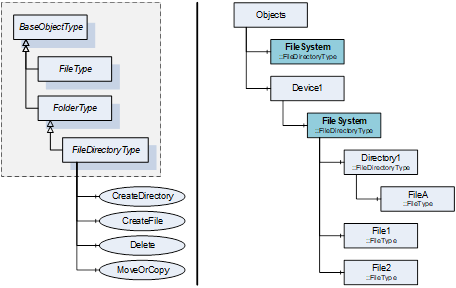
Figure 1 – FileSystem example
The Object representing the root of a file directory structure shall have the BrowseName FileSystem. An OPC UA Server may have different FileSystem Objects in the AddressSpace. HasComponent is used to reference a FileSystem from aggregating Objects like the Objects Folder or the Object representing a device.
CreateDirectory is used to create a new FileDirectoryType Object organized by this Object.
Signature
CreateDirectory(
[in] String directoryName
[out] NodeId directoryNodeId
);
|
Argument |
Description |
|
directoryName |
The name of the directory to create. The name is used for the BrowseName and DisplayName of the directory object and also for the directory in the file system. For the BrowseName, the directoryName is used for the name part of the QualifiedName. The namespace index is Server specific. For the DisplayName, the directoryName is used for the text part of the LocalizedText. The locale part is Server specific. |
|
directoryNodeId |
The NodeId of the created directory Object. |
Method Result Codes (defined in Call Service)
|
Result Code |
Description |
|
Bad_BrowseNameDuplicated |
See OPC 10000-4 for a general description. A directory with the name already exists. |
|
Bad_UserAccessDenied |
See OPC 10000-4 for a general description. |
Table 9 specifies the AddressSpace representation for the CreateDirectory Method.
Table 9 – CreateDirectory Method AddressSpace definition
|
Attribute |
Value |
||||
|
BrowseName |
CreateDirectory |
||||
|
References |
NodeClass |
BrowseName |
DataType |
TypeDefinition |
ModellingRule |
|
HasProperty |
Variable |
InputArguments |
Argument[] |
PropertyType |
Mandatory |
|
HasProperty |
Variable |
OutputArguments |
Argument[] |
PropertyType |
Mandatory |
|
Conformance Units |
|||||
|
Base Info FileDirectoryType Base |
|||||
CreateFile is used to create a new FileType Object organized by this Object. The created file can be written using the Write Method of the FileType.
Signature
CreateFile(
[in] String fileName
[in] Boolean requestFileOpen
[out] NodeId fileNodeId
[out] UInt32 fileHandle
);
|
Argument |
Description |
|
fileName |
The name of the file to create. The name is used for the BrowseName and DisplayName of the file object and also for the file in the file system. For the BrowseName, the fileName is used for the name part of the QualifiedName. The namespace index is Server specific. For the DisplayName, the fileName is used for the text part of the LocalizedText. The locale part is Server specific. |
|
requestFileOpen |
Flag indicating if the new file should be opened with the Write and Read bits set in the open mode after the creation of the file. If the flag is set to True, the file is created and opened for writing. If the flag is set to False, the file is just created. |
|
fileNodeId |
The NodeId of the created file Object. |
|
fileHandle |
The fileHandle is returned if the requestFileOpen is set to True. The fileNodeId and the fileHandle can be used to access the new file through the FileType Object representing the new file. If requestFileOpen is set to False, the returned value shall be 0 and shall be ignored by the caller. |
Method Result Codes (defined in Call Service)
|
Result Code |
Description |
|
Bad_BrowseNameDuplicated |
See OPC 10000-4 for a general description. A file with the name already exists. |
|
Bad_UserAccessDenied |
See OPC 10000-4 for a general description. |
Table 10 specifies the AddressSpace representation for the CreateFile Method.
Table 10 – CreateFile Method AddressSpace definition
|
Attribute |
Value |
||||
|
BrowseName |
CreateFile |
||||
|
References |
NodeClass |
BrowseName |
DataType |
TypeDefinition |
ModellingRule |
|
HasProperty |
Variable |
InputArguments |
Argument[] |
PropertyType |
Mandatory |
|
HasProperty |
Variable |
OutputArguments |
Argument[] |
PropertyType |
Mandatory |
|
Conformance Units |
|||||
|
Base Info FileDirectoryType Base |
|||||
Delete is used to delete a file or directory organized by this Object.
Signature
Delete(
[in] NodeId objectToDelete
);
|
Argument |
Description |
|
objectToDelete |
The NodeId of the file or directory to delete. In the case of a directory, all file and directory Objects below the directory to delete are deleted recursively. |
Method Result Codes (defined in Call Service)
|
Result Code |
Description |
|
Bad_NotFound |
See OPC 10000-4 for a general description. A file or directory with the provided NodeId is not organized by this object. |
|
Bad_InvalidState |
See OPC 10000-4 for a general description. The file or directory is locked and thus cannot be deleted. |
|
Bad_UserAccessDenied |
See OPC 10000-4 for a general description. |
Table 11 specifies the AddressSpace representation for the Delete Method.
Table 11 – Delete Method AddressSpace definition
|
Attribute |
Value |
||||
|
BrowseName |
Delete |
||||
|
References |
NodeClass |
BrowseName |
DataType |
TypeDefinition |
ModellingRule |
|
HasProperty |
Variable |
InputArguments |
Argument[] |
PropertyType |
Mandatory |
|
Conformance Units |
|||||
|
Base Info FileDirectoryType Base |
|||||
MoveOrCopy is used to move or copy a file or directory organized by this Object to another directory or to rename a file or directory.
Signature
MoveOrCopy(
[in] NodeId objectToMoveOrCopy
[in] NodeId targetDirectory
[in] Boolean createCopy
[in] String newName
[out] NodeId newNodeId
);
|
Argument |
Description |
|
objectToMoveOrCopy |
The NodeId of the file or directory to move or copy. |
|
targetDirectory |
The NodeId of the target directory of the move or copy command. If the file or directory is just renamed, the targetDirectory matches the ObjectId passed to the method call. |
|
createCopy |
A flag indicating if a copy of the file or directory should be created at the target directory. |
|
newName |
The new name of the file or directory in the new location. If the string is empty, the name is unchanged. |
|
newNodeId |
The NodeId of the moved or copied object. Even if the Object is moved, the Server may return a new NodeId. |
Method Result Codes (defined in Call Service)
|
Result Code |
Description |
|
Bad_BrowseNameDuplicated |
See OPC 10000-4 for a general description. A file or directory with the name already exists. |
|
Bad_NotFound |
See OPC 10000-4 for a general description. A file or directory with the provided NodeId is not organized by this object. |
|
Bad_InvalidState |
See OPC 10000-4 for a general description. The file or directory is locked and thus cannot be moved or copied. |
|
Bad_UserAccessDenied |
See OPC 10000-4 for a general description. |
Table 12 specifies the AddressSpace representation for the MoveOrCopy Method.
Table 12 – MoveOrCopy Method AddressSpace definition
|
Attribute |
Value |
||||
|
BrowseName |
MoveOrCopy |
||||
|
References |
NodeClass |
BrowseName |
DataType |
TypeDefinition |
ModellingRule |
|
HasProperty |
Variable |
InputArguments |
Argument[] |
PropertyType |
Mandatory |
|
HasProperty |
Variable |
OutputArguments |
Argument[] |
PropertyType |
Mandatory |
|
Conformance Units |
|||||
|
Base Info FileDirectoryType Base |
|||||
This ObjectType defines a type for the representation of temporary file transfers. It is formally defined in Table 13. The Methods GenerateFileForRead or GenerateFileForWrite generate a temporary FileType Object that is not browsable in the AddressSpace and can only be accessed with the NodeId and FileHandle returned by the Methods in the same Session. This Object is used to transfer the temporary file between OPC UA Client and Server.
Table 13 – TemporaryFileTransferType
|
Attribute |
Value |
|||||
|
BrowseName |
TemporaryFileTransferType |
|||||
|
IsAbstract |
False |
|||||
|
References |
NodeClass |
BrowseName |
DataType |
TypeDefinition |
Modelling Rule |
|
|
Subtype of the BaseObjectType defined in OPC 10000-5 |
||||||
|
HasProperty |
Variable |
ClientProcessingTimeout |
Duration |
PropertyType |
Mandatory |
|
|
HasComponent |
Method |
GenerateFileForRead |
Defined in 4.4.3 |
Mandatory |
||
|
HasComponent |
Method |
GenerateFileForWrite |
Defined in 4.4.4 |
Mandatory |
||
|
HasComponent |
Method |
CloseAndCommit |
Defined in 4.4.5 |
Mandatory |
||
|
HasComponent |
Object |
<TransferState> |
|
FileTransferStateMachineType |
OptionalPlaceholder |
|
|
Conformance Units |
||||||
|
Base Info TemporaryFileTransferType Base |
||||||
The Property ClientProcessingTimeout defines the maximum time in milliseconds the Server accepts between Method calls necessary to complete a file read transfer or a file write transfer transaction. This includes the Method calls to read or write the file content from the virtual temporary FileType Object. If the Client exceeds the timeout between Method calls, the Server may close the file and cancel the corresponding transfer transaction. Any open temporary transfer file shall be deleted if the Session used to create the file is no longer valid.
The TransferState Objects are used to expose the state of a transfer transaction in the case that the preparation of a file for reading or the processing of the file after writing completes asynchronous after the corresponding Method execution. If the transactions are completed when the Method is returned, the optional TransferState Objects are not available. A Server may allow more than one parallel read transfer. A Server may not allow more than one write transfer or a parallel read and writer transfer.
The sequence of Method calls necessary to execute a read file transfer transaction is illustrated in Figure 2.
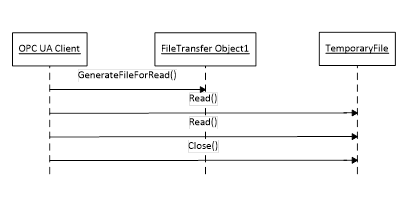
Figure 2 – Read file transfer example sequence
The read file transfer transaction is started with the Method GenerateFileForRead defined by the TemporaryFileTransferType. After a successful call of this Method, the Client reads the file content by calling the Method Read defined by the FileType until the whole file is transferred from the Server to the Client. The transaction is completed by calling the Method Close defined by the FileType.
The sequence of Method calls necessary to execute a write file transfer transaction is illustrated in Figure 3.
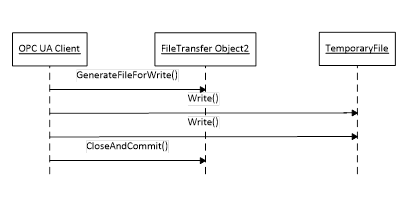
Figure 3 – Write file transfer example sequence
The write file transfer transaction is started with the Method StartWriteTransfer defined by the TemporaryFileTransferType. After a successful call of this Method, the Client writes the file content by calling the Method Write defined by the FileType until the whole file is transferred from the Client to the Server. The transaction is completed by calling the Method CloseAndCommit defined by the TemporaryFileTransferType. If the Client wants to abort the operation it uses the Close Method of the temporary FileType Object.
GenerateFileForRead is used to start the read file transaction. A successful call of this Method creates a temporary FileType Object with the file content and returns the NodeId of this Object and the file handle to access the Object.
Signature
GenerateFileForRead(
[in] BaseDataType generateOptions
[out] NodeId fileNodeId
[out] UInt32 fileHandle
[out] NodeId completionStateMachine
);
|
Argument |
Description |
|
generateOptions |
The optional parameter can be used to specify server specific file generation options. To allow such options, the Server shall specify a concrete DataType in the Argument Structure for this argument in the instance of the Method. If the DataType is BaseDataType, the Client shall pass Null for this argument. Examples for concrete DataTypes are OptionSet Used to provide a bit mask for file content selection String Can be used to provide a string filter or a regular expression Structure Can be used to provide a structure with create settings e.g. to create a report Enumeration Can be used to provide a list of options |
|
fileNodeId |
NodeId of the temporary file. |
|
fileHandle |
The fileHandle of the opened TransferFile. The fileHandle can be used to access the TransferFile Methods Read and Close. |
|
completionStateMachine |
If the creation of the file is completed asynchronous, the parameter returns the NodeId of the corresponding FileTransferStateMachineType Object. If the creation of the file is already completed, the parameter is null. If a FileTransferStateMachineType Object NodeId is returned, the Read Method of the file fails until the TransferState changed to ReadTransfer. |
Method Result Codes (defined in Call Service)
|
Result Code |
Description |
|
Bad_UserAccessDenied |
See OPC 10000-4 for a general description. |
Table 14 specifies the AddressSpace representation for the GenerateFileForRead Method.
Table 14 – GenerateFileForRead Method AddressSpace definition
|
Attribute |
Value |
||||
|
BrowseName |
GenerateFileForRead |
||||
|
References |
NodeClass |
BrowseName |
DataType |
TypeDefinition |
ModellingRule |
|
HasProperty |
Variable |
InputArguments |
Argument[] |
PropertyType |
Mandatory |
|
HasProperty |
Variable |
OutputArguments |
Argument[] |
PropertyType |
Mandatory |
|
Conformance Units |
|||||
|
Base Info TemporaryFileTransferType Base |
|||||
GenerateFileForWrite is used to start the write file transaction. A successful call of this Method creates a temporary FileType Object and returns the NodeId of this Object and the file handle to access the Object.
Signature
GenerateFileForWrite(
[in] BaseDataType generateOptions
[out] NodeId fileNodeId
[out] UInt32 fileHandle
);
|
Argument |
Description |
|
generateOptions |
The optional parameter can be used to specify server specific file generation options. To allow such options, the Server shall specify a concrete DataType in the Argument Structure for this argument in the instance of the Method. If the DataType is BaseDataType, the Client shall pass Null for this argument. Examples for concrete DataTypes are OptionSet Used to provide a bit mask for file use selection Structure Can be used to provide a structure with create settings e.g. firmware update settings Enumeration Can be used to provide a list of options like file handling options |
|
fileNodeId |
NodeId of the temporary file. |
|
fileHandle |
The fileHandle of the opened TransferFile. The fileHandle can be used to access the TransferFile Methods Write and Close. |
Method Result Codes (defined in Call Service)
|
Result Code |
Description |
|
Bad_UserAccessDenied |
See OPC 10000-4 for a general description. |
Table 15 specifies the AddressSpace representation for the GenerateFileForWrite Method.
Table 15 – GenerateFileForWrite Method AddressSpace definition
|
Attribute |
Value |
||||
|
BrowseName |
GenerateFileForWrite
|
||||
|
References |
NodeClass |
BrowseName |
DataType |
TypeDefinition |
ModellingRule |
|
Variable |
InputArguments |
Argument[] |
PropertyType |
Mandatory |
|
|
HasProperty |
Variable |
OutputArguments |
Argument[] |
PropertyType |
Mandatory |
|
Conformance Units |
|||||
|
Base Info TemporaryFileTransferType Base |
|||||
CloseAndCommit is used to apply the content of the written file and to delete the temporary file after the completion of the transaction.
Signature
CloseAndCommit(
[in] UInt32 fileHandle
[out] NodeId completionStateMachine
);
|
Argument |
Description |
|
fileHandle |
The fileHandle used to write the file. |
|
completionStateMachine |
If the processing of the file is completed asynchronous, the parameter returns the NodeId of the corresponding FileTransferStateMachineType Object. If the processing of the file is already completed, the parameter is null. If a FileTransferStateMachineType Object NodeId is returned, the processing is in progress until the TransferState changed to Idle. |
Method Result Codes (defined in Call Service)
|
Result Code |
Description |
|
Bad_UserAccessDenied |
See OPC 10000-4 for a general description. |
Table 16 specifies the AddressSpace representation for the CloseAndCommit Method.
Table 16 – CloseAndCommit Method AddressSpace definition
|
Attribute |
Value |
||||
|
BrowseName |
CloseAndCommit |
||||
|
References |
NodeClass |
BrowseName |
DataType |
TypeDefinition |
ModellingRule |
|
HasProperty |
Variable |
InputArguments |
Argument[] |
PropertyType |
Mandatory |
|
HasProperty |
Variable |
OutputArguments |
Argument[] |
PropertyType |
Mandatory |
|
Conformance Units |
|||||
|
Base Info TemporaryFileTransferType Base |
|||||
The states of the file transfer state machine are shown in Figure 4.
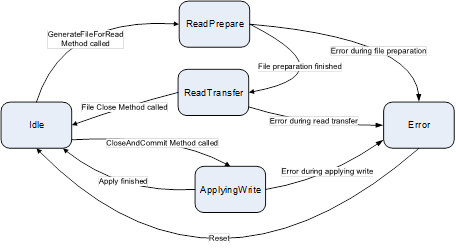
Figure 4 – File transfer States
The FileTransferStateMachineType and the related type are illustrated in Figure 5.
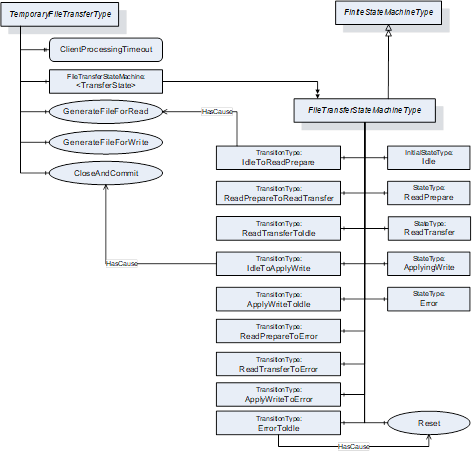
Figure 5 – FileTransferStateMachineType
This ObjectType defines the StateMachine for asynchronous processing of temporary file transfers. It is formally defined in Table 17. The transitions are formally defined in Table 19.
Table 17 – FileTransferStateMachineType
|
Attribute |
Value |
|||||
|
BrowseName |
FileTransferStateMachineType |
|||||
|
IsAbstract |
False |
|||||
|
References |
NodeClass |
BrowseName |
DataType |
TypeDefinition |
Modelling Rule |
|
|
Subtype of the FiniteStateMachineType defined in B.4.5. |
||||||
|
HasComponent |
Object |
Idle |
|
InitialStateType |
|
|
|
HasComponent |
Object |
ReadPrepare |
|
StateType |
|
|
|
HasComponent |
Object |
ReadTransfer |
|
StateType |
|
|
|
HasComponent |
Object |
ApplyWrite |
|
StateType |
|
|
|
HasComponent |
Object |
Error |
|
StateType |
|
|
|
HasComponent |
Object |
IdleToReadPrepare |
|
TransitionType |
|
|
|
HasComponent |
Object |
ReadPrepareToReadTransfer |
|
TransitionType |
|
|
|
HasComponent |
Object |
ReadTransferToIdle |
|
TransitionType |
|
|
|
HasComponent |
Object |
IdleToApplyWrite |
|
TransitionType |
|
|
|
HasComponent |
Object |
ApplyWriteToIdle |
|
TransitionType |
|
|
|
HasComponent |
Object |
ReadPrepareToError |
|
TransitionType |
|
|
|
HasComponent |
Object |
ReadTransferToError |
|
TransitionType |
|
|
|
HasComponent |
Object |
ApplyWriteToError |
|
TransitionType |
|
|
|
HasComponent |
Object |
ErrorToIdle |
|
TransitionType |
|
|
|
HasComponent |
Method |
Reset |
Defined in 4.4.7 |
Mandatory |
||
|
Conformance Units |
||||||
|
Base Info TemporaryFileTransferType Base |
||||||
The component Variables of the FileTransferStateMachineType have additional Attributes defined in Table 18.
Table 18 – FileTransferStateMachineType Attribute values for child Nodes
|
Source Path |
Value Attribute |
||
|
1 |
||
|
2 |
||
|
3 |
||
|
4 |
||
|
5 |
||
|
12 |
||
|
23 |
||
|
31 |
||
|
14 |
||
|
41 |
||
|
25 |
||
|
35 |
||
|
45 |
||
|
51 |
Table 19 – FileTransferStateMachineType Additional References
|
SourceBrowsePath |
References |
IsForward |
TargetBrowsePath |
|
IdleToReadPrepare |
FromState |
True |
Idle |
|
|
ToState |
True |
ReadPrepare |
|
|
HasEffect |
True |
TransitionEventType |
|
ReadPrepareToReadTransfer |
FromState |
True |
ReadPrepare |
|
|
ToState |
True |
ReadTransfer |
|
|
HasEffect |
True |
TransitionEventType |
|
ReadTransferToIdle |
FromState |
True |
ReadTransfer |
|
|
ToState |
True |
Idle |
|
|
HasEffect |
True |
TransitionEventType |
|
IdleToApplyWrite |
FromState |
True |
Idle |
|
|
ToState |
True |
ApplyWrite |
|
|
HasEffect |
True |
TransitionEventType |
|
ApplyWriteToIdle |
FromState |
True |
ApplyWrite |
|
|
ToState |
True |
Idle |
|
|
HasEffect |
True |
TransitionEventType |
|
ReadPrepareToError |
FromState |
True |
ReadPrepare |
|
|
ToState |
True |
Error |
|
|
HasEffect |
True |
TransitionEventType |
|
ReadTransferToError |
FromState |
True |
ReadTransfer |
|
|
ToState |
True |
Error |
|
|
HasEffect |
True |
TransitionEventType |
|
ApplyWriteToError |
FromState |
True |
ApplyWrite |
|
|
ToState |
True |
Error |
|
|
HasEffect |
True |
TransitionEventType |
|
ErrorToIdle |
FromState |
True |
Error |
|
|
ToState |
True |
Idle |
|
|
HasEffect |
True |
TransitionEventType |
Reset is used to reset the Error state of a FileTransferStateMachineType Object.
Signature
Reset();
Table 20 specifies the AddressSpace representation for the Reset Method.
Table 20 – Reset Method AddressSpace definition
|
Attribute |
Value |
||||
|
BrowseName |
Reset |
||||
|
References |
NodeClass |
BrowseName |
DataType |
TypeDefinition |
ModellingRule |
|
Conformance Units |
|||||
|
Base Info TemporaryFileTransferType Base |
|||||
_____________