|
|
|
|
OPC 10000-21 |
|
|
OPC Unified Architecture Part 21: Device Onboarding
Release 1.05.04 2024-10-15
|



|
|
|
|
OPC 10000-21 |
|
|
OPC Unified Architecture Part 21: Device Onboarding
Release 1.05.04 2024-10-15
|
|
Specification Type |
Industry Standard Specification |
Comments: |
|
|
|
|
|
|
|
Document |
OPC 10000-21 |
|
|
|
Title: |
OPC Unified
Architecture |
Date: |
2024-10-15 |
|
|
|
|
|
|
Version: |
Release 1.05.04 |
Software |
MS-Word |
|
|
|
Source: |
OPC 10000-21 - UA Specification Part 21 - Device Onboarding 1.05.04.docx |
|
|
|
|
|
|
Author: |
OPC Foundation |
Status: |
Release |
|
|
|
|
|
Page
3 Terms, definitions, and conventions
4.2.2 Firmware and Applications
4.2.3 Transfer of Physical Control
4.2.4 Trust on First Use (TOFU)
6.4 Acquiring and Validating Tickets
7.4 Alternate Authentication Models
8.2.3 DeviceIdentityTicketType
8.2.4 CompositeIdentityTicketType
8.2.6 CertificateAuthorityType
9.2.8 RegisterManagedApplication
9.2.10 DeviceRegistrarAdminType
9.2.13 DeviceRegistrationAuditEventType
9.2.14 DeviceIdentityAcceptedAuditEventType.
9.2.15 DeviceSoftwareUpdatedAuditEventType
9.3 Device Configuration Application (DCA)
10.2 Handling of OPC UA Namespaces
Annex A (normative) Namespaces and Identifiers
A.1 Namespace and Identifiers for the Onboarding Information Model
Figure 1 – The Lifecycle of a Device
Figure 2 – Device Hardware and Software Layers
Figure 3 – Possible Transfers of Physical Control
Figure 4 – Device Authentication using Pull Management
Figure 5 – Requesting Certificates using Pull Management
Figure 6 – Device Authentication using Push Management
Figure 7 – Updating Certificates using Push Management
Figure 8 – Alternate Authentication Models with Pull Management
Figure 9 – Device Authentication with the FDO Protocol
Figure 10 – Registrar Address Space for Onboarding Workflow
Figure 11 – Device Address Space for Onboarding Workflows
Table 1 – The Actors in the Device Lifecycle.............................................................. 5
Table 2 – The Stages in the Device Lifecycle............................................................. 6
Table 3 – Well-known Roles for Onboarding.............................................................. 9
Table 4 – Privileges for Onboarding......................................................................... 9
Table 5 – RFC 7515 Header Fields........................................................................ 24
Table 6 – EncodedTicket Definition........................................................................ 25
Table 7 – BaseTicketType Structure....................................................................... 25
Table 8 – BaseTicketType Definition...................................................................... 25
Table 9 – DeviceIdentityTicketType Structure........................................................... 25
Table 10 – DeviceIdentityTicketType Definition......................................................... 26
Table 11 – CompositeIdentityTicketType Structure.................................................... 26
Table 12 – CompositeIdentityTicketType Definition.................................................... 26
Table 13 – TicketListType Structure....................................................................... 26
Table 14 – TicketListType Definition....................................................................... 27
Table 15 – CertificateAuthorityType Structure........................................................... 27
Table 16 – CertificateAuthorityType Definition.......................................................... 27
Table 17 – DeviceRegistrarType Definition.............................................................. 28
Table 18 – ProvideIdentities Method AddressSpace Definition...................................... 30
Table 19 – UpdateSoftwareStatus Method AddressSpace Definition............................... 30
Table 20 – RegisterDeviceEndpoint Method AddressSpace Definition............................. 31
Table 21 – GetManagers Method AddressSpace Definition.......................................... 31
Table 22 – ManagerDescription Structure................................................................ 32
Table 23 – ManagerDescription Definition................................................................ 32
Table 24 – RegisterManagedApplication Method AddressSpace Definition....................... 33
Table 25 – DeviceRegistrar Definition..................................................................... 33
Table 26 – DeviceRegistrarAdminType Definition...................................................... 33
Table 27 – RegisterTickets Method AddressSpace Definition....................................... 34
Table 28 – UnregisterTickets Method AddressSpace Definition..................................... 35
Table 29 – DeviceRegistrationAuditEventType Definition............................................. 35
Table 30 – DeviceIdentityAcceptedAuditEventType Definition....................................... 36
Table 31 – DeviceSoftwareUpdatedAuditEventType Definition...................................... 36
Table 32 – ProvisionableDevice Object Definition...................................................... 38
Table 33 – ProvisionableDeviceType Definition......................................................... 38
Table 34 – RequestTickets Method AddressSpace Definition........................................ 39
Table 35 – SetRegistrarEndpoints Method AddressSpace Definition............................... 39
Table 36 – NamespaceMetadata Object for this Document.......................................... 40
Table 37 – Namespaces used in this document......................................................... 40
OPC Foundation
____________
UNIFIED ARCHITECTURE –
This specification is the specification for developers of OPC UA applications. The specification is a result of an analysis and design process to develop a standard interface to facilitate the development of applications by multiple vendors that shall inter-operate seamlessly together.
Copyright © 2006-2024, OPC Foundation, Inc.
COPYRIGHT RESTRICTIONS
Any unauthorized use of this specification may violate copyright laws, trademark laws, and communications regulations and statutes. This document contains information which is protected by copyright. All Rights Reserved. No part of this work covered by copyright herein may be reproduced or used in any form or by any means--graphic, electronic, or mechanical, including photocopying, recording, taping, or information storage and retrieval systems--without permission of the copyright owner.
OPC Foundation members and non-members are prohibited
from copying and redistributing this specification. All copies must be obtained
on an individual basis, directly from the OPC Foundation Web site
http://www.opcfoundation.org.
PATENTS
The attention of adopters is directed to the possibility that compliance with or adoption of OPC specifications may require use of an invention covered by patent rights. OPC shall not be responsible for identifying patents for which a license may be required by any OPC specification, or for conducting legal inquiries into the legal validity or scope of those patents that are brought to its attention. OPC specifications are prospective and advisory only. Prospective users are responsible for protecting themselves against liability for infringement of patents.
WARRANTY AND LIABILITY DISCLAIMERS
WHILE THIS PUBLICATION IS BELIEVED TO BE ACCURATE, IT IS PROVIDED "AS IS" AND MAY CONTAIN ERRORS OR MISPRINTS. THE OPC FOUDATION MAKES NO WARRANTY OF ANY KIND, EXPRESSED OR IMPLIED, WITH REGARD TO THIS PUBLICATION, INCLUDING BUT NOT LIMITED TO ANY WARRANTY OF TITLE OR OWNERSHIP, IMPLIED WARRANTY OF MERCHANTABILITY OR WARRANTY OF FITNESS FOR A PARTICULAR PURPOSE OR USE. IN NO EVENT SHALL THE OPC FOUNDATION BE LIABLE FOR ERRORS CONTAINED HEREIN OR FOR DIRECT, INDIRECT, INCIDENTAL, SPECIAL, CONSEQUENTIAL, RELIANCE OR COVER DAMAGES, INCLUDING LOSS OF PROFITS, REVENUE, DATA OR USE, INCURRED BY ANY USER OR ANY THIRD PARTY IN CONNECTION WITH THE FURNISHING, PERFORMANCE, OR USE OF THIS MATERIAL, EVEN IF ADVISED OF THE POSSIBILITY OF SUCH DAMAGES.
The entire risk as to the quality and performance of software developed using this specification is borne by you.
RESTRICTED RIGHTS LEGEND
This Specification is provided with Restricted Rights. Use, duplication or disclosure by the U.S. government is subject to restrictions as set forth in (a) this Agreement pursuant to DFARs 227.7202-3(a); (b) subparagraph (c)(1)(i) of the Rights in Technical Data and Computer Software clause at DFARs 252.227-7013; or (c) the Commercial Computer Software Restricted Rights clause at FAR 52.227-19 subdivision (c)(1) and (2), as applicable. Contractor / manufacturer are the OPC Foundation, 16101 N 82nd Street, Suite 3B, Scottsdale, AZ, 85260-1830.
COMPLIANCE
The OPC Foundation shall at all times be the sole entity that may authorize developers, suppliers and sellers of hardware and software to use certification marks, trademarks or other special designations to indicate compliance with these materials. Products developed using this specification may claim compliance or conformance with this specification if and only if the software satisfactorily meets the certification requirements set by the OPC Foundation. Products that do not meet these requirements may claim only that the product was based on this specification and must not claim compliance or conformance with this specification.
Trademarks
Most computer and software brand names have trademarks or registered trademarks. The individual trademarks have not been listed here.
GENERAL PROVISIONS
Should any provision of this Agreement be held to be void, invalid, unenforceable or illegal by a court, the validity and enforceability of the other provisions shall not be affected thereby.
This Agreement shall be governed by and construed under the laws of the State of Minnesota, excluding its choice or law rules.
This Agreement embodies the entire understanding between the parties with respect to, and supersedes any prior understanding or agreement (oral or written) relating to, this specification.
ISSUE REPORTING
The OPC Foundation strives to maintain the highest quality standards for its published specifications, hence they undergo constant review and refinement. Readers are encouraged to report any issues and view any existing errata here: http://www.opcfoundation.org/errata.
Revision 1.05.04 Highlights
The following table includes the Mantis issues resolved with this revision.
|
Mantis ID |
Summary |
|
Resolution |
|
Feature |
Add FDO as an alternative onboarding protocol. |
Added 7.4.2. |
|
|
Feature |
Move ApplicationConfigurationType to Part 12. |
Removed definition and updated text in 9.3.3. |
OPC UNIFIED ARCHITECTURE
Part 21: Device Onboarding
This part defines the life cycle of Devices and Composites and mechanisms to verify their authenticity, set up their security and maintain their configuration.
OPC 10000-1, OPC Unified Architecture - Part 1: Overview and Concepts
http://www.opcfoundation.org/UA/Part1/
OPC 10000-2, OPC Unified Architecture - Part 2: Security Model
http://www.opcfoundation.org/UA/Part2/
OPC 10000-3, OPC Unified Architecture - Part 3: Address Space Model
http://www.opcfoundation.org/UA/Part3/
OPC 10000-4, OPC Unified Architecture - Part 4: Services
http://www.opcfoundation.org/UA/Part4/
OPC 10000-5, OPC Unified Architecture - Part 5: Information Model
http://www.opcfoundation.org/UA/Part5/
OPC 10000-6, OPC Unified Architecture - Part 6: Mappings
http://www.opcfoundation.org/UA/Part6/
OPC 10000-7, OPC Unified Architecture - Part 7: Profiles
http://www.opcfoundation.org/UA/Part7/
OPC 10000-9, OPC Unified Architecture - Part 9: Alarms and Conditions
http://www.opcfoundation.org/UA/Part9/
OPC 10000-12, OPC Unified Architecture - Part 12: Discovery and Global Services
http://www.opcfoundation.org/UA/Part12/
OPC 10000-14, OPC UA Specification: Part 14 - PubSub
http://www.opcfoundation.org/UA/Part14/
OPC 10000-22, OPC UA Specification: Part 22 - Base Network Model
http://www.opcfoundation.org/UA/Part22/
OPC 10000-100, OPC UA Specification: Part 100 - Devices
http://www.opcfoundation.org/UA/Part100/
ISO/IEC 11889, Information technology — Trusted platform module library
https://www.iso.org/standard/66510.html
802.1AR, Secure Device Identity
https://1.ieee802.org/security/802-1ar/
RFC 3161, Internet X.509 Public Key Infrastructure Time-Stamp Protocol (TSP)
https://tools.ietf.org/html/rfc3161
RFC 5280, Internet X.509 Public Key Infrastructure Certificate
https://tools.ietf.org/html/rfc5280
RFC 7515, JSON Web Signature (JWS)
https://tools.ietf.org/html/rfc7515
RFC 7518, JSON Web Algorithms (JWA)
https://tools.ietf.org/html/rfc7518
RFC 2045, Multipurpose Internet Mail Extensions (MIME) Part One
https://tools.ietf.org/html/rfc2045
RFC 4648, The Base16, Base32, and Base64 Data Encodings
https://tools.ietf.org/html/rfc4648
DIN 91406, Automatic identification of physical objects and information on physical objects in IT systems
https://www.dinmedia.de/en/technical-rule/din-spec-91406/314564057
FDO, FIDO Device Onboard Specification 1.1
For the purposes of this document the following terms and definitions as well as the terms and definitions given in OPC 10000-1, OPC 10000-2, OPC 10000-3, OPC 10000-4, OPC 10000-6, OPC 10000-9 and OPC 10000-100 apply.
Application
a program that runs on a Device and communicates with other Applications on the network.
Note 1 to entry: Each Application has an identifier that is unique within the network.
Note 2 to entry: An OPC UA Application is an Application that supports OPC UA.
3.1.2
ApplicationUri
a globally unique identifier for an OPC UA Application running on a particular Device.
Note 3 to entry: The Application Instance Certificate has the ApplicationUri in the subjectAltName field.
Composite
a collection of Devices or Composites assembled into a single unit.
Note 1 to entry: Each Composite has a globally unique identifier.
Note 2 to entry: A Composite may act as a single Device when connected to a network.
Note 3 to entry: A Composite may appear as multiple Devices when connected to a network.
CompositeBuilder
an organization that creates Composites.
3.1.5
CompositeInstanceUri
a globally unique resource identifier assigned by a builder to a Composite.
3.1.6
DCA Client
a DCA which is a Client and supports PullManagement.
3.1.7
DCA Server
a DCA which is a Server and supports PushManagement.
3.1.8
Device
As defined in OPC 10000-100.
Note 1 to entry: For this document a Device also executes one or more OPC UA Applications.
Note 2 to entry: a generic computer or mobile device may be a Device if it has a DeviceIdentity Certificate
3.1.9
Device Configuration Application (DCA)
a Client or Server installed on a Device used to configure other applications installed on the same Device.
Note 1 to entry: a DCA which is a Client uses PullManagement (see 7.2) to interact with the Registrar.
Note 2 to entry: the Registrar uses PushManagement (see 7.3) to interact with a DCA which is a Server.
3.1.10
a Certificate issued to a Device that identifies the Device.
Note 1 to entry: All DeviceIdentity Certificates have the ProductInstanceUri as a subjectAltName.
Note 2 to entry: All DeviceIdentity Certificates are IDevID or LDevID Certificates as defined by 802.1AR.
Note 3 to entry: The ProductInstanceUri is the ApplicationUri when the DeviceIdentity Certificate is used to create a SecureChannel.
Distributor
an organization that re-sells Devices and/or Composites.
Note 1 to entry: A Distributor may enhance Devices and Composites by adding customized products or services.
Manufacturer
an organization that creates Devices.
OwnerOperator
an organization deploying and operating a system that comprises of Devices, Composites or other computers connected via a network.
3.1.14
Privilege
a named set of permissions or access rights which are needed to perform a task.
3.1.15
ProductInstanceUri
a globally unique resource identifier assigned by the manufacturer to a Device.
3.1.16
Registrar
an OPC UA Application that registers and authenticates Devices added to the network.
SystemIntegrator
an organization that installs and configures a system for an OwnerOperator that comprises of Devices, Composites or other computers connected via a network.
3.1.18
SecureElement
a hardware component that protects Private Keys from unauthorized access and disclosure.
3.1.19
Ticket
a document that identifies a Device or Composite and has a DigitalSignature.
API Application Programming Interface
ASN.1 Abstract Syntax Notation #1
CA Certificate Authority
CRL Certificate Revocation List
DCA Device Configuration Application
DER ASN.1 Distinguished Encoding Rules
DHCP Dynamic Host Configuration Protocol
DNS Domain Name System
ERP Enterprise Resource Planning
GDS Global Discovery Server
IDevID Initial Device Identifier
LDevID Locally Significant Device Identifier
LDS Local Discovery Server
mDNS Multicast Domain Name System
NAT Network Address Translation
PKCS Public Key Cryptography Standards
TLS Transport Layer Security
TPM Trusted Platform Module
UA Unified Architecture
URI Uniform Resource Identifier
URN Uniform Resource Name
The Onboarding model is designed to allow the configuration of a Device to be managed over the complete lifecycle of the Device from manufacture to decommissioning. The entire lifecycle approach is needed because Devices, unlike PC-class computers, are often shipped with automation software pre-installed and are connected directly to sensitive networks. This requires a process to authenticate Devices before they are given access to a sensitive network.
The complete life cycle of a Device is shown in Figure 1.
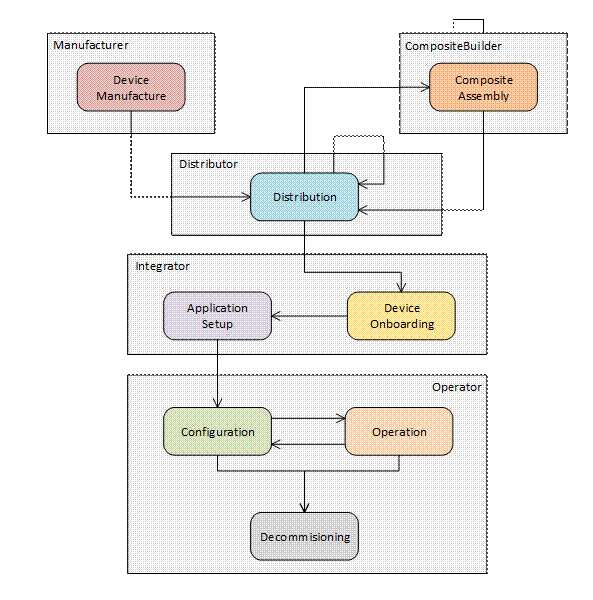
Figure 1 – The Lifecycle of a Device
The actors in the Device lifecycle are described in Table 1.
Table 1 – The Actors in the Device Lifecycle
|
Actor |
Description |
|
Device |
A computer that is able to communicate via a network. A Device has a unique identifier and may have one or more Applications (see 3.1.4). |
|
Composite |
A collection of Devices or Composites assembled into a single unit. Each Composite has a unique identifier and may appear as a single Device on a network or it may appear as multiple Devices (see 3.1.3). |
|
Application |
A program that runs on a Device. Each Application has a unique identifier and communicates with other Applications on the network (see 3.1.1). |
|
OwnerOperator |
An organization deploying and operating a system that comprises of Devices, Composites or other computers connected via a network (see 3.1.13). |
|
Manufacturer |
An organization that creates Devices (see 3.1.12). |
|
CompositeBuilder |
An organization that creates Composites (see 3.1.4). |
|
Distributor |
An organization that re-sells Devices and/or Composites. A Distributor enhances Devices and Composites by adding customized products or services before resale (see 3.1.11). |
|
SystemIntegrator |
An organization that installs and configures a system for an OwnerOperator that comprises of Devices, Composites or other computers connected via a network (see 3.1.17). |
|
RegistrarAdmin |
A user authorized to change the configuration of the Registrar. |
|
SoftwareUpdateAdmin |
A user authorized to update the firmware running on a Device. |
|
SecurityAdmin |
A user authorized to make changes to security configuration for Clients and Servers running on the network. |
The stages in the lifecycle for a single Device are described in Table 2. This information model defines mechanisms to automate some of the tasks necessary for each stage.
Table 2 – The Stages in the Device Lifecycle
|
Stage |
Description |
|
Device Manufacture |
A Device is created and a DeviceIdentity Certificate is assigned. This Certificate is provided when the Device is transferred to other actors. During Device Manufacture, Applications may be installed on the Device. A Ticket describing the Device is created and signed by the Manufacturer. |
|
Composite Assembly |
A Composite is created from Devices and a unique identity is assigned to the Composite. This identity is provided when the Composite is transferred to other actors. During Composite Assembly, Applications may be installed on the Devices contained in the Composite. A Ticket describing the Composite is created and signed by the CompositeBuilder. |
|
Distribution |
The Device or Composite is stored until it is delivered to a CompositeBuilder, SystemIntegrator, OwnerOperator or another Distributor. |
|
Onboarding |
The SystemIntegrator connects a Device to the network and verifies that the identity reported by the Device matches the identity in a Ticket provided by the Manufacturer or CompositeBuilder. |
|
Application Setup |
The SystemIntegrator configures the Applications running on the Device or Composite so they can communicate with other Applications running in the system. This process includes distributing TrustLists and issuing Certificates. |
|
Configuration |
The OwnerOperator performs tasks that are not done while the Device is in full operation, such as updating firmware, installing new Applications, or changing Application configuration. |
|
Operation |
The Device does the tasks it was deployed to do. |
|
Decommissioning |
The Device has all access revoked and, if the Device is still functional, then it is reset to the default factory settings. |
The commonly understood concept of “Commissioning” is represented by the Onboarding, Application Setup and Configuration stages.
The stages in the Device lifecycle map onto workflows that are defined in this specification. The workflows are described in 4.2.
SecureElements are a hardware-based storage for cryptographic secrets that protect them against authorized access and disclosure. The mechanisms defined for Device authentication depend on PrivateKeys that are stored in SecureElements. PrivateKeys stored on Devices without SecureElements can be stolen and reused on counterfeit Devices.
OwnerOperators may provision Devices without SecureElements if they have other ways to ensure their authenticity.
Every Device has multiple layers of hardware and software that are installed and managed at different stages in the lifecycle by different actors. The layers are shown in Figure 2.
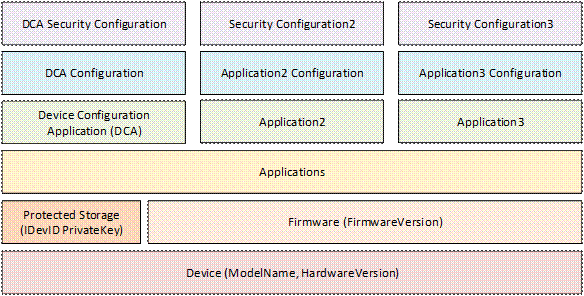
Figure 2 – Device Hardware and Software Layers
A Device has firmware that is generally not changed during normal operation. Firmware updates may be provided by the Manufacturer to correct software bugs or patch security flaws. A Device should have a mechanism to ensure the integrity of the system, including the firmware, during the boot process. A Device should have a way to update firmware after onboarding in the OwnerOperator’s system.
A Device should have SecureElement storage used for security sensitive elements such as Private Keys. This storage cannot be backed up nor is it affect by a firmware update. The Private Key of DeviceIdentity Certificates (IDevID and LDevID) shall be placed in this storage.
A Device shall have a Device Configuration Application (DCA) which is used for Device authentication and setup of other Applications on the Device.
A Device may have storage used for Applications and their configuration. A Device should have a mechanism to back up and restore configurations. A Device may support multiple Applications which have their own configuration and security configuration.
A Device has storage for the Application security configuration that does not need to be in the protected storage. This storage is separate from the storage for Applications and configurations. Certificates, Trust Lists, administrator credentials are examples of information that is part of the security configuration. The Device shall have mechanisms to ensure that only authorized actors are able to alter the security configuration or access sensitive data such as the PrivateKeys. If a Device supports multiple Applications, the set of authorized actors may be different for each Application.
Implicit in the Device lifecycle is the notion that Devices and Composites will be physically delivered to different actors. The transfers of physical control that may occur are shown in Figure 3.
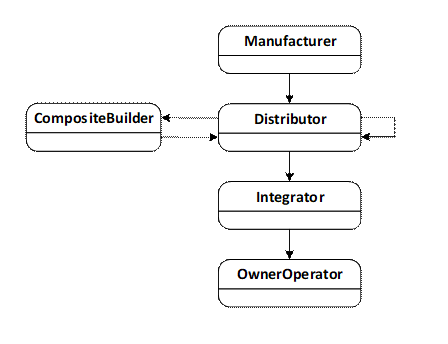
Figure 3 – Possible Transfers of Physical Control
In many cases, the Distributor belongs to the same organization as the Manufacturer or CompositeBuilder. Similarly, the Integrator and the OwnerOperator may be the same organization.
When a transfer of physical control occurs, the supplier ships the equipment (a Device or Composite) and an electronic Ticket (see 6) that describes the equipment. The receiver may use the Ticket to authenticate the origin of the equipment using the mechanisms defined in this standard or save it so it can be provided when the equipment is transferred to another actor.
While an actor has physical control, the actor may Install, Provision, Configure or Operate (see Table 2) the equipment. For example, if an actor (e.g., a CompositeBuilder) makes changes to a Device and then transfers this Device to another actor (e.g., an OwnerOperator) then those changes may restrict what the new owner is able to do, i.e., CompositeBuilder may install an Application used for maintenance that the OwnerOperator cannot access.
The workflows (see 4.3) describe this process in more detail.
The onboarding process defined in this document describes how an OwnerOperator can authenticate Devices added to the network. This document does not define any mechanisms to allow Devices to authenticate the network it is connected to. This implies that a Device connected to a network will allow itself to be configured via any network that it is connected to. This behaviour is called “Trust on First Use” or TOFU.
When first connected to a network the DCA will be in an initial state where it will either attempt to discover a network service that it can get its configuration (PullManagement, see 7.2) or wait for another application to provide its configuration (PushManagement, see 7.3).
Once the onboarding process completes the DCA is supplied with credentials that authorize Applications that are allowed to make changes to its security configuration. Devices should have a mechanism to return the DCA to an initial state which discards all configuration, including all credentials and TrustLists that were assigned in a previous onboarding process.
The new state allows the TOFU onboarding process to start again. Note the initial state is not the same as a factory reset which typically deletes all software installed on the Device. The reset mechanism should require proof of physical possession of the Device to ensure it cannot be exploited remotely.
The TOFU model exposes the Device to malicious actors that are running on the network. This means the network used for configuration has to be protected to make it harder for a malicious actor to gain access to the network. OwnerOperators should also have network services designed to detect and eliminate malicious applications that attempt to interfere with the onboarding process.
Devices may have other ways to assign the credentials provided by the onboarding process in order to avoid the risks associated with TOFU.
The SoftwareUpdateManager is a system component that provides updates to firmware or software running on a Device. The SoftwareUpdateManager may implement the standard model defined in OPC 10000-100, however, it often will be specific to the Manufacturer. This document defines APIs that allow any SoftwareUpdateManager to coordinate with the components defined in this document.
The SoftwareUpdateManager is an important part of the onboarding process because it is necessary to ensure that Devices with out-of-date firmware are not allowed on the network. The interactions between the SoftwareUpdateManager and the other components are described in clause 7. The SoftwareUpdateManager may not be present in systems where the OwnerOperator has other mechanisms in place to ensure the Devices have up to date firmware.
Registrars and DCA Servers need to restrict access to many of the features they provide. These restrictions are described either by referring to well-known Roles which a Session must have access to or by referring to named Privileges which are assigned to Sessions using mechanisms other than the well-known Roles. Privileges are needed because not all restrictions can be expressed simply by granting Role permissions on Nodes. For example, authenticated Devices are granted the ability to update only their own information which means the decision on granting access can depend on the values of the arguments passed to a Method call rather than the permissions on the Method Node. The well-known Roles used in this document are listed in Table 3.
Table 3 – Well-known Roles for Onboarding
|
Name |
Description |
|
RegistrarAdmin |
The Role grants rights to manage the Tickets known the Registrar and approve Devices when automatic authentication was not possible. |
|
SoftwareUpdateAdmin |
The Role grants rights to set the software status for a Device. |
|
SecurityAdmin |
The Role grants the right to changes the security configuration of a Registrar or a DCA Server. For the DCA Server this includes the right to set the location of the Registrar or to force the Server to restart the authentication process. |
The Privileges used in this document are listed in Table 4.
Table 4 – Privileges for Onboarding
|
Name |
Description |
|
DeviceSelfAdmin |
The Device has rights to modify its own registration. |
|
DCA |
The Client is a DCA that has rights to request Certificates and TrustLists for Applications that it has been granted rights to. |
For a detailed description of Roles, see OPC 10000-3.
Distribution is the process of transferring physical control of Devices and Composites from one organization to another. This transfer of physical control is accompanied by the electronic transfer of Tickets as described in 6.2.
Onboarding is the process where a Device or Composite is connected to the network managed by an organization. When this happens the authenticity of the Device is verified via interactions with a Registrar running on the network.
Every Device has a Device Configuration Application (DCA) which interacts with the Registrar using the interactions described in PullManagement (7.2) or PushManagement (7.3). These interactions are secured with a DeviceIdentity Certificate.
After authentication completes, the DCA is issued a Certificate by the Registrar that allows the DCA to configure other Applications running on the Device. The Registrar is responsible for determining if a DCA is authorized to request Certificates on behalf a specific Application. For example, the DCA rights may be limited to Applications with the same hostname as the DCA.
During Onboarding, the Device may need to have software updated before the process can complete. The DCA uses the software update model described in OPC 10000-100 to manage the software update process.
Application Setup is the process of issuing an Application Instance Certificate and a TrustList to one or more Applications running on a Device that will allow the Applications to communicate with other OPC UA Applications running on the network. These mechanisms are provided by the CertificateManager Information Model and are described in OPC 10000-12.
During the Onboarding step, the DCA is issued a Certificate that allows it to request or accept Certificates on behalf of any Application running on the Device. If the DCA is a Client it can connect to CertificateManager and request the additional Certificates and TrustLists without the need for additional approvals. If the DCA is a Server the CertificateManager can locate Applications within the DCA AddressSpace and provide Certificates and TrustLists to them.
Some Applications on a Device could have access rights that prevent the Integrator or OwnerOperator from changing the setup for the Application. This could occur if Applications are used for maintenance or protect intellectual property.
Configuration occurs when the Applications running on the Device are installed, modified, backed up or restored. Configuration is also the mode that allows a new Device to be dropped in as a replacement for an existing Device that is no longer functioning.
Some Devices may allow individual Applications to be configured while other Applications continue in Operation state described in 4.3.5.
Operation occurs when one or more Applications on a Device are running normally performing whatever task it was deployed to do. In this stage it is possible to update the TrustList and/or renew the Application Instance Certificate using the CertificateManager PushManagement or PullManagement described in OPC 10000-12. Some Devices may allow the Application configuration to be changed while in this stage.
Decommissioning is the final state for the Device where it is reset to an initial state to ensure that all sensitive data is deleted. Any permissions granted to the Device on the OwnerOperator network are revoked.
The DeviceIdentity Certificates and their associated PrivateKeys are not affected by a reset.
A Device that was Decommissioned by mistake can be Onboarded again as described in 4.3.2.
In some cases, the OwnerOperator may wish to prevent the Device from being used again by removing/destroying the SecureElement or some other method to physically disable the Device.
Every Device shall have an “Initial Device Identifier” (IDevID) Certificate (see 802.1AR) that is used to prove the origin of the Device. This identity shall include a Private Key and an X.509v3 Certificate.
IDevID Certificate should have the ProductInstanceUri (see 5.2) as a uniformResourceIdentifier in the subjectAltName field (see RFC 5280). If the IDevID Certificate does not have the ProductInstanceUri the Device shall have an LDevID (Locally Significant Device Identifier) Certificate with the ProductInstanceUri in the subjectAltName.
If an LDevID Certificate is used it should be installed by the Manufacturer and signed by the Manufacturer CA. If the LDevID Certificate is signed by another organization, such as a Distributor, then this implies the other organization is trusted as an authority capable of assuring the origin of the Device.
The LDevID Certificate may use the same keypair as the IDevID Certificate. The Private Key should be placed in SecureElement storage on the Device.
The ProductInstanceUri should also be affixed to the Device in a form that allows electronic reading (e.g. RFID, QR code, bar code, et. al.).
The IDevID and LDevID Certificates shall conform to 802.1AR. The term DeviceIdentity Certificate is used to describe IDevID and LDevID Certificates that meet the requirements of this document.
The mechanisms for creating, installing, securing and revoking the IDevID and LDevID Certificates depend on the Manufacturer, however, Devices should provide a SecureElement storage (for an example, see ISO/IEC 11889) to ensure the associated Private Keys cannot be copied off the Device.
The IDevID and LDevID Certificates may have expiry dates that should be far in the future (802.1AR recommends the GeneralizedTime value 99991231235959Z in the notAfter field). The Manufacturer is responsible for creating the Certificate Authority used to issue the Certificates. Properly verifying the Certificates requires that the CA Certificate be acquired out-of-band via a mechanism that allows the receiver to authenticate the origin of the CA Certificate (see 6).
Any long-lived Certificate shall only be used for Device authentication during Onboarding stage (see Table 2).
Note that even if the IDevID or LDevID Certificate does not expire the CA Certificate could expire. When this happens, it is no longer possible to completely verify a DeviceIdentity Certificate. OwnerOperators need to be cautious and develop strategies to protect against risks created by these unverifiable Devices. Manufacturers should develop strategies to ensure these Certificates are verifiable for the expected lifetime of the Device.
The Ticket mechanism described in 6 includes the option to extend the validity period by adding Signatures created by trusted Certificate Authorities that have not expired.
ProductInstanceUri is a globally unique resource identifier assigned by the Manufacturer to a Device. This is often stamped on the outside of a physical component and may be used for traceability and warranty purposes. The identifier shall be a valid URI that meets the following requirements:
Have a length which does not exceed the limits imposed by the labelling technology chosen by the manufacturer;
Truly globally unique with a structure that enforces it.
Other standards, such as DIN 91406, define specific syntaxes that could meet these requirements.
Examples of ProductInstanceUris:
urn:some-company.com:5ff40f78-9210-494f-8206-c2c082f0609c
urn:some-company.com:model-xyz:snr-16273849
A Composite is a piece of equipment that contains a network of Devices. All of these Devices are internal to the Composite and can be accessed by other Devices within the Composite. Some of these Devices are also visible on an external network and have one or more Applications that need to be provisioned. Composites are an abstraction on a network and can only be physically accessed via one or more of the externally visible Devices.
A Machine is a common example of a Composite.
A Device which is visible on an external network may have an LDevID Certificate (see 802.1AR) created by the CompositeBuilder that can be used to prove the Device belongs to the Composite.
The CompositeInstanceUri is an identifier for the Composite assigned by the CompositeBuilder. All Devices in the same Composite shall have the same CompositeInstanceUri. The CompositeInstanceUri follows the same rules as ProductInstanceUri (see 5.2).
The subjectAltName is an array of alternate names for the Device. Each entry in the subjectAltName has a datatype and a value. An IDevID and LDevID shall have at least one URI name which is the ProductInstanceUri. LDevIDs created for a Composite shall have at least two URI names, the ProductInstanceUri and the CompositeInstanceUri. If a Device is in a Composite that is contained by another Composite, then only the outermost CompositeInstanceUri is present.
Note that the subjectAltName is a generic field that contains names used for purposes outside the scope of this specification. The URI names with the CompositeInstanceUri and ProductInstanceUri are identified by finding a Ticket that contains the values. URI names that cannot be matched to a Ticket are ignored.
Composites may contain other Composites and Devices. The contained Composite may be externally visible outside of the container Composite. In these scenarios, the CompositeBuilder may treat the contained Composites as Devices and add additional LDevID Certificates that identify the Devices as a component of the container Composite.
The additional LDevID Certificate has the Device ProductInstanceUri and the CompositeInstanceUri for the containing Composite.
The CompositeBuilder is responsible for installing and setup all Devices so they can interact with each other before the Composite is delivered.
When a Composite is connected to an external network it may be necessary to install and re-provision some of the Applications on each externally visible Device. This requires that additional Trust Lists be provided and new Certificates be issued to the Applications. CompositeBuilders may limit access to Applications running on the Devices and/or prevent management Applications on the external network from installing new Applications.
Each Client or Server on a network has a unique ApplicationUri. An ApplicationUri chosen by the CompositeBuilder may not be appropriate when the Composite is connected to the external network. For this reason, all externally visible Applications shall create their default ApplicationUri derived from the Device ProductInstanceUri which is specified in the subjectAltName field of the DeviceIdentity Certificate.
The Device lifecycle shown in Figure 1 implies information needs to flow between businesses when there is a transfer of physical control over a Device (see 4.2.3). How this information is transmitted is out of scope but it could be email, a block chain ledger, cloud based webservice, a file on a USB stick or some other mechanism. This specification defines the format of a document that contains information that needs to be provided with a Device. A Ticket is the term used for a document that describes one or more Devices and has a Digital Signature that can be used to verify that the contents of the document have not been altered and that they confirm the origin of the Device.
Tickets are long lived documents which means the signing Certificate should be issued by a widely trusted root Certificate Authority that is likely to be in business even if the Manufacturer or CompositeBuilder has gone out of business. Tickets allow additional Signatures to be added at any time by an entity in the chain of physical control. The current owner of a Device validates the Ticket by choosing a Signature created by an authority it trusts.
For example, a CompositeBuilder re-signs the Tickets for the Devices to associate the CompositeInstanceUri with the Device Ticket (see 8.1). Customers of the CompositeBuilder will not need a relationship with the Manufacturer of the Device to validate the Ticket.
DeviceIdentity Certificates are typically signed with a chain ending in a root CA owned by the Manufacturer or CompositeBuilder. Tickets are typically signed with a Certificate issued to the Manufacturer by a well-known root CA. Issuer Certificates for Certificates used to sign Tickets shall have the cRLDistributionPoints or authorityInfoAccess extensions defined (see RFC 5280).
When physical control over Devices and/or Composites is transferred from one organization to another there needs to be a physical transfer of goods and an electronic transfer of the Tickets associated with the Devices and Composites. The Tickets allow the new user to verify the authenticity of the Devices and Composites they received by using the handshake defined in 7.
When transferring Devices, the sender provides a DeviceIdentityTicket (see 8.2.1) for each Device. When transferring Composites, the sender provides a CompositeIdentityTicket (see 8.2.4) for each Composite and a DeviceIdentityTicket for each externally visible Device in the Composite. The DeviceIdentityTickets and CompositeIdentityTickets should be created and signed by the original Manufacturer and/or CompositeBuilder, however, a trusted intermediary, such as a Distributor, could create the Tickets or add additional Signatures to the existing Tickets.
Properly verifying the origin of Devices requires that OwnerOperators and other downstream users of Devices have access to the Tickets and the CA that issued the signing Certificates. This usually requires a network connection that allows the revocation status to be checked. The Tickets are used to build a list of Devices and Composites which are allowed on the network. The ProductInstanceUri and CompositeInstanceUri are used to correlate a Device with a Ticket. A Ticket can be verified before the Devices are connected to the network or done when a new Device is detected.
When an OwnerOperator initially receives a Ticket, it may wish to validate them immediately and add a Signature with their own Certificate. A Signature shall only be applied to a Ticket that has been validated. This allows the Device to be stored until it is needed without any further need for access to an external system to check revocation lists. The OwnerOperator can also manage the issue of expiring Certificates by periodically re-validating and adding a new Signature before the previous Certificate that created the previous Signature expires. The re-signed Tickets should be stored in systems controlled by the OwnerOperator.
Automatic validation of Devices requires a service, called a Registrar, running on the network. The Registrar is able to communicate with new Devices and see if they match a Ticket known to the Registrar. The mechanism for providing the Tickets to the Registrar depends on the Registrar. A completely automated solution would integrate the Registrar with the corporate ERP system. This would allow the Registrar to receive the Tickets as part of the purchasing process. When such integration is not available, the Tickets could be uploaded manually by the technician installing the Devices or they could be read from the Device itself. If a Ticket is provided with the Device, the RegistrarAdmin shall provide the Registrar with the CAs that can sign Tickets which are trusted.
When a CompositeBuilder or Integrator receives a shipment of Devices it needs to connect them to their network and verify their authenticity. This process is automated by the use of a Registrar that detects new Devices added to the network, inspects their DeviceIdentity Certificates and finds the corresponding DeviceIdentityTicket. If a match was found the Device is accepted and can be provisioned for use on the network. See 7 for a complete description of this process.
There are two modes of operation that a Device can use depending on whether it is a Client or a Server. Clients use PullManagement which is defined in 7.2. Servers use PushManagement which is described in 7.3. Devices which are a Client and a Server may use either model.
The authentication process requires secure communication using OPC UA. A Device shall have a Client or Server installed on the Device which is used for Device Onboarding, Application Setup and Configuration. This Application is called the “Device Configuration Application” or DCA. When a Device is first connected the DCA is configured to use any of its DeviceIdentity Certificates as its Application Instance Certificate. Note that DeviceIdentity Certificates will not have a DNS name or IP address because these values are not known when the DeviceIdentity Certificate is created. Therefore, the Registrar shall suppress host name validation errors when communicating with a DCA. The Registrar should verify that the DCA is running on a network designated by the RegistrarAdmin as a source for new Devices.
Once the Device has been authenticated by the Registrar, it is provided with an Application Instance Certificate, called a DCA Certificate, that is used for any subsequent communication. The DCA Certificate will have a shorter lifespan and a CA which is managed by the OwnerOperator. This Certificate allows all Applications running on the Device to automatically be onboarded and configured without human intervention.
When a Device is first deployed it may have out of date firmware that needs to be upgraded before it can participate in the network. The SoftwareUpdateManager may use the software update model (PushManagement only) in OPC 10000-100 or it may rely on proprietary mechanisms that are specific to the Device. The Device will not get access to the network until the SoftwareUpdateManager indicates that the Device is up to date and whether a software update was applied. Once the firmware is updated, the Registrar can issue an Application Instance Certificate to the DCA.
Application Instance Certificates issued to a DCA shall not be used for communication with any application other than the Registrar, SoftwareUpdateManager, CertificateManager or a configuration application that acts on behalf of those agents. The CertificateManager shall restrict the Applications that a DCA is permitted to manage. A simple restriction would limit Certificate Requests to the host names/IP addresses that appear in the DCA Certificates. More complex rules could exist for complex Devices. OwnerOperators may choose to create a special VLAN (Virtual LAN) that is only used for communication using the DCA Certificates.
The registration process here also applies to externally visible Devices that are contained in a Composite. In these cases, the CompositeBuilder provides the list of Devices.
When a Device is first connected to the network it may not have a properly synchronized clock (e.g., a battery backed clock set by the manufacturer). This means it will not be possible for the Device to check the validity period of the Certificates used to establish secure communication with the Registrar. In these situations, the Device should use a time synchronization protocol such as NTP to update the system clock at boot. If a time synchronization server is not available the Device may ignore the validity period for the Certificates provided by the Registrar.
Device authentication depends on a process for creating, distributing and validating Tickets which contain information needed to determine if any given Device is allowed to be connected to the OwnerOperator’s network.
There are two strategies for validating Tickets that depend on how the Tickets are acquired. The recommended approach is to rely on an out-of-band mechanism which provides the Tickets for the Devices and Composites that will be delivered to the facility before the Devices are connected to the network. This could be done automatically if the Registrar is integrated with the ERP. It can also be a manual process where a digital file is delivered to an RegistrarAdmin that uploads it to Registrar. When a new Device is detected on the network the matching Ticket is found which confirms that the Device is authorized.
The second strategy uses a Ticket that is distributed with the Device or Composite. This Ticket could be stored on the Device or on physical media that was delivered with the Device. When a Device is connected to the network the Ticket is either manually uploaded to the Registrar by the technician installing the Device or is read from the Device during the authentication process. For this strategy to be secure the Certificates used to sign the Tickets are provided to the Registrar in advance by the RegistrarAdmin. A Device is authorized to be on the network if the Ticket is valid, it matches the Device and is signed by a trusted Ticket authority.
The steps to validate a Ticket are as follows:
1) Verify that a signing Certificate is valid and trusted;
2) Verify the Signature is valid;
Tickets that are not valid shall not be used.
Tickets may have multiple signatures added by different actors in the supply chain. The Registrar only needs to find one Signature created by a trusted authority. This assumes that actors in the supply chain only add a Signature if at least one of the existing Signatures is valid and created by an authority the actor trusts. Registrars shall not trust authorities unless they are confident that the authority is properly validating Tickets before adding a Signature.
A signing Certificate is trusted if it is valid and the Certificate is recorded as a trusted Ticket signing Certificate with the Registrar or if the issuer is a trusted root CertificateAuthority. The latter criteria is only allowed if the Ticket was provided out of band.
The process of verifying a Certificate is described completely in OPC 10000-4, however, checks that are specific to Application Instance Certificates do not apply (e.g. the HostName and ApplicationUri checks).
Trusted root CertificateAuthorities used to issue Ticket signing Certificates are companies that maintain Internet accessible online revocation status checks. For example, companies that provide Certificates for code/document signing could be a root CertificateAuthority for Ticket signing. Each OwnerOperator is responsible for maintaining a list of trusted root CertificateAuthorities which are accepted by the organization.
Registrars shall not accept Devices they do not trust. The steps to determine trust are:
1) Read all DeviceIdentity Certificates from the Device;
2) Locate a Ticket that has a ProductInstanceUri that matches one or more DeviceIdentity Certificates;
3) Validate the Ticket if it has not already been validated (see 6.4);
4) Select and Validate DeviceIdentity Certificate that matches the Ticket;
5) Establish a secure connection to the Device using the selected DeviceIdentity Certificate.
6) Issue a DCA Application Instance Certificate to the Device that indicates that it has been authenticated.
The initial communication between the Registrar and the Device is secured with a DeviceIdentity Certificate. When using PushManagement (7.3), the Registrar is a Client that calls GetEndpoints via connection without security on the Device Configuration Application (DCA). The DCA shall provide at least one EndpointDescription for each DeviceIdentity Certificate. The Registrar chooses a DeviceIdentity Certificate, establishes a secure connection using an EndpointDescription that uses that Certificate. This provides proof that the Device possesses the PrivateKey associated with the Certificate. The Registrar uses the SecureChannel to provide an Application Instance Certificate to the DCA which will allow the DCA to be used to provision the other Applications running on the Device. This Certificate is called the DCA Certificate.
When using PullManagement (7.2) the DCA connects to the Registrar without security and calls the ProvideIdentities Method. The Registrar chooses a valid DeviceIdentity Certificate and returns it in the response along with a ApplicationId which is used to request new Certificates. The DCA reconnects using a new SecureChannel with the selected Certificate which provides proof that the Device possesses the PrivateKey associated with the Certificate. The DCA uses the SecureChannel to request a new Application Instance Certificate which will allow the DCA to provision the other Applications running on the Device. The DCA Application Instance Certificate cannot be used for any action other than configuring the DCA or other Applications managed by that DCA (for example, the host name/IP address of the Application being configured has the same host name/IP addresses assigned to the Device where the DCA is running).
Registrar first looks for a Certificate that has a ProductInstanceUri as a value in the subjectAltName of the Certificate. The Registrar first searches the set of pre-validated Tickets that were provided out-of-band for a match. If that fails it either calls the RequestTickets Method on the DCA (see PushManagement in 7.3), or returns a code from ProvideIdentities Method that tells the DCA to call the ProvideTickets Method (see pull management in 7.2).
If the matching DeviceIdentityTicket is referenced by a Composite Ticket (see CompositeIdentityTicketType in 8.2.4) then the Registrar looks for a Certificate that has both the CompositeInstanceUri and the ProductInstanceUri as values in the subjectAltName.
A Device that is part of a Composite should provide the Composite Tickets in the RequestTickets or ProvideTickets Method.
Partial matches to DeviceIdentityTickets in CompositeIdentityTickets are rejected (i.e. Certificates with the ProductInstanceUri but no CompositeInstanceUri).
If more than one Certificate had a matching Ticket the Registrar may choose any one of them. The one selected is logged.
If the matching Ticket came from the Device, the Registrar validates the Ticket (see 6.4).
Once the Registrar has found a valid Ticket that matches a DeviceIdentity Certificate, it can use the CertificateAuthority in the Ticket to validate the selected Certificate using the process described in OPC 10000-4 for Application Instance Certificates. The revocation status check may be online if the Manufacturer or CompositeBuilder adds the cRLDistributionPoints or authorityInfoAccess extensions (see RFC 5280) to the DeviceIdentity Certificates. If those extensions do not exist then the revocation check may be skipped. Skipped revocation checks shall be logged. If the Ticket is signed by a trusted Ticket signing authority and the timestamp is valid then expired CA Certificates may be ignored since the lifetime of a Device is usually longer than the lifetime of a CA Certificate.
The Registrar, and the storage it needs, is a critical part of the authentication process and needs to be protected from access by malicious actors.
Clients may use pull management which is illustrated in Figure 4.
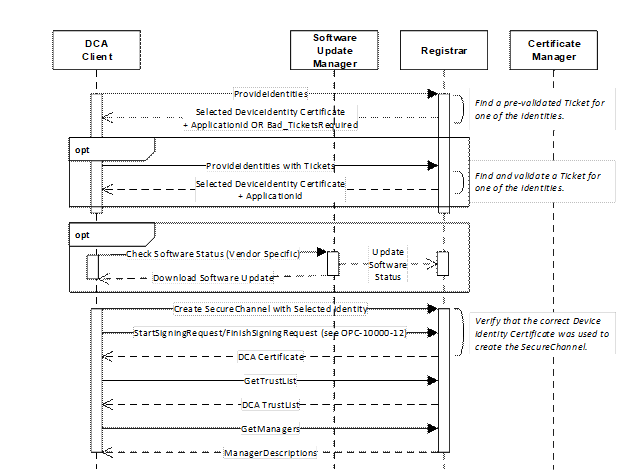
Figure 4 – Device Authentication using Pull Management
See 7 for a complete description of the Device authentication process.
The sequence begins when the Device discovers the location of the Registrar via mDNS (see OPC 10000-12), the SetRegistrarEndpoints Method is called (Servers only) or the Endpoints are provided via a Device specific mechanism. The sequence automatically repeats until the Device receives its DCA Certificate and no software update is required. Any errors occur the sequence restarts from the beginning. Note that step requires that the DCA trust any Registrar it finds since it does not have a valid TrustList (see 4.2.4).
If multiple Registrars are on the network, the DCA shall attempt to connect to each one until it finds one that accepts it and allows it to request a DCA Certificate and a TrustList. Once configured, the DCA shall not attempt to connect to Registrars that are not in the TrustList. Devices that support pull management shall have a way for a person with physical access to the Device to reset the DCA TrustList and restart the Device authentication process.
The OwnerOperator should have a strategy to detect and remove rogue Registrars since the DCA always trusts the first Registrar that provides an Application Instance Certificate.
Once connected to a Registrar the Device provides all of its DeviceIdentity Certificates to the Registrar which then attempts to locate a valid Ticket that matches one of the Certificates. If a Composite Ticket that matches the Device ProductInstanceUri exists then only DeviceIdentity Certificates with the CompositeInstanceUri are considered by the Registrar.
If no Ticket is found the Registrar asks the Device to provide any Tickets that it has by returning a Bad_TicketRequired error.
If a valid Ticket is found the Registrar returns a DeviceIdentity Certificate and ApplicationId which the Device is expected to used to request the DCA Certificate and the DCA TrustList.
The Registrar also uses the Ticket to determine if a software update is required before it provides a Certificate to a Device. If one is required it returns a Endpoint to the SoftwareUpdateManager that the Device is expected to use.
When the Device connects to SoftwareUpdateManager it provides the current version number of the software that is installed. If it is the required version, the SoftwareUpdateManager calls the UpdateSoftwareStatus Method. Otherwise, the Device downloads the update, applies it and then connects to SoftwareUpdateManager again and provides the new version number. The process repeats until the required software version is installed.
The complete process for requesting a Certificate and a TrustList are described in OPC 10000-12. Note that the DCA does not call RegisterApplication on the CertificateManager since the Registrar does that on behalf of the DCA when it finds a valid Ticket for the Device. Note that the Methods exposed by the Registrar rather than the CertificateManager. The expectation is the Registrar and the CertificateManager share a common backend so Certificates and Applications created via the Registrar will be known to the CertificateManager. In some cases, the Registrar and the CertificateManager will be the same Server.
The GetManagers call returns the Endpoints for the CertificateManager which the DCA is expected to use.
The DCA shall not connect to an untrusted Registrar once it has a TrustList.
The process for requesting Application Instance Certificates is shown in Figure 5.
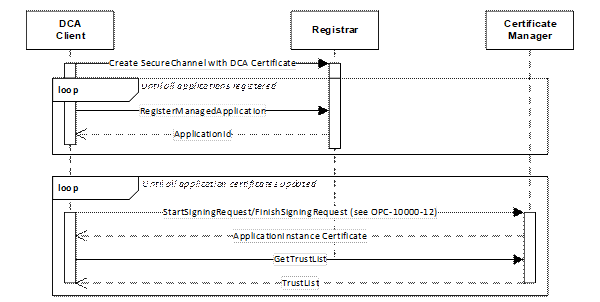
Figure 5 – Requesting Certificates using Pull Management
The DCA registers all Applications it intends to manage with the Registrar which verifies that the DCA is authorized to manage the Applications and provides ApplicationIds needed to request Certificates from the CertificateManager. This authorization process is specific to the Registrar implementation and can include communication with an external authorization service or manual approval by a RegistrarAdmin.
Servers may use PushManagement which is illustrated in Figure 6.
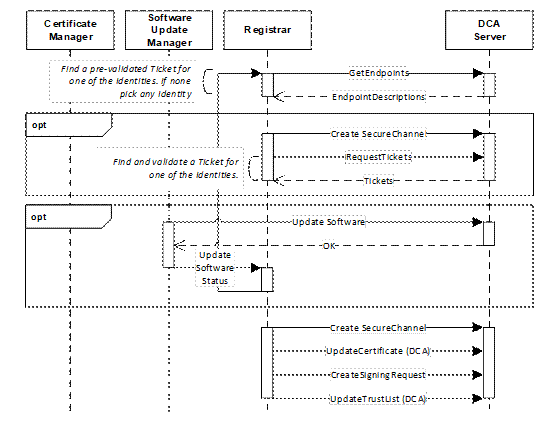
Figure 6 – Device Authentication using Push Management
See 7 for a complete description of the authentication process.
Each of the DeviceIdentity Certificates is returned in EndpointDescriptions returned by GetEndpoints. The Registrar looks for a pre-validated Ticket that matches the Certificate in one of the Endpoints. If none found it chooses any one and establishes a SecureChannel and calls RequestTickets. The Registrar needs to validate the Tickets returned by the Device which requires access to the Certificate that created one of the Signatures and the ability to check its revocation status.
If the Registrar finds an EndpointDescription that matches a valid Ticket it will create a new SecureChannel using that EndpointDescription. It provides the DCA Certificate and TrustList to the Device. Once a Device has a DCA TrustList and all software updates have been applied, it will not accept connections from untrusted Registrars. In this state, the DCA shall only return EndpointDescriptions that use the DCA Certificate when GetEndpoints is called.
The Registrar may then pass control to the SoftwareUpdateManager which is responsible for checking if the Device software is up to date and uploading a new image if required. Once complete the SoftwareUpdateManager or an agent acting on its behalf calls UpdateSoftwareStatus Method on the Registrar.
Once the Device has updated software the CertificateManager will be able to push Application Instance Certificates and TrustLists for all Applications exposed via an ApplicationConfiguration Object (see Figure 7Error! Reference source not found.) in the DCA AddressSpace. This process is shown in Figure 7.
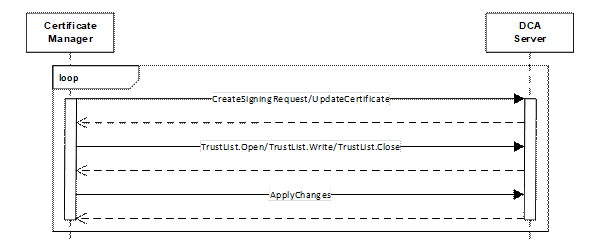
Figure 7 – Updating Certificates using Push Management
If multiple Registrars are on the network, the DCA shall accept the first one to provide an Application Instance Certificate and a TrustList. Once configured, the DCA shall reject connections from Registrars that are not in the TrustList. The OwnerOperator should have a strategy to detect and remove rogue Registrars since the DCA always trusts the first Registrar that provides a Certificate.
Some Devices with limited resources may only support a single Server which acts as both the DCA and the operational Application. DCAs report this requirement to the Registrar by setting the IsSingleton Property to TRUE on the ProvisionableDevice Object (see 9.3.2). Registrar that shall provide a normal Application Instance Certificate to the DCA that cannot be used to configure other Applications.
There are different standards for Device Authentication which do not meet the complete set of requirements described in this specification. However, an OwnerOperator may have reasons to use one of these other mechanisms (i.e. they have the infrastructure and wish to reuse it).
In some cases, the OwnerOperator have a complete solution that manages the entire life cycle of the Certificates installed on the Device. In these cases, the onboarding mechanisms described in this specification are not used and it is responsibility of the alternate mechanism to issue and renew Application Instance Certificates to all Applications running on the Device and to maintain their Trust Lists.
In other cases, the alternate mechanism will only authenticate the Device and install a single Certificate. In these cases, the mechanism described in this specification takes over and manages the life cycle of Application Instance Certificates and the Trust Lists. This pull management version of this case is illustrated in Figure 8.
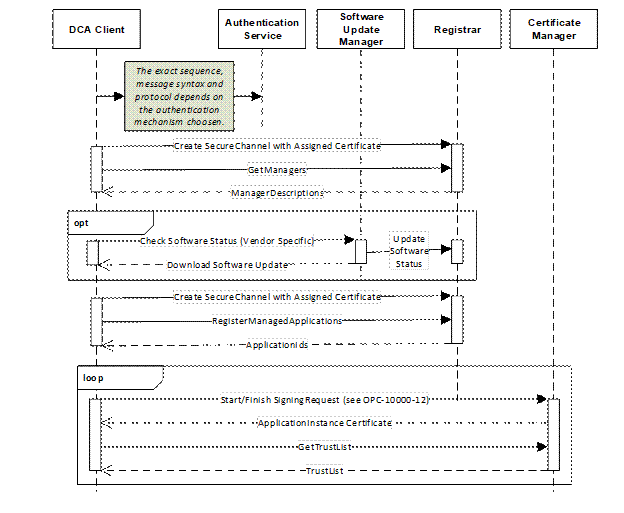
Figure 8 – Alternate Authentication Models with Pull Management
In this case, it is responsibility of the Authentication Service to verify the authenticity of the Device and supply a Certificate to the DCA that is trusted by the Registrar, SoftwareUpdateManager and CertificateManager. This Certificate shall also contain a ProductInstanceUri (see 5.2) which uniquely identifies the Device.
If a software update check is required the DCA needs the Endpoint for the SoftwareUpdateManager. If the Authentication Service cannot supply this Endpoint, the DCA can get it from the Registrar which may be discovered with mDNS and then calling the GetManagers Method. Once any software update is completed, the DCA calls RegisterManagedApplications on the Registrar to get permission to request Certificates and TrustLists on behalf of those Applications.
The location of the CertificateManager is returned by the GetManagers Method. The DCA can use the mechanisms defined in OPC 10000-12 to request the Certificates and TrustLists for all of the Applications which it is authorized to manage.
The Authentication Service may also provide a DCA Certificate to a Server which would then annouce its presence via mDNS. The Registrar would then follow the process described in 7.3 to discover the Applications managed by the DCA and providing their Certificates and TrustLists.
FIDO Device Onboard (FDO) is an onboarding protocol from the FIDO Alliance, an open industry association. The current version is FDO 1.1. FDO can be used as an alternate authentication model, as described in 7.4.1.
When a FDO Device is connected to a network it searches for one of the preconfigured DNS addresses for a FDO Rendezvous Server (TO1 in the FDO specification). When it finds one, it asks for the FDO Owner that has a digital document, called the FDO Ownership Voucher, that allows the onboarding process to start. The FDO Owner registers with a FDO Rendezvous Server when it recieves the FDO Ownership Voucher via mechanisms independent from the delivery of the FDO Device (TO0 in the FDO specification).
The FDO Device then creates a connection to the FDO Owner (TO2 in the FDO specification). The FDO Device identifies itself to the FDO Owner and creates a Signature with a PrivateKey preinstalled on the FDO Device. Then the FDO Owner verifies the Signature and determines if the FDO Device can be trusted by checking a TrustList provided to the FDO Owner. The FDO Owner presents the FDO Ownership Voucher for FDO Device with a Signature created by the FDO Owner. The FDO then allows communication to continue if it is able to verify the FDO Ownership Voucher.
The FDO Ownership Voucher is a digital document distributed by the manufacturer and is delivered via a mechanism independent from FDO as the FDO Device moves through the supply chain. The FDO Ownership Voucher has multiple Signatures provided by each intermediary in the supply chain. However, the FDO Device only knows the first PublicKey in the chain but this is sufficient to allow the FDO Device to verify the entire chain when it receives it from the FDO Owner.
Once FDO authentication is complete, the FDO Device creates an encrypted tunnel that is used to complete the onboarding process. The information exchanged during this stage can be application specific. FDO ServiceInfo Modules (FSIMs) are subprotocols that defined the messages exchanged during the onboarding process. The FSIMs to use are negotiated once the encrypted tunnel has been established.
Figure 9 illustrates the handoff from the FDO protocol to the mechanisms defined in this document.
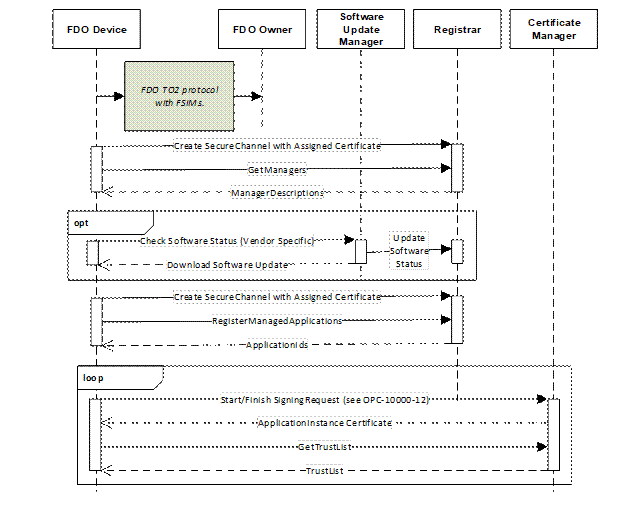
Figure 9 – Device Authentication with the FDO Protocol
Specifically, the FDO Owner supplies the FDO device with a Certificate that can be used to create a SecureChannel with the Registrar. The Registrar is preconfigured with the CA Certificate used by the FDO Owner to issue the Certificates to authenticated FDO Devices. The FDO Owner uses a FSIM (fdo.csr) that creates a new LDevID that can be installed on the FDO Device as part of the onboarding process described in 7.4.2.1. This LDevID shall contain the information specified in Clause 5. The rest of onboarding process is the same as when the OPC UA device authentication mechanisms are used.
A FDO Device that supports integration with OPC UA shall have an OPC UA Client that can communicate with the Registrar. The OPC UA Client (a.k.a., a DCA using Pull Management as described in 7.2) may be installed by the Manufacturer or could be installed by the FDO Owner as part of the FDO onboarding process.
All Tickets (see 8.2.3 and 8.2.4) are encoded as JSON documents. These JSON documents secured with digital signature applied to the general serialization described by RFC 7515. The structure of an RFC 7515 document is as follows.
{
"payload":"BASE64URL(UTF8(JSON encoded Ticket))",
"signatures":[
{"protected":"BASE64URL(UTF8(JSON encoded protected header))",
"header": JSON encoded header,
"signature":" BASE64URL(JWS Signature)"},
...
{"protected":"BASE64URL(UTF8(JSON encoded protected header))",
"header": JSON encoded header,
"signature":" BASE64URL(JWS Signature)"}]
}
Appendix A.6 in RFC 7515 provides an example of a document encoding using this structure.
The BASE64URL transform which allows binary data (e.g., UTF-8 encoded text) to be represented as ASCII.
The Ticket is encoded as a JSON object using the reversible JSON encoding defined in OPC 10000-6. This JSON object is converted to an UTF-8 byte array and then BASE64URL before being added to the document.
The protected header specifies the signing Certificate and other information needed to verify the Signature. The required fields are defined in Table 5.
The unprotected header is generally not used; however, it could be used for additional vendor specific information such as a RFC 3161 timestamp or other anti-forgery or validation metadata.
A Signature is computed on the following byte array:
<protected header>.<payload>
Tickets may have additional signatures added by any actor in the supply chain. For example, a CompositeBuilder shall add Signatures to all Tickets for Devices incorporated into the Composite. The protected header shall have the CompositeInstanceUri.
The Certificate and algorithms used to create the payload Signature are the same as the Certificate and algorithms used to create the RFC 7515 Signature. The RFC 7515 header provides the information needed to calculate the size of payload Signature.
Table 5 – RFC 7515 Header Fields
|
Header Field |
Type |
Description |
|
alg |
String |
The cryptographic algorithm used to sign the Ticket. The possible values are defined by RFC 7518. The default when using RSA public keys is “RS256”. |
|
x5c |
String [] |
The signing Certificate and all of its issuers. Each array element is base64 encoded (see RFC 4648) DER encoding. The first element is the signing Certificate. |
|
cty |
String |
The type of Ticket contained in the payload. This is media type defined by RFC 2045 with the leading “application/” omitted. The subtype is "opc-ticket+json". The type parameter is the name from BrowseName of the Structure. For example, the value for a DeviceIdentityTicketType is: opc-ticket+json;type=DeviceIdentityTicketType |
|
opc-uri |
String |
The CompositeInstanceUri if the Signature was created by a CompositeBuilder who has incorporated the Device into a Composite. |
The EncodedTicket is a simple DataType representing a JSON encoded Ticket.
Its representation in the AddressSpace is defined in Table 8.
Table 6 – EncodedTicket Definition
|
Attribute |
Value |
|||||
|
BrowseName |
0:EncodedTicket |
|||||
|
IsAbstract |
False |
|||||
|
References |
NodeClass |
BrowseName |
DataType |
TypeDefinition |
Other |
|
|
Subtype of the 0:String DataType defined in OPC 10000-5. |
||||||
|
|
||||||
|
Conformance Units |
||||||
|
Onboarding Ticket Reader |
||||||
The BaseTicketType is an abstract base class for a Ticket.
The fields of this DataType are defined in Table 7.
Table 7 – BaseTicketType Structure
|
Name |
Type |
Description |
|
BaseTicketType |
0:Structure |
Subtype of the Structure DataType defined in OPC 10000-5. |
|
manufacturerName |
0:String |
The name of the Manufacturer for the Device. |
|
modelName |
0:String |
The model name assigned by the Manufacturer. Not specified if no model name was assigned or known. |
|
modelVersion |
0:String |
The model version assigned by the Manufacturer. Not specified if no model version was assigned or known. |
|
hardwareRevision |
0:String |
The hardware revision assigned by the Manufacturer. Not specified if no hardware revision was assigned or known. |
|
softwareRevision |
0:String |
The software revision assigned by the Manufacturer. May not be the same as the current version of software installed on the Device. Not specified if no software revision was assigned or known. |
|
serialNumber |
0:String |
The serial number assigned by the Manufacturer. Not specified if no serial number was assigned or known. |
|
manufactureDate |
0:DateTime |
When the Device was manufactured. DateTime.MinValue if the date is not known. |
|
authorities |
2:CertificateAuthorityType [] |
A list of CAs need to validate DeviceIdentity Certificates on the Device that were installed when the Ticket was created. |
Its representation in the AddressSpace is defined in Table 8.
Table 8 – BaseTicketType Definition
|
Attribute |
Value |
|||||
|
BrowseName |
2:BaseTicketType |
|||||
|
IsAbstract |
True |
|||||
|
References |
NodeClass |
BrowseName |
DataType |
TypeDefinition |
Other |
|
|
Subtype of the Structure DataType defined in OPC 10000-5. |
||||||
|
|
||||||
|
Conformance Units |
||||||
|
Onboarding Ticket Reader |
||||||
The DeviceIdentityTicketType describes a single Device produced by a Manufacturer.
The fields of this DataType are defined in Table 9.
Table 9 – DeviceIdentityTicketType Structure
|
Name |
Type |
Description |
|
DeviceIdentityTicketType |
0:Structure |
Subtype of the 2:BaseTicketType DataType defined in 8.2.1. |
|
productInstanceUri |
0:UriString |
The ProductInstanceUri for the Device. |
Its representation in the AddressSpace is defined in Table 10.
Table 10 – DeviceIdentityTicketType Definition
|
Attribute |
Value |
|||||
|
BrowseName |
2:DeviceIdentityTicketType |
|||||
|
IsAbstract |
False |
|||||
|
References |
NodeClass |
BrowseName |
DataType |
TypeDefinition |
Other |
|
|
Subtype of the BaseTicketType DataType defined in 8.2.1. |
||||||
|
|
||||||
|
Conformance Units |
||||||
|
Onboarding Ticket Reader |
||||||
The CompositeIdentityTicketType describes a single Composite produced by a CompositeBuilder.
The fields of this DataType are defined in Table 11.
Table 11 – CompositeIdentityTicketType Structure
|
Name |
Type |
Description |
|
CompositeIdentityTicketType |
0:Structure |
Subtype of the 2:BaseTicketType DataType defined in 8.2.2. |
|
compositeInstanceUri |
0:UriString |
The ProductInstanceUri assigned to the Composite. This value appears in LDevID Certificates assigned to Devices by the CompositeBuilder (see 5.3). |
|
devices |
0:UriString [] |
A list of ProductInstanceUris for the Devices in the Composite that are externally visible. |
|
composites |
0:UriString [] |
A list of CompositeInstanceUris for the sub-components in the Composite that are externally visible. |
Its representation in the AddressSpace is defined in Table 12.
Table 12 – CompositeIdentityTicketType Definition
|
Attribute |
Value |
|||||
|
BrowseName |
2:CompositeIdentityTicketType |
|||||
|
IsAbstract |
False |
|||||
|
References |
NodeClass |
BrowseName |
DataType |
TypeDefinition |
Other |
|
|
Subtype of the BaseTicketType DataType defined in 8.2.2. |
||||||
|
|
||||||
|
Conformance Units |
||||||
|
Onboarding Ticket Reader |
||||||
The TicketListType describes a list of Devices and Composites which are part of a shipment from one organization to another.
The fields of this DataType are defined in Table 13.
Table 13 – TicketListType Structure
Its representation in the AddressSpace is defined in Table 14.
Table 14 – TicketListType Definition
|
Attribute |
Value |
|||||
|
BrowseName |
2:TicketListType |
|||||
|
IsAbstract |
False |
|||||
|
References |
NodeClass |
BrowseName |
DataType |
TypeDefinition |
Other |
|
|
Subtype of the Structure DataType defined in OPC 10000-5. |
||||||
|
|
||||||
|
Conformance Units |
||||||
|
Onboarding Ticket Reader |
||||||
The CertificateAuthorityType describes a Certificate Authority (CA) used to issue Certificates to Devices, Composites or to organizations that create Tickets.
The fields of this DataType are defined in Table 15.
Table 15 – CertificateAuthorityType Structure
|
Name |
Type |
Description |
|
CertificateAuthorityType |
0:Structure |
Subtype of the 0:Structure DataType defined in OPC 10000-5. |
|
authorityCertificate |
0:ByteString |
The DER encoded Certificate used to issue Certificates. |
|
issuerCertificates |
0:ByteString [] |
The DER encoded form of the Issuer for the authorityCertificate. It should include the entire chain. |
Its representation in the AddressSpace is defined in Table 16.
Table 16 – CertificateAuthorityType Definition
|
Attribute |
Value |
|||||
|
BrowseName |
2:CertificateAuthorityType |
|||||
|
IsAbstract |
False |
|||||
|
References |
NodeClass |
BrowseName |
DataType |
TypeDefinition |
Other |
|
|
Subtype of the 0:Structure DataType defined in OPC 10000-5. |
||||||
|
|
||||||
|
Conformance Units |
||||||
|
Onboarding Ticket Reader |
||||||
The workflows described in 4.3 define interactions between OPC UA Applications. Implementing these workflows requires an OPC UA Information Model. This section builds on existing Information Models and defines the additional types and instances needed to completely implement the workflows. Clause 9.2 defines the Information Model implemented in a Registrar that provides support for PullManagement defined in 7.2. Clause 9.3 defines the Information Model implemented in a DCA Server that provides support for PushManagement defined in 7.3.
The Registrar described in 7 is a Server that implements the Information Model shown in Figure 10. This Information Model allows new Devices to use pull management described in 7.2 to authenticate themselves. It also allows Endpoints for new Devices to be manually registered for PushManagement when no multicast discovery mechanism is available.
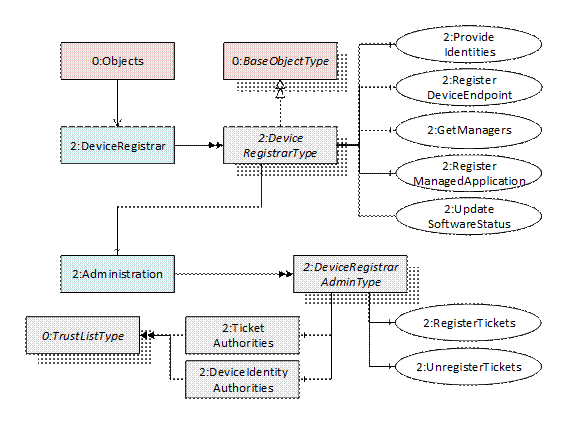
Figure 10 – Registrar Address Space for Onboarding Workflow
The DeviceRegistrarType ObjectType represents an entity that provides the services needed when authenticating Devices on a network. The ObjectType is defined in Table 17.
Table 17 – DeviceRegistrarType Definition
|
Attribute |
Value |
|||||
|
BrowseName |
2:DeviceRegistrarType |
|||||
|
IsAbstract |
False |
|||||
|
References |
NodeClass |
BrowseName |
DataType |
TypeDefinition |
Modelling Rule |
|
|
Subtype of the 0:BaseObjectType defined in OPC 10000-5. |
||||||
|
0:HasComponent |
Method |
2:ProvideIdentities |
Defined in 9.2.3. |
Mandatory |
||
|
0:HasComponent |
Method |
2:UpdateSoftwareStatus |
Defined in 9.2.4. |
Mandatory |
||
|
0:HasComponent |
Method |
2:RegisterDeviceEndpoint |
Defined in 9.2.5. |
Mandatory |
||
|
0:HasComponent |
Method |
2:GetManagers |
Defined in 9.2.6. |
Mandatory |
||
|
0:HasComponent |
Method |
2:RegisterManagedApplication |
Defined in 9.2.8. |
Mandatory |
||
|
0:HasComponent |
Object |
2:Administration |
|
2:DeviceRegistrarAdminType |
Optional |
|
|
|
||||||
|
Conformance Units |
||||||
The ProvideIdentities Method allows a Device to request that it be authenticated so it can have access to the network.
The UpdateSoftwareStatus Method is used by the SoftwareUpdateManager to tell the Registrar that the Device has up to date software.
The RegisterDeviceEndpoint Method allows an administration Client to provide the location of a Device on the network that needs to be authenticated. The expectation is calling this Method would start a background task register the Device using PullManagement. If an administration Client needs to register many Devices it can call the RegisterDeviceEndpoint Method multiple times in a single Call request.
The GetManagers Method returns the location of the SoftwareUpdateManager and CertificateManager which an authenticated DCA needs to use to complete the onboarding process.
The RegisterManagedApplication Method allows the DCA to register Applications that it needs to manage with the Registrar.
The Administration Object allows an administration Client to manage Tickets and Certificates received out of band that are needed for the automated registration process.
The ProvideIdentities Method allows a Device to request that it be authenticated so it can have access to the network. It is called by a Device using PullManagement to provide the Registrar with its DeviceIdentity Certificates. The Registrar follows the process described in 7 to select and validate one of the Certificates.
This Method shall be called from an authenticated SecureChannel.
Signature
ProvideIdentities (
[in] 0:ByteString [] identities,
[in] 0:ByteString [] issuers,
[in] 0:EncodedTicket [] tickets,
[out] 0:ByteString selectedIdentity,
[out] 2:BaseTicketType matchingTicket,
[out] 0:NodeId applicationId,
[out] 2:ManagerDescription softwareUpdateManager
);
|
Argument |
Description |
|
identities |
The DER encoded DeviceIdentity Certificates issued to the Device. The first Certificates shall be the IDevID Certificates. |
|
issuers |
The DER encoded Certificates needed to verify the DeviceIdentity Certificates. Certificates that cannot be verified are ignored. |
|
tickets |
The signed Tickets stored on the Device. This argument may be null. If the Registrar returns a Bad_TicketRequired error this Method needs to called again with any available Tickets. Tickets that cannot be verified are ignored. |
|
selectedIdentity |
The DER encoded DeviceIdentity Certificate that the DCA needs to use to complete the registration process. |
|
matchingTicket |
The Ticket describing the Device which the Registrar accepted. |
|
applicationId |
The identifier assigned by the CertificateManager to the Device. This identifier is needed to request Certificates from the CertificateManager. |
|
softwareUpdateManager |
The Endpoint for the SoftwareUpdateManager which the caller contacts to complete the onboarding process. Set to NULL if a software update is not required or not supported. |
Method Result Codes (defined in Call Service)
|
Result Code |
Description |
|
Bad_CertificateInvalid |
None of the identity Certificates can be verified. |
|
Bad_TicketRequired |
The Device has to provide a Ticket before it can be accepted. |
|
Bad_NotFound |
No valid Ticket was found. |
Table 18 specifies the AddressSpace representation for the ProvideIdentities Method.
Table 18 – ProvideIdentities Method AddressSpace Definition
|
Attribute |
Value |
||||
|
BrowseName |
2:ProvideIdentities |
||||
|
References |
NodeClass |
BrowseName |
DataType |
TypeDefinition |
ModellingRule |
|
HasProperty |
Variable |
0:InputArguments |
0:Argument [] |
0:PropertyType |
Mandatory |
|
HasProperty |
Variable |
0:OutputArguments |
0:Argument [] |
0:PropertyType |
Mandatory |
The UpdateSoftwareStatus Method allows a Client to provide the firmware status for a Device on the network.
The Client may be the SoftwareUpdateManager (see 4.2.5) or other administrative application that allows a human to provide information about a manual process.
This Method shall be called from an authenticated SecureChannel and from a Session that has access to the SoftwareUpdateAdmin Role (see 4.2.6).
Signature
UpdateSoftwareStatus(
[in] 0:String productInstanceUri,
[in] 0:Boolean status,
[in] 0:String softwareRevision
);
|
Argument |
Description |
|
productInstanceUri |
The unique identifier for the Device. |
|
status |
The status of the software. If TRUE the firmware is up to date, otherwise, an update is required before the Device can be used on the network. |
|
softwareRevision |
The version of the software which is running on the Device (status=TRUE) or needs to be installed on the Device (status=FALSE). |
Method Result Codes (defined in Call Service)
|
Result Code |
Description |
|
Bad_UserAccessDenied |
The Session does not have the permissions needed to call the Method. |
|
Bad_NotFound |
The productInstanceUri does not refer to a known Device. |
Table 19 specifies the AddressSpace representation for the UpdateSoftwareStatus Method.
Table 19 – UpdateSoftwareStatus Method AddressSpace Definition
|
Attribute |
Value |
||||
|
BrowseName |
2:UpdateSoftwareStatus |
||||
|
References |
NodeClass |
BrowseName |
DataType |
TypeDefinition |
ModellingRule |
|
0:HasProperty |
Variable |
0:InputArguments |
0:Argument [] |
0:PropertyType |
Mandatory |
The RegisterDeviceEndpoint Method allows a Client to provide the location of a Device on the network that needs to be authenticated.
The Client may be an engineering tool or other administrative application that allows a human to provide information that cannot be discovered automatically.
Once the Registrar knows the location of a Device it schedules a task that uses PushManagement to complete the onboarding process.
This Method shall be called from an authenticated SecureChannel and from a Session that has access to the RegistrarAdmin Role (see 4.2.6).
Signature
RegisterDeviceEndpoint (
[in] 0:ApplicationDescription application
);
|
Argument |
Description |
|
application |
The Server which allows a Device to be authenticated via the Push Model. |
Method Result Codes (defined in Call Service)
|
Result Code |
Description |
|
Bad_UserAccessDenied |
The Session does not have the permissions needed to call the Method. |
Table 20 specifies the AddressSpace representation for the RegisterDeviceEndpoint Method.
Table 20 – RegisterDeviceEndpoint Method AddressSpace Definition
|
Attribute |
Value |
||||
|
BrowseName |
2:RegisterDeviceEndpoint |
||||
|
References |
NodeClass |
BrowseName |
DataType |
TypeDefinition |
ModellingRule |
|
0:HasProperty |
Variable |
0:InputArguments |
0:Argument [] |
0:PropertyType |
Mandatory |
The GetManagers Method allows a Registrar to provide the location of other managers on a network which are needed to support onboarding of Devices. The managers have network Endpoints that may support non-OPC UA protocols. The DCA has knowledge of what managers it can use and what protocol they use.
The response is a list of ManagerDescriptions that includes a URI which defines the purpose of the manager and a flag indicating whether the DCA is required to interact with the manager to complete the onboarding process.
Each ManagerDescription has 1 or more URLs which are network Endpoints accessible to the DCA.
This Method shall be called from an authenticated SecureChannel and from a Session that has access to the DCA Privilege (see 4.2.6).
Signature
GetManagers (
[out] 2:ManagerDescription [] managers
);
|
Argument |
Description |
|
managers |
The managers which the DCA has access to. |
Method Result Codes (defined in Call Service)
|
Result Code |
Description |
|
Bad_UserAccessDenied |
The Session does not have the permissions needed to call the Method. |
Table 21 specifies the AddressSpace representation for the GetManagers Method.
Table 21 – GetManagers Method AddressSpace Definition
|
Attribute |
Value |
||||
|
BrowseName |
2:GetManagers |
||||
|
References |
NodeClass |
BrowseName |
DataType |
TypeDefinition |
ModellingRule |
|
0:HasProperty |
Variable |
0:OutputArguments |
0:Argument [] |
0:PropertyType |
Mandatory |
The ManagerDescription provides metadata and the location of a manager on the network such as a SoftwareUpdateManager or a CertificateManager.
The following purposeUris are defined by this specification:
http://opcfoundation.org/UA/Onboarding/CertificateManager
http://opcfoundation.org/UA/Onboarding/SoftwareUpdateManager
Other purposes may be defined by the Registrar.
The fields of this DataType are defined in Table 7.
Table 22 – ManagerDescription Structure
|
Name |
Type |
Description |
|
ManagerDescription |
0:Structure |
Subtype of the Structure DataType defined in OPC 10000-5. |
|
name |
0:LocalizedText |
A human readable name for the manager. |
|
isRequired |
0:Boolean |
If TRUE then interaction with this manager is required to complete the onboarding process. |
|
purposeUri |
0:UriString |
A unique identifier for the purpose of the manager. |
|
protocolUri |
0:UriString |
A unique identifier for the communication protocol used by the manager endpoints. If not specified the protocol is OPC UA. |
|
endpointUrls |
0:String [] |
A list of network endpoints. |
Its representation in the AddressSpace is defined in Table 23.
Table 23 – ManagerDescription Definition
|
Attribute |
Value |
|||||
|
BrowseName |
2:ManagerDescription |
|||||
|
IsAbstract |
False |
|||||
|
References |
NodeClass |
BrowseName |
DataType |
TypeDefinition |
Other |
|
|
Subtype of the Structure DataType defined in OPC 10000-5. |
||||||
|
|
||||||
|
Conformance Units |
||||||
The RegisterManagedApplication Method allows a DCA using pull management to register an application that it manages. The Registrar creates whatever records are needed in the CertificateManager and returns the ApplicationIds which are needed to request Certificates and TrustLists for the Application.
The ProtocolUri is only specified when the Application does not support OPC UA. It indicates what protocol the Application supports.
The Registrar shall have some mechanism to verify that a DCA is authorized to manage Application (e.g. DNS name check, pre-populated permission list, human review, et. al.). If the DCA is not authorized the Registrar returns Bad_RequestNotAllowed.
This Method shall be called from an authenticated SecureChannel and from a Session that has access to the DCA Privilege (see 4.2.6).
Signature
RegisterManagedApplication (
[in] 3:ApplicationRecordDataType application,
[in] 0:UriString protocolUri,
[out] 0:NodeId applicationId
);
|
Argument |
Description |
|
application |
The application to register. |
|
protocolUri |
The URI identifying the protocol supported by a non-OPC UA Application. |
|
applicationId |
The applicationId assigned to the application. |
Method Result Codes (defined in Call Service)
|
Result Code |
Description |
|
Bad_UserAccessDenied |
The caller does not have the rights to call the Method. |
|
Bad_RequestNotAllowed |
The caller is not allowed to manage the specified Application. |
Table 24 specifies the AddressSpace representation for the RegisterManagedApplication Method.
Table 24 – RegisterManagedApplication Method AddressSpace Definition
|
Attribute |
Value |
||||
|
BrowseName |
2:RegisterManagedApplication |
||||
|
References |
NodeClass |
BrowseName |
DataType |
TypeDefinition |
ModellingRule |
|
0:HasProperty |
Variable |
0:InputArguments |
0:Argument [] |
0:PropertyType |
Mandatory |
|
0:HasProperty |
Variable |
0:OutputArguments |
0:Argument [] |
0:PropertyType |
Mandatory |
The DeviceRegistrar Object is a well-known Object that is present in the AddressSpace of a Server that is a Registrar. It is formally defined in Table 25.
Table 25 – DeviceRegistrar Definition
|
Attribute |
Value |
||||
|
BrowseName |
2:DeviceRegistrar |
||||
|
TypeDefinition |
2:DeviceRegistrarType defined in 9.2.2. |
||||
|
References |
Node Class |
BrowseName |
DataType |
TypeDefinition |
Modelling Rule |
|
OrganizedBy the Objects Object defined in OPC 10000-5. |
|||||
|
|
|||||
|
Conformance Units |
|||||
The DeviceRegistrarAdminType ObjectType that provides an interface to manage the TrustLists and Tickets used by the Registrar when authenticating Devices on a network. The ObjectType is defined in Table 26
Table 26 – DeviceRegistrarAdminType Definition
|
Attribute |
Value |
||||
|
BrowseName |
2:DeviceRegistrarAdminType |
||||
|
IsAbstract |
False |
||||
|
References |
NodeClass |
BrowseName |
DataType |
TypeDefinition |
Modelling Rule |
|
Subtype of the BaseObjectType defined in OPC 10000-5. |
|||||
|
0:HasComponent |
Method |
2:RegisterTickets |
Defined in 9.2.11. |
Mandatory |
|
|
0:HasComponent |
Method |
2:UnregisterTickets |
Defined in 9.2.12. |
Mandatory |
|
|
0:HasComponent |
Object |
|
0:TrustListType |
Mandatory |
|
|
0:HasComponent |
Object |
2:DeviceIdentityAuthorities |
|
0:TrustListType |
Mandatory |
|
|
|||||
|
Conformance Units |
|||||
|
Onboarding Registrar Administration |
|||||
The RegisterTickets Method allows an administration Client to provide a list of Tickets for Devices and Composites that it is expecting to install on the network. Any Device which matches one of these Tickets will be accepted automatically.
The UnregisterTickets Method allows an administration Client to remove Tickets for Devices and Composites that it previously provided. Removing Tickets does not affect Devices that were previously accepted using the Tickets.
The TicketAuthorities Object allows an administration Client to manage the Certificates for authorities that sign Tickets. If a Device provides a Ticket, it is accepted automatically if and only if the signing Certificate is in this list.
The DeviceIdentityAuthorities Object allows an RegistrarAdmin manage the trusted DeviceIdentity Certificates. This list can contain individual DeviceIdentity Certificates that have a valid Ticket or it can contain the issuers for DeviceIdentity Certificates that are provided out of band.
The RegisterTickets Method allows an administration Client to provide a list of Tickets for Devices and Composites that it is expecting to install on the network. Any Device which can be correlated with one of these Tickets will be accepted automatically.
This Method validates each Ticket. Invalid Tickets are rejected. Validation errors are returned in the results output argument.
This Method shall be called from a Session that has access to the RegistrarAdmin Role (see 4.2.6).
Signature
RegisterTickets (
[in] 0:EncodedTicket [] tickets,
[out] 0:StatusCode [] results
);
|
Argument |
Description |
|
tickets |
The signed Tickets which should be treated as trusted. |
|
results |
The result of the Ticket validation process described in 6.4. If validation fails the returned value is Bad_TicketInvalid. |
Method Result Codes (defined in Call Service)
|
Result Code |
Description |
|
Bad_UserAccessDenied |
The Client is not authorized to update the set of known Tickets. |
Table 27 specifies the AddressSpace representation for the RegisterTickets Method.
Table 27 – RegisterTickets Method AddressSpace Definition
|
Attribute |
Value |
||||
|
BrowseName |
2:RegisterTickets |
||||
|
References |
NodeClass |
BrowseName |
DataType |
TypeDefinition |
ModellingRule |
|
0:HasProperty |
Variable |
0:InputArguments |
0:Argument [] |
0:PropertyType |
Mandatory |
|
0:HasProperty |
Variable |
0:OutputArguments |
0:Argument [] |
0:PropertyType |
Mandatory |
The UnregisterTickets Method allows a RegistrarAdmin to remove Tickets for Devices and Composites that it previously provided. Removing Tickets does not affect Devices that were previously accepted using the Tickets.
If the Ticket does not exist an error is returned in the results output argument.
If an error processing a Ticket occurs the error for that Ticket is returned in the results argument. If a Ticket does not exist the error is Bad_NotFound.
This Method shall be called from a Session that has access to the RegistrarAdmin Role (see 4.2.6).
Signature
UnregisterTickets (
[in] 0:EncodedTicket [] tickets,
[out] 0:StatusCode [] results
);
|
Argument |
Description |
|
tickets |
The signed Tickets which should no longer be treated as trusted. |
|
results |
Indicates whether a previously registered Ticket was found. If not found the returned value is Bad_NotFound. |
Method Result Codes (defined in Call Service)
|
Result Code |
Description |
|
Bad_UserAccessDenied |
The Client is not authorized to update the set of known Tickets. |
Table 28 specifies the AddressSpace representation for the UnregisterTickets Method.
Table 28 – UnregisterTickets Method AddressSpace Definition
|
Attribute |
Value |
||||
|
BrowseName |
2:UnregisterTickets |
||||
|
References |
NodeClass |
BrowseName |
DataType |
TypeDefinition |
ModellingRule |
|
0:HasProperty |
Variable |
0:InputArguments |
0:Argument [] |
0:PropertyType |
Mandatory |
|
0:HasProperty |
Variable |
0:OutputArguments |
0:Argument [] |
0:PropertyType |
Mandatory |
This abstract Event is a base type for events raised when a change affecting Device registration occurs.
This Event and its subtypes are security related and Servers shall only report them to Sessions with access to the SecurityAdmin Role.
Its representation in the AddressSpace is formally defined in Table 29.
Table 29 – DeviceRegistrationAuditEventType Definition
|
Attribute |
Value |
||||
|
BrowseName |
2:DeviceRegistrationAuditEventType |
||||
|
IsAbstract |
True |
||||
|
References |
NodeClass |
BrowseName |
DataType |
TypeDefinition |
Modelling Rule |
|
Subtype of the 0:AuditEventType defined in OPC 10000-5. |
|||||
|
0:HasProperty |
Variable |
2:ProductInstanceUri |
0:UriString |
0:PropertyType |
Mandatory |
|
0:HasSubtype |
ObjectType |
2:DeviceIdentityAcceptedAuditEventType |
Defined in 9.2.14. |
|
|
|
0:HasSubtype |
ObjectType |
2:DeviceSoftwareUpdatedAuditEventType |
Defined in 9.2.15. |
|
|
|
|
|||||
|
Conformance Units |
|||||
This EventType inherits all Properties of the AuditEventType. Their semantic is defined in OPC 10000-5.
The ProductInstanceUri Property specifies the identity for the Device that was affected by the change.
This abstract Event is raised when the Registrar accepts a DeviceIdentity. This occurs when the Registrar finds a matching validated Ticket and is able to validate a DeviceIdentity Certificate.
This Event and it subtypes are security related and Servers shall only report them to Sessions with access to the SecurityAdmin Role.
Its representation in the AddressSpace is formally defined in Table 30.
Table 30 – DeviceIdentityAcceptedAuditEventType Definition
|
Attribute |
Value |
||||
|
BrowseName |
2:DeviceIdentityAcceptedAuditEventType |
||||
|
IsAbstract |
True |
||||
|
References |
NodeClass |
BrowseName |
DataType |
TypeDefinition |
Modelling Rule |
|
Subtype of the 2:DeviceRegistrationAuditEventType defined in 9.2.13 |
|||||
|
0:HasProperty |
Variable |
2:Certificate |
0:ByteString |
0:PropertyType |
Mandatory |
|
0:HasProperty |
Variable |
2:Ticket |
0:EncodedTicket |
0:PropertyType |
Mandatory |
|
0:HasProperty |
Variable |
2:Composite |
0:EncodedTicket |
0:PropertyType |
Mandatory |
|
|
|||||
|
Conformance Units |
|||||
This EventType inherits all Properties of the AuditEventType. Their semantic is defined in OPC 10000-5.
The Certificate Property is the DER encoded form of the DeviceIdentity Certificate that was validated.
The Ticket Property is the signed Ticket (see 8.1) that matches the DeviceIdentity Certificate.
The Composite Property is the signed Ticket (see 8.1) for the Composite that contains the Device.
This abstract Event is raised when the Registrar receives the Device software status has changed.
This Event and it subtypes are security related and Servers shall only report them to Sessions with access to the SecurityAdmin Role.
Its representation in the AddressSpace is formally defined in Table 31.
Table 31 – DeviceSoftwareUpdatedAuditEventType Definition
|
Attribute |
Value |
||||
|
BrowseName |
2:DeviceSoftwareUpdatedAuditEventType |
||||
|
IsAbstract |
True |
||||
|
References |
NodeClass |
BrowseName |
DataType |
TypeDefinition |
Modelling Rule |
|
Subtype of the 2:DeviceRegistrationAuditEventType defined in 9.2.13. |
|||||
|
0:HasProperty |
Variable |
2:Status |
0:Boolean |
0:PropertyType |
Mandatory |
|
0:HasProperty |
Variable |
2:SoftwareRevision |
0:String |
0:PropertyType |
Mandatory |
|
|
|||||
|
Conformance Units |
|||||
This EventType inherits all Properties of the AuditEventType. Their semantic is defined in OPC 10000-5.
The Status Property is the TRUE if the Device firmware is up to date.
The SoftwareRevision Property is the version of the firmware that was installed (if Status=TRUE) or needs to be installed (Status=FALSE).
Devices that support PushManagement described in 7.3 have a Server that implements the Information Model shown in Figure 11. This Information Model allows Registrars to authenticate Devices on the network. It also allows the location of the Registrars to be manually provided if the Device needs to use PullManagement and no multicast discovery capabilities are available.
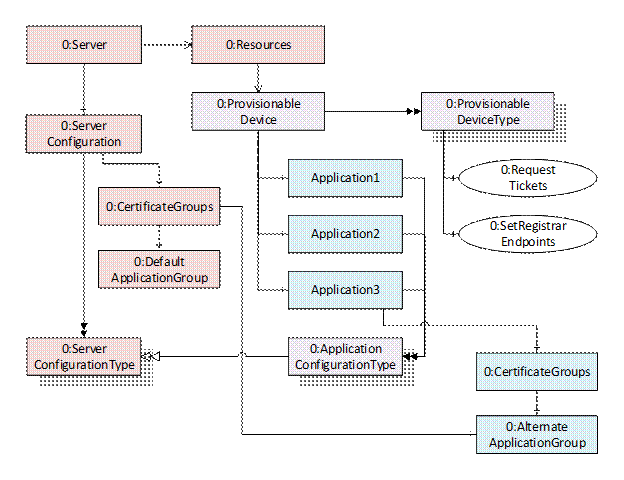
Figure 11 – Device Address Space for Onboarding Workflows
The ProvisionableDevice Object shall be organized by the Resources Object (see OPC 10000-22) used to provision the Device the Server is running on. It is an instance of the ProvisionableDeviceType ObjectType which defines Methods used by the Registrar when it authenticates a Device.
The DefaultApplicationGroup Object is a well-known CertificateGroup that stores the Application Instance Certificate and TrustList for the DCA provided by the Registrar. This group is initially empty when the Device is first connected to the network. It is updated by the Registrar when the Device Authentication process completes.
The Applications that may be configured via the Server are components of the ProvisionableDevice Object. They are instances of ApplicationConfigurationType. The Server itself is configured via the ServerConfiguration Object. Some DCAs may choose to have CertificateGroups for individual Applications organized by the CertificateGroups Folder in the ServerConfiguration Object. In these cases, DCAs shall add a Reference from the ServerConfiguration CertificateGroups Folder to the CertificateGroup Object under the Application.
This Object is an instance of ProvisionableDeviceType. It is the well-known Resource which is used to authenticate a Device using PushManagement.
It is a target of an Organizes Reference from the Resources Object defined in OPC 10000-22.
It It is defined in Table 32.
Table 32 – ProvisionableDevice Object Definition
|
Attribute |
Value |
||||
|
BrowseName |
0:ProvisionableDevice |
||||
|
TypeDefinition |
0:ProvisionableDeviceType defined in 9.3.3. |
||||
|
References |
Node Class |
BrowseName |
DataType |
TypeDefinition |
Modelling Rule |
|
OrganizedBy the Resources Object defined in OPC 10000-22. |
|||||
|
|
|||||
|
Conformance Units |
|||||
|
Onboarding Server PushManagement |
|||||
The ProvisionableDeviceType ObjectType defines Objects that support PushManagement described in 7.3. The ObjectType is defined in Table 33.
Table 33 – ProvisionableDeviceType Definition
|
Attribute |
Value |
||||||
|
BrowseName |
0:ProvisionableDeviceType |
||||||
|
IsAbstract |
False |
||||||
|
References |
Node |
BrowseName |
DataType |
TypeDefinition |
Modelling Rule |
||
|
Subtype of the BaseObjectType defined in OPC 10000-5. |
|||||||
|
0:HasProperty |
Variable |
0:IsSingleton |
0:Boolean |
0:PropertyType |
Mandatory |
||
|
0:HasComponent |
Method |
0:RequestTickets |
Defined in 9.3.4. |
Mandatory |
|||
|
0:HasComponent |
Method |
0:SetRegistrarEndpoints |
Defined in 9.3.5. |
Optional |
|||
|
0:HasComponent |
Object |
0:<ApplicationName> |
|
OptionalPlaceholder |
|||
|
Conformance Units |
|||||||
|
Onboarding Server PushManagement |
|||||||
The RequestTickets Method allows the Registrar to request the list of Tickets stored on the Device.
The SetRegistrarEndpoints Method allows a configuration Client to provide the location of one or more Registrars which the Device can use to authenticate itself via PullManagement.
The :<ApplicationName> Objects defines an API which represents the configuration of an Client or Server running on a Device. The ApplicationConfigurationType is defined in OPC 10000-12.
The RequestTickets Method allows a Client to request the list of Tickets stored on the Device. It is called by a Client using PushManagement to authenticate a Device. The Registrar follows the process described in 7 to select and validate one of the Tickets.
Signature
RequestTickets (
[out] 0:EncodedTicket [] tickets
);
|
Argument |
Description |
|
tickets |
The signed Tickets stored on the Device. |
Method Result Codes (defined in Call Service)
|
Result Code |
Description |
|
|
|
Table 34 specifies the AddressSpace representation for the RequestTickets Method.
Table 34 – RequestTickets Method AddressSpace Definition
|
Attribute |
Value |
||||
|
BrowseName |
0:RequestTickets |
||||
|
References |
NodeClass |
BrowseName |
DataType |
TypeDefinition |
ModellingRule |
|
0:HasProperty |
Variable |
0:OutputArguments |
0:Argument [] |
0:PropertyType |
Mandatory |
The SetRegistrarEndpoints Method allows a Client to provide the location of one or more Registrars which the Device can use to authenticate itself via PullManagement.
The Client may be an engineering tool or other administrative application that allows a human to provide information that cannot be discovered automatically.
This Method shall be called from a Session that has access to the SecurityAdmin Role (see 4.2.6).
Signature
SetRegistrarEndpoints (
[in] 0:ApplicationDescription [] registrars
);
|
Argument |
Description |
|
registrars |
The Servers which allow a Device to be authenticated via PullManagement. |
Method Result Codes (defined in Call Service)
|
Result Code |
Description |
|
Bad_UserAccessDenied |
The Session does not have rights to call the Method. |
Table 35 specifies the AddressSpace representation for the SetRegistrarEndpoints Method.
Table 35 – SetRegistrarEndpoints Method AddressSpace Definition
|
Attribute |
Value |
||||
|
BrowseName |
0:SetRegistrarEndpoints |
||||
|
References |
NodeClass |
BrowseName |
DataType |
TypeDefinition |
ModellingRule |
|
0:HasProperty |
Variable |
0:InputArguments |
0:Argument [] |
0:PropertyType |
Mandatory |
Table 36 defines the namespace metadata for this document. The Object is used to provide version information for the namespace and an indication about static Nodes. Static Nodes are identical for all Attributes in all Servers, including the Value Attribute. See OPC 10000-5 for more details.
The information is provided as Object of type NamespaceMetadataType. This Object is a component of the Namespaces Object that is part of the Server Object. The NamespaceMetadataType ObjectType and its Properties are defined in OPC 10000-5.
The version information is also provided as part of the ModelTableEntry in the UANodeSet XML file. The UANodeSet XML schema is defined in OPC 10000-6.
Table 36 – NamespaceMetadata Object for this Document
|
Attribute |
Value |
||
|
BrowseName |
|||
|
Property |
DataType |
Value |
|
|
0:NamespaceUri |
0:String |
http://opcfoundation.org/UA/Onboarding/ |
|
|
0:NamespaceVersion |
0:String |
1.05.04 |
|
|
0:NamespacePublicationDate |
0:DateTime |
2024-12-01 |
|
|
0:IsNamespaceSubset |
0:Boolean |
False |
|
|
0:StaticNodeIdTypes |
0:IdType [] |
0 |
|
|
0:StaticNumericNodeIdRange |
0:NumericRange [] |
|
|
|
0:StaticStringNodeIdPattern |
0:String |
|
|
Namespaces are used by OPC UA to create unique identifiers across different naming authorities. The Attributes NodeId and BrowseName are identifiers. A Node in the UA AddressSpace is unambiguously identified using a NodeId. Unlike NodeIds, the BrowseName cannot be used to unambiguously identify a Node. Different Nodes may have the same BrowseName. They are used to build a browse path between two Nodes or to define a standard Property.
Servers may often choose to use the same namespace for the NodeId and the BrowseName. However, if they want to provide a standard Property, its BrowseName shall have the namespace of the standards body although the namespace of the NodeId reflects something else, for example the EngineeringUnits Property. All NodeIds of Nodes not defined in this document shall not use the standard namespaces.
Table 37 provides a list of namespaces and their index used for BrowseNames in this document. The default namespace of this document is not listed since all BrowseNames without prefix use this default namespace.
Table 37 – Namespaces used in this document
|
NamespaceURI |
Namespace Index |
Example |
|
http://opcfoundation.org/UA/ |
0 |
0:EngineeringUnits |
|
http://opcfoundation.org/UA/Onboarding/ |
2 |
2:Registrar |
|
http://opcfoundation.org/UA/GDS/ |
3 |
3:ApplicationRecordDataType |
Annex A
(normative)
Namespaces and Identifiers
A.1 Namespace and Identifiers for the Onboarding Information Model
This document defines Nodes which are part of the base OPC UA Specification. The numeric identifiers for these Nodes are part of the complete list of identifiers defined in OPC 10000-6.
In addition, this document defines Nodes which are only used by Registrars.
The NamespaceUri for any Device Onboarding specific NodeIds is:
http://opcfoundation.org/UA/Onboarding/
The CSV released with this version of the standards can be found here:
http://www.opcfoundation.org/UA/schemas/1.05/Opc.Ua.Onboarding.NodeIds.csv
NOTE The latest CSV that is compatible with this version of the standard can be found here:
http://www.opcfoundation.org/UA/schemas/Opc.Ua.Onboarding.NodeIds.csv
A computer processible version of the Information Model defined in the Onboarding namespace is also provided. It follows the XML Information Model schema syntax defined in OPC 10000-6.
The Information Model Schema for this version of the document (including any revisions, amendments or errata) can be found here:
http://www.opcfoundation.org/UA/schemas/1.05/Opc.Ua.Onboarding.NodeSet2.xml
NOTE The latest Information Model schema that is compatible with this version of the document can be found here:
http://www.opcfoundation.org/UA/schemas/Opc.Ua.Onboarding.NodeSet2.xml
________________